"fa182e0cd0a6ea73"{"id":"1001807","slug":"freight-train","title":"Freight Train","category":"Trains","engine":"5.6+","assetVersion":"","engineVersion":"Engine Version: 5.6+","tag":"Trains","accent":"blue","visual":"mech","summary":"Assemble customizable industrial freight trains using the BP_Train blueprint, multi-wagon presets, weathering controls, and detailed rolling stock.","platform":"Unreal Engine","publishedAt":"2026-10-21T07:58:51.633Z","updatedAt":"2026-10-21T07:58:51.633Z","sourceNotes":[],"fileContents":[],"compatibility":["Unreal Engine","Engine Version: 5.6+"],"featuredImage":{"alt":"Freight Train","src":"/wp-content/uploads/published/2026/10/aa6793636cea-b3eb7e0c-2f97-4d9e-9528-6a01e7537344-4eed8872fc.webp"},"hasDownloadLink":true,"downloads":0,"terms":[{"taxonomy":"category","slug":"trains","name":"Trains"}],"galleryImages":[{"src":"/wp-content/uploads/published/2026/10/cc1abf50b094-8dd73977-3f35-400f-9c84-16af813b2767-1e8554f2a6.webp","alt":"Freight Train"},{"src":"/wp-content/uploads/published/2026/10/15e01df54fa9-b75382dd-c81d-485a-917b-4a25c0b92e30-ce6e413ef5.webp","alt":"Freight Train"},{"src":"/wp-content/uploads/published/2026/10/be3de0b6f666-020f47ec-7cbd-48b0-ba32-d842b6b26db9-1e33853802.webp","alt":"Freight Train"},{"src":"/wp-content/uploads/published/2026/10/a4d97524d138-aa3e1753-3d38-48ed-8fa1-e7cc5e5a944f-abdc918e4d.webp","alt":"Freight Train"},{"src":"/wp-content/uploads/published/2026/10/323a7e337b46-9c5d6dc9-98d0-410e-8fa8-2bcc71585171-f79f76d740.webp","alt":"Freight Train"},{"src":"/wp-content/uploads/published/2026/10/a88662c2c05b-aac447ad-03e1-4db9-ab7e-39f8bc7950fe-0dfe560a36.webp","alt":"Freight Train"},{"src":"/wp-content/uploads/published/2026/10/8df75cb91b04-f19ff13e-996d-48bd-a949-e9230336e7ea-30472d331d.webp","alt":"Freight Train"},{"src":"/wp-content/uploads/published/2026/10/bfda52be01e2-f99c5cc3-0e7c-4e78-b898-7a0cc5befaa0-c40562c8aa.webp","alt":"Freight Train"},{"src":"/wp-content/uploads/published/2026/10/f418afee1153-889acc4c-df23-4659-9a51-9ff94ca9d5d0-634fcb15bd.webp","alt":"Freight Train"},{"src":"/wp-content/uploads/published/2026/10/bac585d9fa62-b87cf38a-b62a-4666-ac1a-539714fd8eb0-b369b53f47.webp","alt":"Freight Train"}],"accessPanel":{"kind":"resource","title":"Download this resource","eyebrow":"Free Download","message":"Log in or create a free account to start your download.","fileName":"Content.7z","safetyNote":"Resources are manually reviewed before listing to improve quality and reduce obvious risks.","actionLabel":"Download Free","resourceType":"Resource archive"},"contentHtml":"\u003ch2\u003eAssembling Consists with the BP_Train Blueprint\u003c/h2\u003e\u003cp\u003ePopulating industrial sidings and main lines begins directly with the BP_Train blueprint actor. Rather than forcing artists to manually snap dozens of individual bogies, couplers, and wagon chassis together in the viewport, the blueprint acts as an assembly tool that generates a full train along a straight alignment. Once dragged into a scene, the entire train actor can be configured with either Static or Movable mobility depending on lighting requirements and whether the assembled train is intended as non-moving background scenery or attached to custom vehicle rigs.\u003c/p\u003e\u003cp\u003eBecause the blueprint generates the train strictly in a straight line, placement works naturally along straight yard tracks, intermodal transfer facilities, loading terminals, and long staging depots. The setup relies on a clean hierarchy: the lead locomotive sets the orientation, followed by the wagon sequence behind it, sitting atop the included straight concrete track mesh.\u003c/p\u003e\u003ch2\u003eConfiguring Rolling Stock Presets and Wagon Block Sizes\u003c/h2\u003e\u003cp\u003eThe blueprint offers three distinct workflows for building out rolling stock, starting with an automated preset system designed to mirror the composition of real-world railway freight. When using the preset mode, setting the total Number of Wagons establishes the full length of the train. Selecting a specific Wagons Preset then replaces the existing train list, applying pre-configured distributions and proportions of specific wagon types across the consist.\u003c/p\u003e\u003cp\u003eTo avoid the visual chaos of random wagon interleaving, the preset logic operates on a grouping system governed by the Average Block Size parameter:\u003c/p\u003e\u003cul\u003e\u003cli\u003e\u003cstrong\u003eBlock-by-Block Generation:\u003c/strong\u003e Real-world freight operations rarely alternate car types individually. Instead, they run strings of identical wagons loaded with the same commodity. The blueprint replicates this by assembling consecutive batches using the same wagon mesh.\u003c/li\u003e\u003cli\u003e\u003cstrong\u003eColor Cohesion:\u003c/strong\u003e Wagons within the same block share similar color tones selected from an underlying color array, avoiding erratic single-car paint shifts across a unified rake.\u003c/li\u003e\u003cli\u003e\u003cstrong\u003eProportional Balancing:\u003c/strong\u003e The preset dictates the macro ratio of car styles—such as tanks, hoppers, or container flats—while the block size variable dictates the grouping rhythm along the tracks.\u003c/li\u003e\u003c/ul\u003e\u003ch2\u003eManual Wagon Stacking and List Editing\u003c/h2\u003e\u003cp\u003eWhen an environment calls for a specific sequence—such as a single tank car cut into a string of boxcars at a warehouse loading dock—the system allows for direct manual control. The Add Wagons Manually utility allows scene builders to choose an Add Wagons Type, define an Add Wagons Color, and specify an Add Wagons Count. Entering a count instantly appends that specific quantity to the rear of the train. If the color parameter is left at its default black setting, the blueprint automatically assigns a randomized tint chosen from the wagon color array.\u003c/p\u003e\u003cp\u003eFor total control over every coupler point, developers can manipulate the List of Wagons directly. This array remains editable at all stages, even after running an automated preset or appending wagons in batches. Expanding the list exposes every individual slot, allowing direct per-wagon overrides:\u003c/p\u003e\u003cul\u003e\u003cli\u003e\u003cstrong\u003eType Selection:\u003c/strong\u003e Swap individual entries between Open Wagons, Flat Wagons, Box Wagons, or Tank Wagons without resetting neighboring cars.\u003c/li\u003e\u003cli\u003e\u003cstrong\u003eColor Overrides:\u003c/strong\u003e Define explicit hex values or custom hues on specific wagons to single out distinct fleet liveries.\u003c/li\u003e\u003cli\u003e\u003cstrong\u003eCargo Toggles:\u003c/strong\u003e Enable or disable physical cargo payloads on supported rolling stock. Flat Wagons toggle a standard Shipping Container on or off, while Open Wagons toggle an internal Coal load.\u003c/li\u003e\u003c/ul\u003e\u003ch2\u003eLocomotive Detailing, Roof Equipment, and Cab Illumination\u003c/h2\u003e\u003cp\u003eAnchoring the front of the consist is a heavy locomotive detailed for close inspection in industrial terminals. The locomotive mesh includes separated doors to facilitate open or closed states, along with dual bogie assemblies underneath. It also features a fully modeled cabin interior complete with control screens and an integrated driver figure positioned in the cab seat.\u003c/p\u003e\u003cp\u003eThe locomotive configuration handles both propulsion aesthetics and visual signaling:\u003c/p\u003e\u003cul\u003e\u003cli\u003e\u003cstrong\u003eRoof Equipment Swapping:\u003c/strong\u003e The blueprint provides adjustable locomotive roof modules, toggling between Diesel hardware and Electric pantograph gear to match the electrification status of the surrounding environment.\u003c/li\u003e\u003cli\u003e\u003cstrong\u003eLighting Systems:\u003c/strong\u003e The locomotive integrates front running lights, tail marker lights, an active cabin interior light, and a directional headlight beam for low-light or night yard operations.\u003c/li\u003e\u003cli\u003e\u003cstrong\u003eSeparated Components:\u003c/strong\u003e Doors on both the locomotive body and the box wagons are independent mesh components, allowing yard staging where rolling stock sits partially open at cargo bays.\u003c/li\u003e\u003c/ul\u003e\u003ch2\u003eAdjusting Material Rust, Dirt, and Surface Wear\u003c/h2\u003e\u003cp\u003eFreight equipment endures significant environmental wear, and the materials across the locomotive, track, and wagons reflect this through procedural wear parameters. The master materials feature dedicated controls for adjusting rust, surface dirt, and aged paint degradation. Sliders allow environments to present pristine, recently painted rolling stock or push the look toward decades of industrial neglect, surface corrosion, and grime buildup.\u003c/p\u003e\u003cp\u003eFor derelict train yards, maintenance sheds, or trackside scrap heaps, wagon meshes are provided both with and without wheels. This separation makes it simple to stage unmounted wagon bodies onto blocks, flatbeds, or ground piles without displaying floating wheelsets, while the separate two-bogie assemblies can be positioned around shop bays as standalone maintenance props.\u003c/p\u003e\u003ch2\u003eTechnical Scope, Track Placement, and Setup Limits\u003c/h2\u003e\u003cp\u003eUnderstanding the exact boundaries of the package ensures it fits the target technical pipeline. The package includes the complete BP_Train assembly tool, the locomotive, the five wagon variants (Open, Flat, Box, Tank, and Container loads), the driver figure, bogies, and the straight concrete track mesh. It functions cleanly within level layouts and pairs naturally alongside Road Creator Pro networks for road-rail crossings and intermodal setups.\u003c/p\u003e\u003cp\u003eThe pack is dedicated strictly to train generation and static or movable placement. It does not include a movement blueprint, spline-following logic, track generation blueprints, or railway audio assets. Trains assembled via BP_Train generate strictly in a straight line, making the asset suited for straight mainline sections, industrial sidings, rail docks, or parented attachment to custom movement setups.\u003c/p\u003e\n\n\u003ch2\u003eContinue Browsing Similar Packs\u003c/h2\u003e\n\u003cul\u003e\n\u003cli\u003e\u003ca href=\"https://3dcghub.com/vintage-train/\" title=\"Vintage train\"\u003eVintage train\u003c/a\u003e\u003c/li\u003e\n\u003cli\u003e\u003ca href=\"https://3dcghub.com/retro-80-s-vol-3-toys-nanite-and-low-poly/\" title=\"Retro 80\u0026#039;s VOL.3 - Toys (Nanite and Low Poly)\"\u003eRetro 80\u0026#039;s VOL.3 - Toys (Nanite and Low Poly)\u003c/a\u003e\u003c/li\u003e\n\u003cli\u003e\u003ca href=\"https://3dcghub.com/classic-vehicles-bundle-driveable-functional-classic-vehicles-car-cars-3d/\" title=\"Classic Vehicles Bundle / Driveable / Functional (Classic Vehicles Car Cars 3D)\"\u003eClassic Vehicles Bundle / Driveable / Functional (Classic Vehicles Car Cars 3D)\u003c/a\u003e\u003c/li\u003e\n\u003cli\u003e\u003ca href=\"https://3dcghub.com/ultimate-train-system-train-locomotive-steam-engine-wild-west-train/\" title=\"Ultimate Train System (Train, Locomotive, Steam Engine, Wild West Train)\"\u003eUltimate Train System (Train, Locomotive, Steam Engine, Wild West Train)\u003c/a\u003e\u003c/li\u003e\n\u003cli\u003e\u003ca href=\"https://3dcghub.com/soviet-electric-locomotive/\" title=\"Soviet Electric Locomotive\"\u003eSoviet Electric Locomotive\u003c/a\u003e\u003c/li\u003e\n\u003c/ul\u003e","contentTextLength":6822,"navigation":{"current":49,"total":3789,"previous":{"id":"1001808","slug":"futuristicpropsetvol-2","title":"FuturisticPropSetVol-2","category":"Electronics \u0026 Technology","platform":"Unreal Engine","updatedAt":"2026-10-21T08:03:29.663Z"},"next":{"id":"1001806","slug":"flamethrower-and-dragon-breath-vfx-with-sfx","title":"FlameThrower and Dragon Breath VFX ( with SFX )","category":"Fire \u0026 Explosions","platform":"Unreal Engine","updatedAt":"2026-10-21T07:57:55.160Z"}},"relatedResources":[{"id":"1001372","slug":"vintage-train","title":"Vintage train","category":"Trains","engine":"4.25+,5.0+","assetVersion":"","engineVersion":"Engine Version: 4.25+,5.0+","tag":"Trains","accent":"blue","visual":"mech","summary":"Examine the animated Vintage train asset pack, featuring a 128,800-triangle vintage locomotive alongside tender, hopper, freight, and coach wagons.","platform":"Unreal Engine","publishedAt":"2026-10-04T10:39:53.047Z","updatedAt":"2026-10-04T10:39:53.047Z","sourceNotes":[],"fileContents":[],"compatibility":["Unreal Engine","Engine Version: 4.25+,5.0+"],"featuredImage":{"alt":"Vintage train","src":"/wp-content/uploads/published/2026/10/0e167efa526f-ef01bd2e-91e1-42e3-872f-27a70dde532e-0489bdb2df.webp"},"hasDownloadLink":true,"downloads":0},{"id":"1001448","slug":"retro-80-s-vol-3-toys-nanite-and-low-poly","title":"Retro 80's VOL.3 - Toys (Nanite and Low Poly)","category":"Trains","engine":"5.1+","assetVersion":"","engineVersion":"Engine Version: 5.1+","tag":"Trains","accent":"blue","visual":"mech","summary":"Retro 80's VOL.3 - Toys delivers 80 Nanite and low-poly meshes, 4K RMAO textures, a working lava lamp, and Lumen support for Unreal Engine 5.","platform":"Unreal Engine","publishedAt":"2026-10-08T00:52:05.381Z","updatedAt":"2026-10-08T00:52:05.381Z","sourceNotes":[],"fileContents":[],"compatibility":["Unreal Engine","Engine Version: 5.1+"],"featuredImage":{"alt":"Retro 80's VOL.3 - Toys (Nanite and Low Poly)","src":"/wp-content/uploads/published/2026/10/c0de1495fa4e-0f96335e-e94b-43d3-82aa-b4becb6fea41-ab53d1598f.webp"},"hasDownloadLink":true,"downloads":0},{"id":"1000944","slug":"classic-vehicles-bundle-driveable-functional-classic-vehicles-car-cars-3d","title":"Classic Vehicles Bundle / Driveable / Functional (Classic Vehicles Car Cars 3D)","category":"Trains","engine":"5.1+","assetVersion":"","engineVersion":"Engine Version: 5.1+","tag":"Trains","accent":"blue","visual":"mech","summary":"Eight classic vehicles from F1 to limousine, tram, motorbike, and pickup truck, all driveable with Blueprints, 90 separate meshes, material instances, and a rad","platform":"Unreal Engine","publishedAt":"2026-08-13T03:59:50.178Z","updatedAt":"2026-08-13T03:59:50.178Z","sourceNotes":[],"fileContents":[],"compatibility":["Unreal Engine","Engine Version: 5.1+"],"featuredImage":{"alt":"Classic Vehicles Bundle / Driveable / Functional (Classic Vehicles Car Cars 3D)","src":"/wp-content/uploads/published/2026/08/b1c461098829-a87ea7eb-e855-4435-b6a2-43d684dafb6a-bafcd850cc.webp"},"hasDownloadLink":true,"downloads":0}]}
Trains
Freight Train
Assemble customizable industrial freight trains using the BP_Train blueprint, multi-wagon presets, weathering controls, and detailed rolling stock.
Category:Unreal Engine,TrainsPlatform: Unreal EngineEngine Version: 5.6+Published: Oct 21, 2026
Trains
Resource overview
Assembling Consists with the BP_Train Blueprint
Populating industrial sidings and main lines begins directly with the BP_Train blueprint actor. Rather than forcing artists to manually snap dozens of individual bogies, couplers, and wagon chassis together in the viewport, the blueprint acts as an assembly tool that generates a full train along a straight alignment. Once dragged into a scene, the entire train actor can be configured with either Static or Movable mobility depending on lighting requirements and whether the assembled train is intended as non-moving background scenery or attached to custom vehicle rigs.
Because the blueprint generates the train strictly in a straight line, placement works naturally along straight yard tracks, intermodal transfer facilities, loading terminals, and long staging depots. The setup relies on a clean hierarchy: the lead locomotive sets the orientation, followed by the wagon sequence behind it, sitting atop the included straight concrete track mesh.
Configuring Rolling Stock Presets and Wagon Block Sizes
The blueprint offers three distinct workflows for building out rolling stock, starting with an automated preset system designed to mirror the composition of real-world railway freight. When using the preset mode, setting the total Number of Wagons establishes the full length of the train. Selecting a specific Wagons Preset then replaces the existing train list, applying pre-configured distributions and proportions of specific wagon types across the consist.
To avoid the visual chaos of random wagon interleaving, the preset logic operates on a grouping system governed by the Average Block Size parameter:
Block-by-Block Generation: Real-world freight operations rarely alternate car types individually. Instead, they run strings of identical wagons loaded with the same commodity. The blueprint replicates this by assembling consecutive batches using the same wagon mesh.
Color Cohesion: Wagons within the same block share similar color tones selected from an underlying color array, avoiding erratic single-car paint shifts across a unified rake.
Proportional Balancing: The preset dictates the macro ratio of car styles—such as tanks, hoppers, or container flats—while the block size variable dictates the grouping rhythm along the tracks.
Manual Wagon Stacking and List Editing
When an environment calls for a specific sequence—such as a single tank car cut into a string of boxcars at a warehouse loading dock—the system allows for direct manual control. The Add Wagons Manually utility allows scene builders to choose an Add Wagons Type, define an Add Wagons Color, and specify an Add Wagons Count. Entering a count instantly appends that specific quantity to the rear of the train. If the color parameter is left at its default black setting, the blueprint automatically assigns a randomized tint chosen from the wagon color array.
For total control over every coupler point, developers can manipulate the List of Wagons directly. This array remains editable at all stages, even after running an automated preset or appending wagons in batches. Expanding the list exposes every individual slot, allowing direct per-wagon overrides:
Type Selection: Swap individual entries between Open Wagons, Flat Wagons, Box Wagons, or Tank Wagons without resetting neighboring cars.
Color Overrides: Define explicit hex values or custom hues on specific wagons to single out distinct fleet liveries.
Cargo Toggles: Enable or disable physical cargo payloads on supported rolling stock. Flat Wagons toggle a standard Shipping Container on or off, while Open Wagons toggle an internal Coal load.
Locomotive Detailing, Roof Equipment, and Cab Illumination
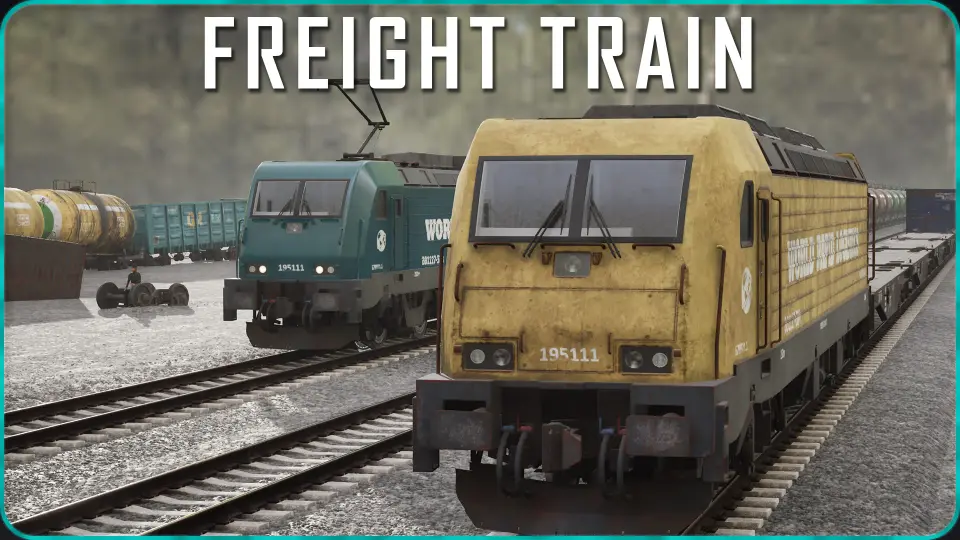
Anchoring the front of the consist is a heavy locomotive detailed for close inspection in industrial terminals. The locomotive mesh includes separated doors to facilitate open or closed states, along with dual bogie assemblies underneath. It also features a fully modeled cabin interior complete with control screens and an integrated driver figure positioned in the cab seat.
The locomotive configuration handles both propulsion aesthetics and visual signaling:
Roof Equipment Swapping: The blueprint provides adjustable locomotive roof modules, toggling between Diesel hardware and Electric pantograph gear to match the electrification status of the surrounding environment.
Lighting Systems: The locomotive integrates front running lights, tail marker lights, an active cabin interior light, and a directional headlight beam for low-light or night yard operations.
Separated Components: Doors on both the locomotive body and the box wagons are independent mesh components, allowing yard staging where rolling stock sits partially open at cargo bays.
Adjusting Material Rust, Dirt, and Surface Wear
Freight equipment endures significant environmental wear, and the materials across the locomotive, track, and wagons reflect this through procedural wear parameters. The master materials feature dedicated controls for adjusting rust, surface dirt, and aged paint degradation. Sliders allow environments to present pristine, recently painted rolling stock or push the look toward decades of industrial neglect, surface corrosion, and grime buildup.
For derelict train yards, maintenance sheds, or trackside scrap heaps, wagon meshes are provided both with and without wheels. This separation makes it simple to stage unmounted wagon bodies onto blocks, flatbeds, or ground piles without displaying floating wheelsets, while the separate two-bogie assemblies can be positioned around shop bays as standalone maintenance props.
Technical Scope, Track Placement, and Setup Limits
Understanding the exact boundaries of the package ensures it fits the target technical pipeline. The package includes the complete BP_Train assembly tool, the locomotive, the five wagon variants (Open, Flat, Box, Tank, and Container loads), the driver figure, bogies, and the straight concrete track mesh. It functions cleanly within level layouts and pairs naturally alongside Road Creator Pro networks for road-rail crossings and intermodal setups.
The pack is dedicated strictly to train generation and static or movable placement. It does not include a movement blueprint, spline-following logic, track generation blueprints, or railway audio assets. Trains assembled via BP_Train generate strictly in a straight line, making the asset suited for straight mainline sections, industrial sidings, rail docks, or parented attachment to custom movement setups.
 Trains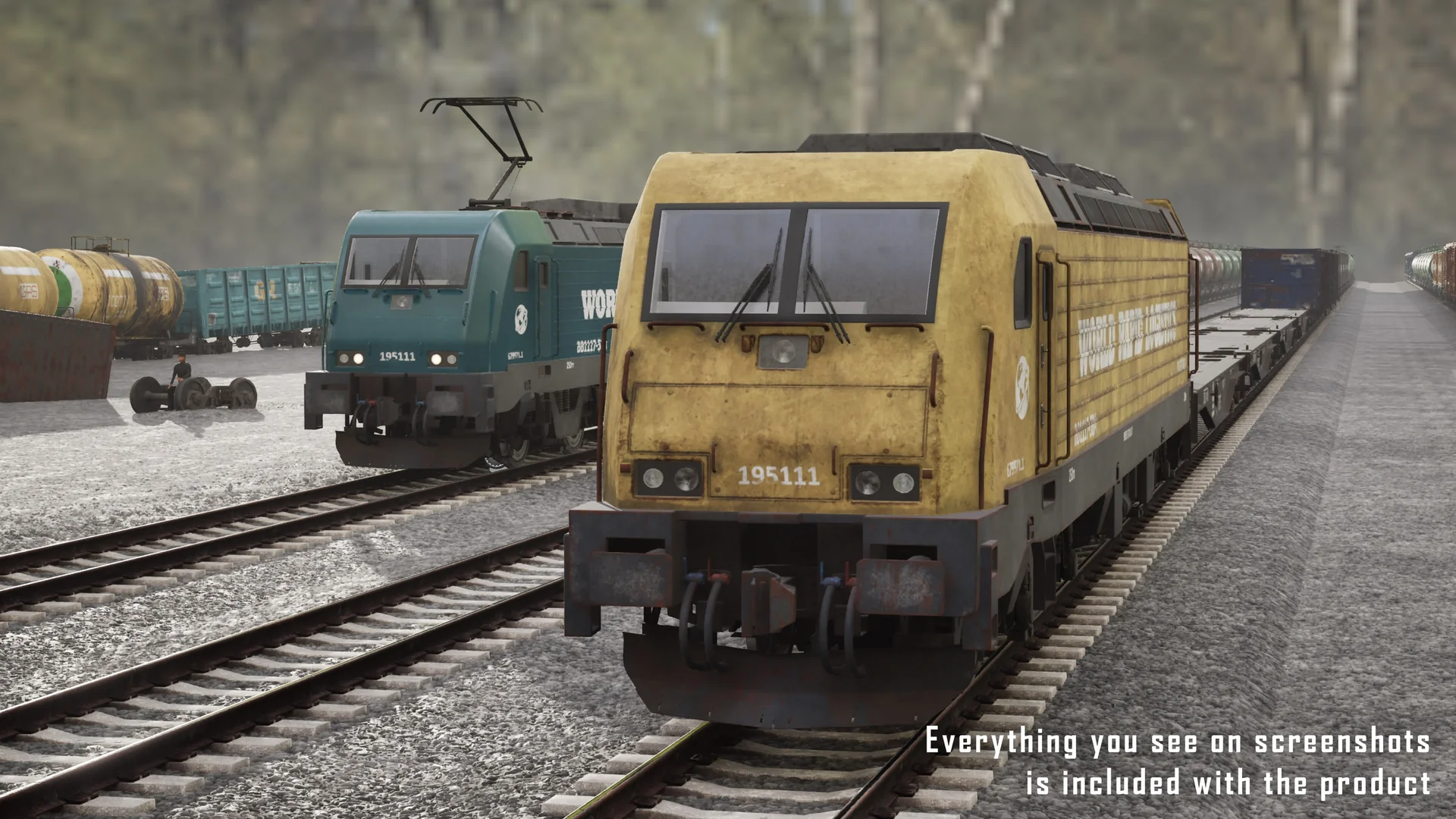
 Trains
 Trains
 Trains