"a19e0535960bd083"{"id":"16028","slug":"fluid-ninja-vfx-tools","title":"Fluid Ninja VFX Tools","category":"Smoke","engine":"4.27,5.0+","assetVersion":"Engine version: 4.27,5.0+","engineVersion":"4.26","tag":"Smoke","accent":"blue","visual":"animation","summary":"Discover how Fluid Ninja VFX Tools optimizes fluid simulations for Unreal Engine 5.4 by baking high-quality density and velocity data into compact, performance-friendly assets.","platform":"Unreal Engine","publishedAt":"2026-03-12T16:02:45.000Z","updatedAt":"2026-04-19T15:44:38.000Z","sourceNotes":[],"fileContents":[],"compatibility":["Unreal Engine","Engine version: 4.27,5.0+"],"featuredImage":{"alt":"Fluid Ninja VFX Tools","src":"https://3dcghub.com/wp-content/uploads/2026/03/685c7480-f622-4d1b-8f8e-41512ad05143.webp"},"hasDownloadLink":true,"downloads":2,"terms":[{"taxonomy":"category","slug":"smoke","name":"Smoke"},{"taxonomy":"post_tag","slug":"environment","name":"Environment"},{"taxonomy":"post_tag","slug":"game-systems","name":"Game Systems"},{"taxonomy":"post_tag","slug":"materials","name":"Materials"},{"taxonomy":"post_tag","slug":"tools","name":"Tools"},{"taxonomy":"post_tag","slug":"unreal-engine-5","name":"Unreal Engine 5"},{"taxonomy":"post_tag","slug":"vfx","name":"VFX"}],"galleryImages":[{"src":"https://3dcghub.com/wp-content/uploads/2026/03/6054d82d5ced_59dbb5b9-f303-48d0-808c-ab0243a62e4a.webp","alt":"Fluid Ninja VFX Tools"},{"src":"https://3dcghub.com/wp-content/uploads/2026/03/e31ed66286a7_868b169b-f53c-412c-b92d-1f60809dc256.webp","alt":"Fluid Ninja VFX Tools"},{"src":"https://3dcghub.com/wp-content/uploads/2026/03/94b6ee063867_5dd7f9bc-28e8-43a1-8942-1fe4e051ac2d.webp","alt":"Fluid Ninja VFX Tools"},{"src":"https://3dcghub.com/wp-content/uploads/2026/03/0fc8e52650bf_c4b5848a-f2b6-40f3-83d3-b23b8708b2a3.webp","alt":"Fluid Ninja VFX Tools"},{"src":"https://3dcghub.com/wp-content/uploads/2026/03/caf9dac3c6d8_e5a4fa54-dd7f-4c72-a895-00b61db3feec.webp","alt":"Fluid Ninja VFX Tools"},{"src":"https://3dcghub.com/wp-content/uploads/2026/03/8cbb7b6f4042_69eca7d9-8758-489d-823b-3add9483357f.webp","alt":"Fluid Ninja VFX Tools"},{"src":"https://3dcghub.com/wp-content/uploads/2026/03/03ce180de427_f4a95b53-8058-4317-8a8a-c95626f54a06.webp","alt":"Fluid Ninja VFX Tools"},{"src":"https://3dcghub.com/wp-content/uploads/2026/03/378e8c48208b_de64da6b-9662-4d8e-97ad-bf3d87fe8ce9.webp","alt":"Fluid Ninja VFX Tools"},{"src":"https://3dcghub.com/wp-content/uploads/2026/03/bc0af1c17e23_481f5772-09ad-429b-b716-7d5dd3fd949f.webp","alt":"Fluid Ninja VFX Tools"},{"src":"https://3dcghub.com/wp-content/uploads/2026/03/d6436af4268f_2f557f51-0fd1-44dd-b05d-6e3841e6dfbd.webp","alt":"Fluid Ninja VFX Tools"},{"src":"https://3dcghub.com/wp-content/uploads/2026/03/046a8c4f5397_d4054f77-a4d3-48d5-899f-cb4e7b7d4f61.webp","alt":"Fluid Ninja VFX Tools"},{"src":"https://3dcghub.com/wp-content/uploads/2026/03/6b1e80ddd725_9cf074c0-ecd5-40de-84cf-9a629322cfa2.webp","alt":"Fluid Ninja VFX Tools"},{"src":"https://3dcghub.com/wp-content/uploads/2026/03/cb072fa1bae8_01b7d5ef-c62c-450e-9eed-f7e33506da48.webp","alt":"Fluid Ninja VFX Tools"},{"src":"https://3dcghub.com/wp-content/uploads/2026/03/7495890b5c07_91e3ea22-39bc-4e5f-9476-d9404b816a1d.webp","alt":"Fluid Ninja VFX Tools"},{"src":"https://3dcghub.com/wp-content/uploads/2026/03/e04187a4ece0_356b2ea5-0e0e-4bdc-b367-eaa3aa1411bd.webp","alt":"Fluid Ninja VFX Tools"},{"src":"https://3dcghub.com/wp-content/uploads/2026/03/283680b3b818_52986491-9ffe-4078-abd7-bd979f96c56b.webp","alt":"Fluid Ninja VFX Tools"},{"src":"https://3dcghub.com/wp-content/uploads/2026/03/ccec2a345aca_d61e2281-d22b-4190-b805-27b8d066ea26.webp","alt":"Fluid Ninja VFX Tools"},{"src":"https://3dcghub.com/wp-content/uploads/2026/03/025fa2386647_62b88181-3199-4f03-bb37-304efb5faa46.webp","alt":"Fluid Ninja VFX Tools"},{"src":"https://3dcghub.com/wp-content/uploads/2026/03/130cf2d34aff_9c546239-ba16-4ee4-b0a4-e95708a3383a.webp","alt":"Fluid Ninja VFX Tools"},{"src":"https://3dcghub.com/wp-content/uploads/2026/03/fd9d52246bac_c8c6180b-8386-411d-91fa-3e5fd0680d6e.webp","alt":"Fluid Ninja VFX Tools"},{"src":"https://3dcghub.com/wp-content/uploads/2026/03/79ff0e8b29f8_8d265730-2002-4aa9-8260-4a88d8140f35.webp","alt":"Fluid Ninja VFX Tools"},{"src":"https://3dcghub.com/wp-content/uploads/2026/03/c14e1ab6cf0d_4a9bf922-5593-4cb6-895f-b9002adacdc7.webp","alt":"Fluid Ninja VFX Tools"},{"src":"https://3dcghub.com/wp-content/uploads/2026/03/c91222638b7c_614fff55-e409-43c1-a829-77a61149cb9e.webp","alt":"Fluid Ninja VFX Tools"},{"src":"https://3dcghub.com/wp-content/uploads/2026/03/40b7b254ff53_4f4f2075-5409-4e6a-b1c8-5cd89d605828.webp","alt":"Fluid Ninja VFX Tools"},{"src":"https://3dcghub.com/wp-content/uploads/2026/03/4e17f6e7462b_6c099bd4-9dd6-4daf-ab06-2c8cf2dcdad6.webp","alt":"Fluid Ninja VFX Tools"}],"accessPanel":{"kind":"resource","title":"Access this resource","eyebrow":"Free Download","message":"Log in or create a free account to start your download.","fileName":"Fluid Ninja VFX Tools.7z","safetyNote":"All resources are 100% manually reviewed to eliminate all risks.","actionLabel":"Download Free","resourceType":"Resource archive"},"contentHtml":"\u003ch2\u003eHigh-Performance Fluid Simulation in Unreal Engine\u003c/h2\u003e\n\u003cp\u003eFluid Ninja VFX Tools is a specialized 2D fluidsim baking toolkit designed specifically for Unreal Engine 5.4. This resource enables developers to drive 3D volumes and particles using extremely small baked data assets. Typically, these assets range from 1 to 4 Megabytes in size. Consequently, they offer a highly efficient alternative to traditional VDB assets, which are often performance-heavy and range from 100 to 400 Megabytes.\u003c/p\u003e\n\n\u003cp\u003eThe primary goal of the toolkit is to provide a lightweight workflow for complex visual effects. By utilizing baked data, the creator ensures that high-quality fluid behavior can be integrated into projects without the massive storage overhead of standard volumetric formats. This efficiency makes it an ideal choice for projects targeting optimized performance.\u003c/p\u003e\n\n\u003ch2\u003eCore Components and Features\u003c/h2\u003e\n\u003cp\u003eThe toolkit includes a comprehensive fluid simulator equipped with real-time viewports. This allows for immediate visual feedback during the creation process. Additionally, a dedicated baking tool is provided to save density and velocity data. This data is converted into flipbooks and player-materials for easy implementation.\u003c/p\u003e\n\n\u003cp\u003eFluid Ninja VFX Tools also supports advanced volumetric setups. It is compatible with Heterogeneous Volume setups for Unreal Engine 5.4. This includes specific configurations for cloud volumes and fog volumes. Furthermore, the toolkit features Niagara modules. These modules sample the baked fluid data to drive GPU particle systems efficiently.\u003c/p\u003e\n\n\u003ch3\u003eVersatile Simulation Inputs and Outputs\u003c/h3\u003e\n\u003cp\u003eThe simulation process is highly flexible, supporting various input methods. Specifically, users can utilize Niagara particles, bitmaps, or a built-in painter to define the simulation. This variety ensures that both stylized and realistic VFX can be achieved within the same framework.\u003c/p\u003e\n\n\u003cp\u003eOnce the simulation is processed, the toolkit provides several output formats. These outputs include:\u003c/p\u003e\n\u003cul\u003e\n \u003cli\u003eHigh-quality flipbooks and flowmaps.\u003c/li\u003e\n \u003cli\u003eReady-to-use container materials.\u003c/li\u003e\n \u003cli\u003eEmbedded baked data for immediate deployment.\u003c/li\u003e\n\u003c/ul\u003e\n\n\u003ch3\u003eWorkflow and Learning Curve\u003c/h3\u003e\n\u003cp\u003eIt is important to note that Fluid Ninja VFX Tools is not a simple drag-and-drop tool. Because of its technical depth, the developer suggests that learning the system typically takes about a week. However, the toolkit includes demo levels that showcase various use cases. These examples cover both stylized and realistic visual effects, providing a solid foundation for new users.\u003c/p\u003e\n\n\u003cp\u003eFor those interested in real-time responsiveness, the creator mentions NinjaLIVE as a separate solution for non-baked simulations. Additionally, NinjaPLAY is available as a standalone flipbook player. Before committing to the full version, a student version is available for testing on the community server to ensure it meets project needs.\u003c/p\u003e\n\n\u003ch2\u003eFinal Take\u003c/h2\u003e\n\u003cp\u003eFluid Ninja VFX Tools represents a significant advancement in managing fluid data for real-time environments. By focusing on compact baked assets, it allows developers to maintain high visual fidelity for smoke, fire, and fog without sacrificing frame rates. Therefore, it remains a vital resource for technical artists working within the Unreal Engine ecosystem.\u003c/p\u003e\n\n\u003ch2\u003eExplore Similar Assets\u003c/h2\u003e\n\u003cul\u003e\n\u003cli\u003e\u003ca href=\"https://3dcghub.com/wormhole-vfx-pack-sci-fi-version/\" title=\"Wormhole VFX Pack ( Sci-Fi Version )\"\u003eWormhole VFX Pack ( Sci-Fi Version )\u003c/a\u003e\u003c/li\u003e\n\u003cli\u003e\u003ca href=\"https://3dcghub.com/slime-vfx/\" title=\"Slime VFX\"\u003eSlime VFX\u003c/a\u003e\u003c/li\u003e\n\u003cli\u003e\u003ca href=\"https://3dcghub.com/geometry-floor-vfx-pack-3/\" title=\"Geometry Floor VFX Pack 3\"\u003eGeometry Floor VFX Pack 3\u003c/a\u003e\u003c/li\u003e\n\u003cli\u003e\u003ca href=\"https://3dcghub.com/geometry-fireworks-vfx-pack/\" title=\"Geometry Fireworks VFX Pack\"\u003eGeometry Fireworks VFX Pack\u003c/a\u003e\u003c/li\u003e\n\u003cli\u003e\u003ca href=\"https://3dcghub.com/energy-ball-vfx-pack/\" title=\"Energy Ball VFX Pack\"\u003eEnergy Ball VFX Pack\u003c/a\u003e\u003c/li\u003e\n\u003c/ul\u003e","contentTextLength":3399,"navigation":{"current":3492,"total":4026,"previous":{"id":"16042","slug":"loop-smoke-niagara-02","title":"Loop Smoke Niagara 02","category":"Smoke","platform":"Unreal Engine","updatedAt":"2026-04-19T15:44:38.000Z"},"next":{"id":"16000","slug":"wormhole-vfx-pack-sci-fi-version","title":"Wormhole VFX Pack ( Sci-Fi Version )","category":"Shaders","platform":"Unreal Engine","updatedAt":"2026-04-19T15:44:38.000Z"}},"relatedResources":[{"id":"16097","slug":"smoke-and-fire-spline-niagara-fluids","title":"Smoke and Fire Spline - Niagara Fluids","category":"Smoke","engine":"5.3+","assetVersion":"Engine version: 5.3+","engineVersion":"5.3","tag":"Smoke","accent":"blue","visual":"audio","summary":"Discover the Smoke and Fire Spline - Niagara Fluids system, a versatile tool for spawning realistic particles along splines. This asset features 115 user parameters and pre-designed effects like Liquid Nitrogen and Anomaly Energy.","platform":"Unreal Engine","publishedAt":"2026-03-12T16:14:00.000Z","updatedAt":"2026-04-19T15:44:37.000Z","sourceNotes":[],"fileContents":[],"compatibility":["Unreal Engine","Engine version: 5.3+"],"featuredImage":{"alt":"Smoke and Fire Spline - Niagara Fluids","src":"https://3dcghub.com/wp-content/uploads/2026/03/4dc5aa57-ecff-41cd-ba47-047476e6c174.webp"},"hasDownloadLink":true,"downloads":1},{"id":"17158","slug":"fluid-ninja-live","title":"Fluid Ninja LIVE","category":"Variety","engine":"5.4+","assetVersion":"Engine version: 5.4+","engineVersion":"Asset Version:1.9.54.4","tag":"Variety","accent":"blue","visual":"character","summary":"Fluid Ninja LIVE is a robust toolset for creating dynamic, responsive fluid simulations in real-time. It supports everything from Metahuman tracking to large-scale environmental effects like fog and sand.","platform":"Unreal Engine","publishedAt":"2026-03-13T13:52:32.000Z","updatedAt":"2026-04-19T15:43:36.000Z","sourceNotes":[],"fileContents":[],"compatibility":["Unreal Engine","Engine version: 5.4+","Asset Version: 1.9.54.4"],"featuredImage":{"alt":"Fluid Ninja LIVE","src":"https://3dcghub.com/wp-content/uploads/2026/03/48b74bb6-c70d-408a-8f29-27d49a842381.webp"},"hasDownloadLink":true,"downloads":8},{"id":"17603","slug":"ice-cool","title":"Ice Cool","category":"Weather","engine":"4.26+,5.0+","assetVersion":"Engine version: 4.26+,5.0+","engineVersion":"4.18","tag":"Weather","accent":"blue","visual":"character","summary":"Enhance your cold-weather environments with Ice Cool, a versatile master material designed for high-performance ice rendering. From icebergs to icicles, this tool provides deep cracks and advanced translucency.","platform":"Unreal Engine","publishedAt":"2026-03-13T14:59:11.000Z","updatedAt":"2026-04-19T15:43:30.000Z","sourceNotes":[],"fileContents":[],"compatibility":["Unreal Engine","Engine version: 4.26+,5.0+"],"featuredImage":{"alt":"Ice Cool","src":"https://3dcghub.com/wp-content/uploads/2026/03/95d3c457-60ba-48b1-a791-311800085067.webp"},"hasDownloadLink":true,"downloads":0}]}
Smoke
Fluid Ninja VFX Tools
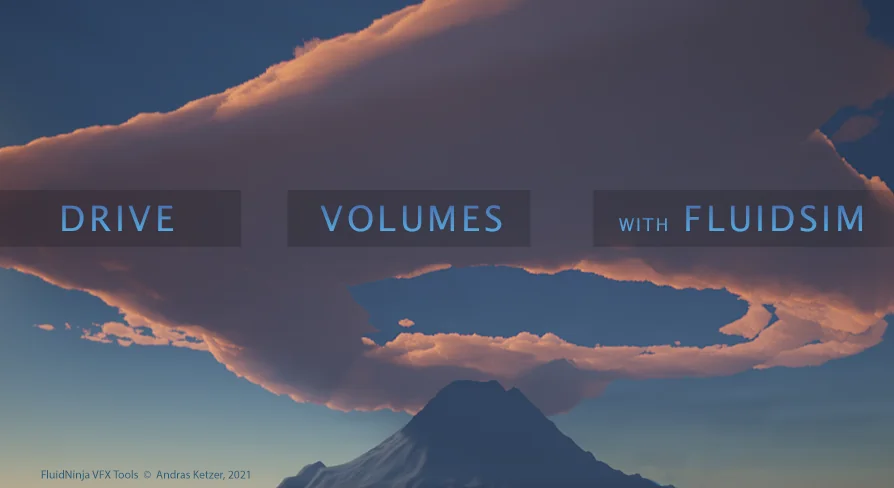
Discover how Fluid Ninja VFX Tools optimizes fluid simulations for Unreal Engine 5.4 by baking high-quality density and velocity data into compact, performance-friendly assets.
High-Performance Fluid Simulation in Unreal Engine
Fluid Ninja VFX Tools is a specialized 2D fluidsim baking toolkit designed specifically for Unreal Engine 5.4. This resource enables developers to drive 3D volumes and particles using extremely small baked data assets. Typically, these assets range from 1 to 4 Megabytes in size. Consequently, they offer a highly efficient alternative to traditional VDB assets, which are often performance-heavy and range from 100 to 400 Megabytes.
The primary goal of the toolkit is to provide a lightweight workflow for complex visual effects. By utilizing baked data, the creator ensures that high-quality fluid behavior can be integrated into projects without the massive storage overhead of standard volumetric formats. This efficiency makes it an ideal choice for projects targeting optimized performance.
Core Components and Features
The toolkit includes a comprehensive fluid simulator equipped with real-time viewports. This allows for immediate visual feedback during the creation process. Additionally, a dedicated baking tool is provided to save density and velocity data. This data is converted into flipbooks and player-materials for easy implementation.
Fluid Ninja VFX Tools also supports advanced volumetric setups. It is compatible with Heterogeneous Volume setups for Unreal Engine 5.4. This includes specific configurations for cloud volumes and fog volumes. Furthermore, the toolkit features Niagara modules. These modules sample the baked fluid data to drive GPU particle systems efficiently.
Versatile Simulation Inputs and Outputs
The simulation process is highly flexible, supporting various input methods. Specifically, users can utilize Niagara particles, bitmaps, or a built-in painter to define the simulation. This variety ensures that both stylized and realistic VFX can be achieved within the same framework.
Once the simulation is processed, the toolkit provides several output formats. These outputs include:
High-quality flipbooks and flowmaps.
Ready-to-use container materials.
Embedded baked data for immediate deployment.
Workflow and Learning Curve
It is important to note that Fluid Ninja VFX Tools is not a simple drag-and-drop tool. Because of its technical depth, the developer suggests that learning the system typically takes about a week. However, the toolkit includes demo levels that showcase various use cases. These examples cover both stylized and realistic visual effects, providing a solid foundation for new users.
For those interested in real-time responsiveness, the creator mentions NinjaLIVE as a separate solution for non-baked simulations. Additionally, NinjaPLAY is available as a standalone flipbook player. Before committing to the full version, a student version is available for testing on the community server to ensure it meets project needs.
Final Take
Fluid Ninja VFX Tools represents a significant advancement in managing fluid data for real-time environments. By focusing on compact baked assets, it allows developers to maintain high visual fidelity for smoke, fire, and fog without sacrificing frame rates. Therefore, it remains a vital resource for technical artists working within the Unreal Engine ecosystem.
 Smoke
Smoke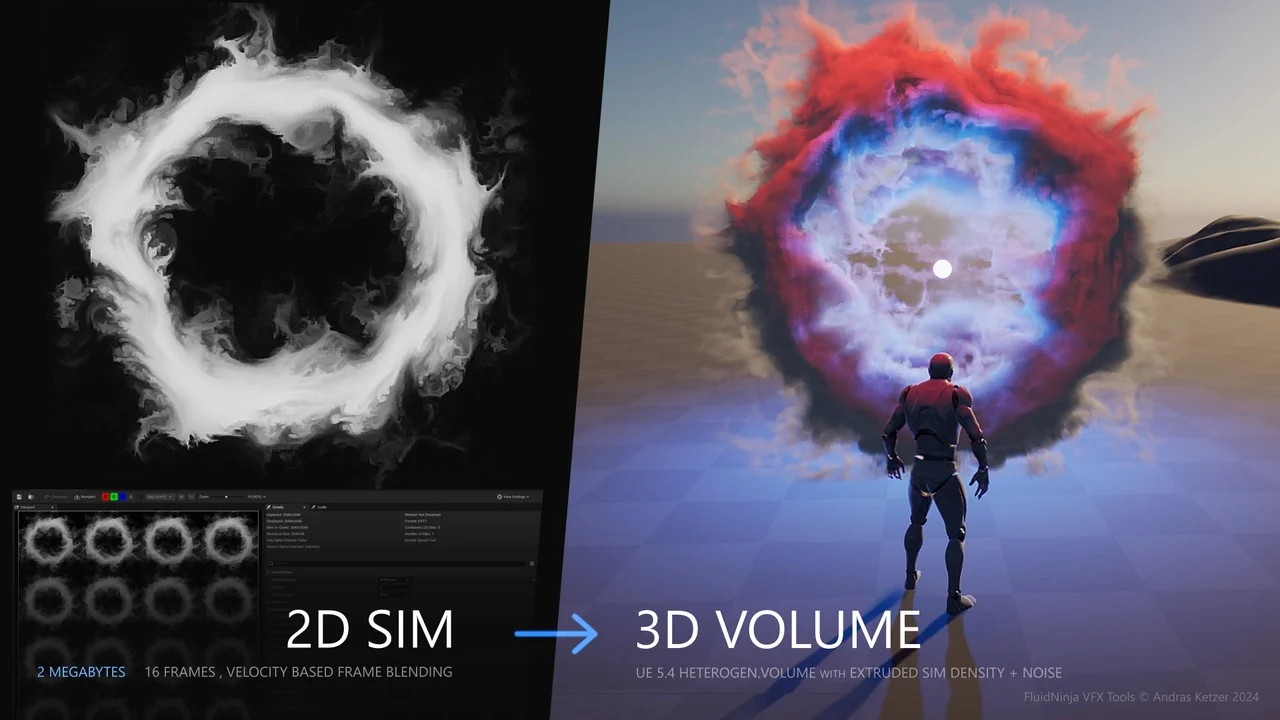
 Smoke
Smoke Variety
 Weather