"a19e0535960bd083"{"id":"15875","slug":"geometry-floor-vfx-pack-3","title":"Geometry Floor VFX Pack 3","category":"Shaders","engine":"5.0+","assetVersion":"Engine version: 5.0+","engineVersion":"5.0","tag":"Shaders","accent":"blue","visual":"mech","summary":"Discover the Geometry Floor VFX Pack 3, a collection of over 20 interactive and customizable geometry floor effects powered by the Niagara system.","platform":"Unreal Engine","publishedAt":"2026-03-12T13:26:38.000Z","updatedAt":"2026-04-19T15:44:39.000Z","sourceNotes":[],"fileContents":[],"compatibility":["Unreal Engine","Engine version: 5.0+"],"featuredImage":{"alt":"Geometry Floor VFX Pack 3","src":"https://3dcghub.com/wp-content/uploads/2026/03/55d70160-8c0f-44a3-a74a-7756d899e167.webp"},"hasDownloadLink":true,"downloads":0,"terms":[{"taxonomy":"category","slug":"shaders","name":"Shaders"},{"taxonomy":"post_tag","slug":"characters","name":"Characters"},{"taxonomy":"post_tag","slug":"game-systems","name":"Game Systems"},{"taxonomy":"post_tag","slug":"materials","name":"Materials"},{"taxonomy":"post_tag","slug":"niagara","name":"Niagara"},{"taxonomy":"post_tag","slug":"unreal-engine-5","name":"Unreal Engine 5"},{"taxonomy":"post_tag","slug":"vfx","name":"VFX"}],"galleryImages":[{"src":"https://3dcghub.com/wp-content/uploads/2026/03/292f36def3f1_1bdbcbe1-03c7-4303-918f-7789573183f6.webp","alt":"Geometry Floor VFX Pack 3"},{"src":"https://3dcghub.com/wp-content/uploads/2026/03/2724417a97dd_c2f8d199-b0a1-486a-a497-9d08c688321b.webp","alt":"Geometry Floor VFX Pack 3"},{"src":"https://3dcghub.com/wp-content/uploads/2026/03/f1261558f5bc_90a41a37-5ff5-4d14-a95d-a6f9aac894a4.webp","alt":"Geometry Floor VFX Pack 3"},{"src":"https://3dcghub.com/wp-content/uploads/2026/03/a8fd5382255a_d152cd05-77e0-40be-b8e1-2fb877237c36.webp","alt":"Geometry Floor VFX Pack 3"},{"src":"https://3dcghub.com/wp-content/uploads/2026/03/6e45a0a0d48b_fefca65d-b50b-4b86-9563-ce6e558612e1.webp","alt":"Geometry Floor VFX Pack 3"},{"src":"https://3dcghub.com/wp-content/uploads/2026/03/11fc0fdb8d2b_24b5625c-86c6-40dc-b23d-a33f21f4c936.webp","alt":"Geometry Floor VFX Pack 3"},{"src":"https://3dcghub.com/wp-content/uploads/2026/03/cb34585efa10_164a1ee9-e7b4-4685-b4f7-bb8f106866c6.webp","alt":"Geometry Floor VFX Pack 3"},{"src":"https://3dcghub.com/wp-content/uploads/2026/03/7143dd4b2854_aa66e7ba-46fc-4d55-a1df-3fa4018e040e.webp","alt":"Geometry Floor VFX Pack 3"},{"src":"https://3dcghub.com/wp-content/uploads/2026/03/e49444dd5a93_10d560ad-e701-4124-ac73-d7ab29ec9ed5.webp","alt":"Geometry Floor VFX Pack 3"},{"src":"https://3dcghub.com/wp-content/uploads/2026/03/944b93998df6_76ee87a2-4aa1-4029-b7cd-b4f84275f845.webp","alt":"Geometry Floor VFX Pack 3"},{"src":"https://3dcghub.com/wp-content/uploads/2026/03/a382fee3eec5_94220866-0658-4986-bf37-bbb3d786c741.webp","alt":"Geometry Floor VFX Pack 3"},{"src":"https://3dcghub.com/wp-content/uploads/2026/03/06ab78420b83_7f636ddf-1214-4317-817a-82d9c5b66b4a.webp","alt":"Geometry Floor VFX Pack 3"},{"src":"https://3dcghub.com/wp-content/uploads/2026/03/211c664e13c4_6a75fa48-6d87-40a2-b7c2-d5b2508ba9a7.webp","alt":"Geometry Floor VFX Pack 3"},{"src":"https://3dcghub.com/wp-content/uploads/2026/03/e64bdddc1937_3f6d6a41-6503-4375-916c-efb2edc3635c.webp","alt":"Geometry Floor VFX Pack 3"},{"src":"https://3dcghub.com/wp-content/uploads/2026/03/c0fe86ebba1e_0b88c66e-dd27-45bf-a38b-6a9cae0b2e18.webp","alt":"Geometry Floor VFX Pack 3"},{"src":"https://3dcghub.com/wp-content/uploads/2026/03/32de34100192_76c3ac77-584a-4286-936b-36100b562ed8.webp","alt":"Geometry Floor VFX Pack 3"},{"src":"https://3dcghub.com/wp-content/uploads/2026/03/de4bcffef257_ba2d38a9-ea5a-43e8-a019-c26eec2934ec.webp","alt":"Geometry Floor VFX Pack 3"},{"src":"https://3dcghub.com/wp-content/uploads/2026/03/8f7e47bf12d3_23d289c3-2243-4237-8c15-33dbe3d3754c.webp","alt":"Geometry Floor VFX Pack 3"},{"src":"https://3dcghub.com/wp-content/uploads/2026/03/09e2a5894ef4_4a8e60a3-bdbc-44f9-9749-fa9df463e0ea.webp","alt":"Geometry Floor VFX Pack 3"},{"src":"https://3dcghub.com/wp-content/uploads/2026/03/3217fdd88da0_8520e96b-c667-423b-8a68-32c20db9d949.webp","alt":"Geometry Floor VFX Pack 3"}],"accessPanel":{"kind":"resource","title":"Access this resource","eyebrow":"Free Download","message":"Log in or create a free account to start your download.","fileName":"Content.7z","safetyNote":"All resources are 100% manually reviewed to eliminate all risks.","actionLabel":"Download Free","resourceType":"Resource archive"},"contentHtml":"\u003ch2\u003eIntroduction to Geometry Floor VFX Pack 3\u003c/h2\u003e\n\u003cp\u003eThe Geometry Floor VFX Pack 3 provides a robust collection of interactive visual effects designed for modern game environments. This pack utilizes the powerful Niagara system to create dynamic geometry-based floors. Consequently, developers can implement high-quality visual patterns that react to characters or environment triggers. This latest release focuses on providing both variety and ease of use for environment artists.\u003c/p\u003e\n\n\u003cp\u003eGeometry Floor VFX Pack 3 is specifically built to be versatile. Whether you are creating a sci-fi corridor or a stylized fantasy arena, these effects add a layer of interactivity. Moreover, the system is designed to integrate seamlessly with your existing game content. Therefore, you can enhance the visual fidelity of your floors with minimal setup time.\u003c/p\u003e\n\n\u003ch2\u003eKey Features and Examples\u003c/h2\u003e\n\u003cp\u003eThe creator included over 20 Geometry Floor Visual Effect examples in this release. These examples demonstrate the wide range of possibilities within the system. Additionally, the pack features more than two dedicated Niagara Modules. These modules serve as the foundation for building complex, stylized floor patterns. By exploring the provided examples, users can understand how to implement various visual styles efficiently.\u003c/p\u003e\n\n\u003cp\u003eEach example within the Geometry Floor VFX Pack 3 showcases a different approach to geometry manipulation. Some focus on rigid, matrix-like arrays, while others highlight fluid, organic movement. Furthermore, the inclusion of multiple modules ensures that you have the tools necessary to expand upon the base effects. Consequently, you can create a truly unique look for every level of your project.\u003c/p\u003e\n\n\u003ch2\u003eExtensive Customization Options\u003c/h2\u003e\n\u003cp\u003eCustomization is a core focus of the Geometry Floor VFX Pack 3. Users can adjust parameters such as Grid Number and Grid Size to fit their specific scene requirements. For instance, increasing the grid number allows for higher-density patterns. Additionally, the Character Area Contrast and Character Area Scale allow for precise control over how the floor interacts with moving actors. This ensures that the interactive elements feel grounded and responsive.\u003c/p\u003e\n\n\u003cp\u003eThe system also offers deep control over the movement of the geometry. You can modify the Wave Pattern Type, Wave Speed, and Wave Scale to achieve various aesthetic goals. Specifically, the wave patterns can range from subtle ripples to intense, dynamic surges. However, the developer has ensured that these settings remain intuitive to adjust. Therefore, you can quickly iterate on different looks without complex scripting.\u003c/p\u003e\n\n\u003ch2\u003eVisual Styling and Material Control\u003c/h2\u003e\n\u003cp\u003eVisual attributes like Color, Material, and Emissive Intensity are fully accessible within the Geometry Floor VFX Pack 3. This allows developers to match the floor effects to their project's specific lighting and art style. Moreover, the ability to swap materials means the geometry can take on any appearance. For example, you could use metallic surfaces for a high-tech lab or glowing materials for a magical portal.\u003c/p\u003e\n\n\u003cp\u003eAdjusting the Emissive Intensity is particularly useful for creating high-contrast environments. This setting helps the geometry stand out in dark areas or blend into brightly lit scenes. Furthermore, the combination of these visual settings with the dynamic wave patterns results in a highly polished finish. Consequently, your environments will feel more alive and interactive to the player.\u003c/p\u003e\n\n\u003ch2\u003eBest Fit\u003c/h2\u003e\n\u003cp\u003eThe clearest takeaway is that the Geometry Floor VFX Pack 3 is a comprehensive toolset for creating interactive floor visuals. By leveraging the included modules and examples, you can save significant development time. The pack provides a high degree of flexibility through its many customizable parameters. Whether you need a stylized wave or a complex geometric matrix, this resource delivers the necessary functionality. Therefore, it is an excellent addition for any developer working with Niagara-based effects.\u003c/p\u003e\n\n\u003ch2\u003eRelated Resources Worth Checking\u003c/h2\u003e\n\u003cul\u003e\n\u003cli\u003e\u003ca href=\"https://3dcghub.com/dissolution-vfx-pack-using-niagara/\" title=\"Dissolution VFX Pack using Niagara\"\u003eDissolution VFX Pack using Niagara\u003c/a\u003e\u003c/li\u003e\n\u003cli\u003e\u003ca href=\"https://3dcghub.com/crystal-vfx-pack/\" title=\"Crystal VFX Pack\"\u003eCrystal VFX Pack\u003c/a\u003e\u003c/li\u003e\n\u003cli\u003e\u003ca href=\"https://3dcghub.com/magic-orb-vfx-and-material/\" title=\"Magic Orb VFX and Material\"\u003eMagic Orb VFX and Material\u003c/a\u003e\u003c/li\u003e\n\u003cli\u003e\u003ca href=\"https://3dcghub.com/ultimate-fire-pack-vol-1-by-actionvfx-and-undertone-fx-inc/\" title=\"Ultimate Fire Pack Vol 1. by ActionVFX and Undertone FX, Inc.\"\u003eUltimate Fire Pack Vol 1. by ActionVFX and Undertone FX, Inc.\u003c/a\u003e\u003c/li\u003e\n\u003cli\u003e\u003ca href=\"https://3dcghub.com/explosion-vfx-2/\" title=\"Explosion VFX 2\"\u003eExplosion VFX 2\u003c/a\u003e\u003c/li\u003e\n\u003c/ul\u003e","contentTextLength":4200,"navigation":{"current":3489,"total":4026,"previous":{"id":"15902","slug":"hologram-display-pack","title":"HOLOGRAM DISPLAY Pack","category":"Shaders","platform":"Unreal Engine","updatedAt":"2026-04-19T15:44:39.000Z"},"next":{"id":"16055","slug":"realistic-shockwaves-2d-effects-pack","title":"Realistic Shockwaves 2d Effects Pack","category":"Smoke","platform":"Unreal Engine","updatedAt":"2026-04-19T15:44:38.000Z"}},"relatedResources":[{"id":"15852","slug":"geometry-fireworks-vfx-pack","title":"Geometry Fireworks VFX Pack","category":"Shaders","engine":"5.0+","assetVersion":"Engine version: 5.0+","engineVersion":"5.0","tag":"Shaders","accent":"blue","visual":"character","summary":"The Geometry Fireworks VFX Pack is a comprehensive collection of over 30 eye-catching geometric fireworks. It offers deep customization for shapes, movement, and colors using Niagara systems.","platform":"Unreal Engine","publishedAt":"2026-03-12T13:25:12.000Z","updatedAt":"2026-04-19T15:44:40.000Z","sourceNotes":[],"fileContents":[],"compatibility":["Unreal Engine","Engine version: 5.0+"],"featuredImage":{"alt":"Geometry Fireworks VFX Pack","src":"https://3dcghub.com/wp-content/uploads/2026/03/152fad83-b7e8-4fa8-8b98-1a376f1bc4c2.webp"},"hasDownloadLink":true,"downloads":0},{"id":"15951","slug":"stylized-rendering-system-cel-shader","title":"Stylized Rendering System (Cel-Shader)","category":"Shaders","engine":"5.0+","assetVersion":"Engine version: 5.0+","engineVersion":"4.26","tag":"Shaders","accent":"blue","visual":"city","summary":"Transform your project with the Stylized Rendering System (Cel-Shader), featuring 25 outline styles and easy drag-and-drop setup for anime and manga aesthetics.","platform":"Unreal Engine","publishedAt":"2026-03-12T13:33:25.000Z","updatedAt":"2026-04-19T15:44:38.000Z","sourceNotes":[],"fileContents":[],"compatibility":["Unreal Engine","Engine version: 5.0+"],"featuredImage":{"alt":"Stylized Rendering System (Cel-Shader)","src":"https://3dcghub.com/wp-content/uploads/2026/03/e9e51600-f665-4ee5-95a5-93a70a539615.webp"},"hasDownloadLink":true,"downloads":5},{"id":"15910","slug":"lasers-with-shadows","title":"Lasers with shadows","category":"Shaders","engine":"4.26+,5.0+","assetVersion":"Engine version: 4.26+,5.0+","engineVersion":"4.20","tag":"Shaders","accent":"blue","visual":"character","summary":"Enhance your project with advanced shader-based lasers that cast dynamic shadows from geometry and masked materials. This asset offers a high-performance solution for realistic and stylized lighting effects.","platform":"Unreal Engine","publishedAt":"2026-03-12T13:28:43.000Z","updatedAt":"2026-04-19T15:44:39.000Z","sourceNotes":[],"fileContents":[],"compatibility":["Unreal Engine","Engine version: 4.26+,5.0+"],"featuredImage":{"alt":"Lasers with shadows","src":"https://3dcghub.com/wp-content/uploads/2026/03/1097ec07-e96f-4ccf-b33e-3793c651d5aa.webp"},"hasDownloadLink":true,"downloads":0}]}
Shaders
Geometry Floor VFX Pack 3
Discover the Geometry Floor VFX Pack 3, a collection of over 20 interactive and customizable geometry floor effects powered by the Niagara system.
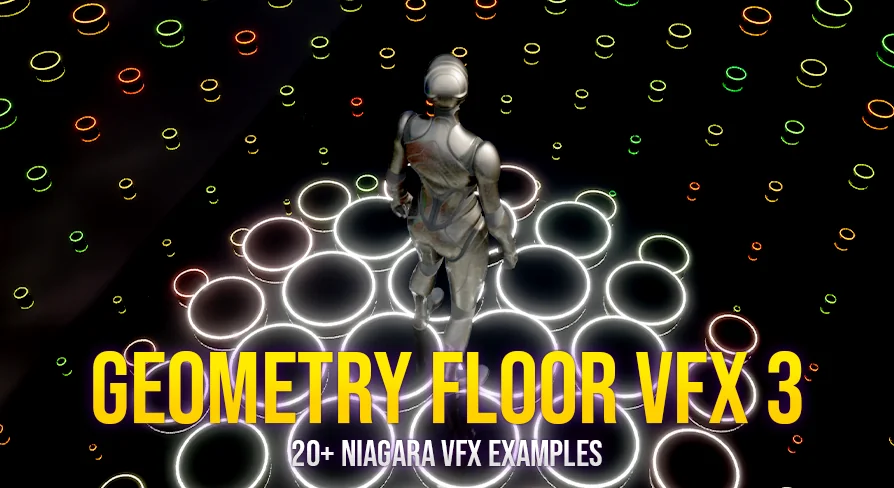
The Geometry Floor VFX Pack 3 provides a robust collection of interactive visual effects designed for modern game environments. This pack utilizes the powerful Niagara system to create dynamic geometry-based floors. Consequently, developers can implement high-quality visual patterns that react to characters or environment triggers. This latest release focuses on providing both variety and ease of use for environment artists.
Geometry Floor VFX Pack 3 is specifically built to be versatile. Whether you are creating a sci-fi corridor or a stylized fantasy arena, these effects add a layer of interactivity. Moreover, the system is designed to integrate seamlessly with your existing game content. Therefore, you can enhance the visual fidelity of your floors with minimal setup time.
Key Features and Examples
The creator included over 20 Geometry Floor Visual Effect examples in this release. These examples demonstrate the wide range of possibilities within the system. Additionally, the pack features more than two dedicated Niagara Modules. These modules serve as the foundation for building complex, stylized floor patterns. By exploring the provided examples, users can understand how to implement various visual styles efficiently.
Each example within the Geometry Floor VFX Pack 3 showcases a different approach to geometry manipulation. Some focus on rigid, matrix-like arrays, while others highlight fluid, organic movement. Furthermore, the inclusion of multiple modules ensures that you have the tools necessary to expand upon the base effects. Consequently, you can create a truly unique look for every level of your project.
Extensive Customization Options
Customization is a core focus of the Geometry Floor VFX Pack 3. Users can adjust parameters such as Grid Number and Grid Size to fit their specific scene requirements. For instance, increasing the grid number allows for higher-density patterns. Additionally, the Character Area Contrast and Character Area Scale allow for precise control over how the floor interacts with moving actors. This ensures that the interactive elements feel grounded and responsive.
The system also offers deep control over the movement of the geometry. You can modify the Wave Pattern Type, Wave Speed, and Wave Scale to achieve various aesthetic goals. Specifically, the wave patterns can range from subtle ripples to intense, dynamic surges. However, the developer has ensured that these settings remain intuitive to adjust. Therefore, you can quickly iterate on different looks without complex scripting.
Visual Styling and Material Control
Visual attributes like Color, Material, and Emissive Intensity are fully accessible within the Geometry Floor VFX Pack 3. This allows developers to match the floor effects to their project's specific lighting and art style. Moreover, the ability to swap materials means the geometry can take on any appearance. For example, you could use metallic surfaces for a high-tech lab or glowing materials for a magical portal.
Adjusting the Emissive Intensity is particularly useful for creating high-contrast environments. This setting helps the geometry stand out in dark areas or blend into brightly lit scenes. Furthermore, the combination of these visual settings with the dynamic wave patterns results in a highly polished finish. Consequently, your environments will feel more alive and interactive to the player.
Best Fit
The clearest takeaway is that the Geometry Floor VFX Pack 3 is a comprehensive toolset for creating interactive floor visuals. By leveraging the included modules and examples, you can save significant development time. The pack provides a high degree of flexibility through its many customizable parameters. Whether you need a stylized wave or a complex geometric matrix, this resource delivers the necessary functionality. Therefore, it is an excellent addition for any developer working with Niagara-based effects.
 Shaders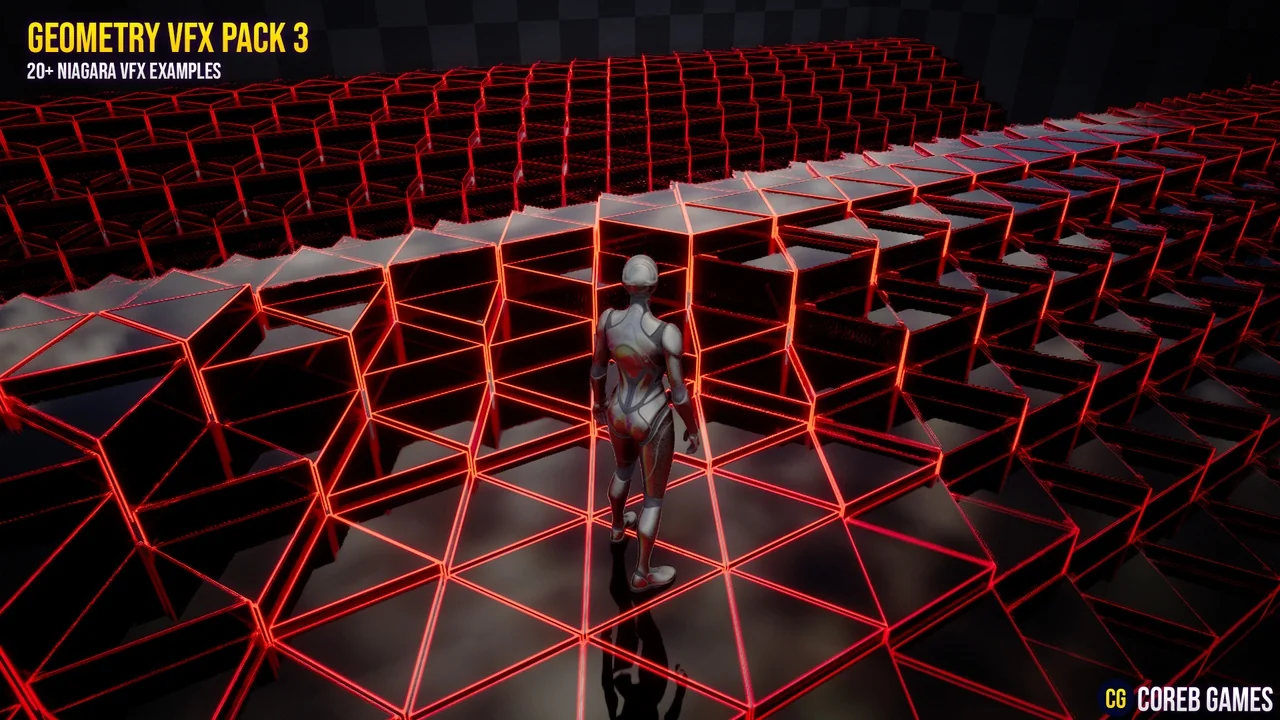
 Shaders
 Shaders
 Shaders