"7cee950366b2d3dd"{"id":"1002301","slug":"fantasy-pirate-island-vol-1","title":"Fantasy Pirate Island Vol 1","category":"Environments","engine":"4.22+,5.0+","assetVersion":"","engineVersion":"Engine Version: 4.22+,5.0+","tag":"Environments","accent":"blue","visual":"city","summary":"A stylized Unreal Engine 4.22+ pirate island kit with more than 50 assets, color-adjustable prefabs, fire and glowing-bug effects, and an example level.","platform":"Unreal Engine","indexPolicy":"index","publishedAt":"2026-11-05T10:03:08.534Z","updatedAt":"2026-11-05T10:03:08.534Z","sourceNotes":[],"fileContents":[],"compatibility":["Unreal Engine","Engine Version: 4.22+,5.0+"],"featuredImage":{"alt":"Fantasy Pirate Island Vol 1","src":"/wp-content/uploads/published/2026/11/4bd3e7fd93d7-027f1860-c091-4c8a-ae4c-3e6ed9d29b62-5ec0bddb52.webp"},"hasDownloadLink":true,"downloads":0,"terms":[{"taxonomy":"category","slug":"environments","name":"Environments"}],"galleryImages":[{"src":"/wp-content/uploads/published/2026/11/9ce768fb3550-3c7d2599-3309-4783-9d4f-6ea4bf6a4bd9-5cfb943923.webp","alt":"Fantasy Pirate Island Vol 1"},{"src":"/wp-content/uploads/published/2026/11/e51d7559c5f1-d5c94fcd-b836-4935-b2f1-224d2f1319b0-c783e42818.webp","alt":"Fantasy Pirate Island Vol 1"},{"src":"/wp-content/uploads/published/2026/11/28d44dd8403c-2efc89e8-1a42-47ef-b512-42b79dae0c4f-ce7aa761af.webp","alt":"Fantasy Pirate Island Vol 1"},{"src":"/wp-content/uploads/published/2026/11/7d3d9690ccee-ec0afeb0-caa4-4d2d-96b1-95f56a15dd03-9fecde53ba.webp","alt":"Fantasy Pirate Island Vol 1"},{"src":"/wp-content/uploads/published/2026/11/1d7784b974e4-74f70fe8-f687-46bf-9733-cbf9752d800f-25be877c48.webp","alt":"Fantasy Pirate Island Vol 1"},{"src":"/wp-content/uploads/published/2026/11/b889987702e3-1adb67ee-094e-4b9d-b466-c67da14ff47b-f3b2677c12.webp","alt":"Fantasy Pirate Island Vol 1"},{"src":"/wp-content/uploads/published/2026/11/dccb426975dc-b05c7b24-14ea-4e21-bf18-e0d3ac5e05b7-9692c376c2.webp","alt":"Fantasy Pirate Island Vol 1"},{"src":"/wp-content/uploads/published/2026/11/3d9f221c43ab-6cb6bc18-1393-4ff3-9b02-e6c3614c06f6-9be8bc79c5.webp","alt":"Fantasy Pirate Island Vol 1"},{"src":"/wp-content/uploads/published/2026/11/492fa63972d3-56e3cda1-8eb2-4df7-8183-f7a1f0f56cc6-f2c1955714.webp","alt":"Fantasy Pirate Island Vol 1"},{"src":"/wp-content/uploads/published/2026/11/5bbb87fc4cc0-27024c91-63a7-4534-b240-4b3dd4b63e6a-77ff654645.webp","alt":"Fantasy Pirate Island Vol 1"}],"accessPanel":{"kind":"resource","title":"Get this resource","eyebrow":"Free resource","message":"3DCGHUB is a discovery service. EduQuill provides the file, account, quotas and delivery.","fileName":"Content.7z","safetyNote":"Resources are manually reviewed before listing to improve quality and reduce obvious risks.","actionLabel":"Get from EduQuill","resourceType":"Resource archive","versions":[]},"contentHtml":"\u003cp\u003eFantasy Pirate Island Vol 1 is a stylized environment set for Unreal Engine 4.22 and later. It contains more than 50 assets for pirate-island scenes, prefabs that show how individual pieces can be combined into more complex assets, simple particle effects for fire and glowing bugs, and an example level. The set's visual vocabulary covers shacks, towers, huts, trees, and sand, the parts that make up a recognizable pirate island rather than a generic outdoor kit.\u003c/p\u003e\u003ch2\u003eA Stylized Pirate Island with More Than 50 Assets\u003c/h2\u003e\u003cp\u003eThe core of the set is its asset count and its stylized treatment. With more than 50 assets, Fantasy Pirate Island Vol 1 is not limited to a single structure or a handful of props. It provides separate pieces that can be composed into a pirate island from shacks, towers, huts, trees, and sandy surfaces. Because those elements share a stylized look, the set can read as one environment instead of a collection of unrelated models.\u003c/p\u003e\u003cp\u003eThe theme is specific: pirate, fantasy, island. That specificity is useful when a scene needs a clear setting. A hut, a tower, a shack, and a tree can be arranged in different combinations while staying within the same visual language. The set supplies the parts; the arrangement is left to the scene builder.\u003c/p\u003e\u003cp\u003eFor environment work, the value of a kit like this is in how the pieces hold together. A tower can sit beside a shack, a hut can be placed among trees, and sand can tie the ground plane to the island theme. None of those arrangements is fixed by the set. The assets are the raw material for an island layout, and the prefabs show what some of those combinations can look like.\u003c/p\u003e\u003ch2\u003ePrefabs That Demonstrate How the Pieces Combine\u003c/h2\u003e\u003cp\u003eThe prefabs are one of the more practical parts of Fantasy Pirate Island Vol 1. They are included as examples of how the individual pieces can be used together to create more complex assets. That means a prefab can be read as a recipe: it shows a finished combination and, by extension, the smaller parts that make it up. An artist can study a prefab and then reuse the same pieces in a different arrangement.\u003c/p\u003e\u003cp\u003ePrefabs also shorten the distance between an empty level and a populated island. Instead of starting with every piece separated, an artist can begin from a combination that already demonstrates a workable structure. The prefabs do not replace the individual assets; they show what those assets can become when grouped.\u003c/p\u003e\u003cp\u003eBecause the set includes both individual assets and prefabs, the same parts can be approached at two scales: single pieces for custom arrangements, and prefab groups for faster scene assembly. A prefab can act as a base, with its parts swapped or rearranged to produce a variation. It remains an example, not a locked composition.\u003c/p\u003e\u003ch2\u003eRecoloring Nearly Every Prefab\u003c/h2\u003e\u003cp\u003eNearly all prefabs can have their colors changed. That single feature expands the set's range without requiring new geometry. A shack, tower, or hut can shift in tone to suit a different scene palette, and the same prefab can be reused with a different color treatment. Because the color flexibility applies to nearly all prefabs, it is not an exception reserved for one or two standout pieces.\u003c/p\u003e\u003cp\u003eFor scene work, recoloring is a way to separate repeated structures. If several prefabs share the same silhouette, color becomes a differentiator. It also lets an artist test a warmer or cooler island look before committing to a final arrangement. The color control is therefore part of the composition workflow, not just a cosmetic extra.\u003c/p\u003e\u003cp\u003eRepeated use of a prefab in a scene can be broken up by color rather than by replacing the model. That makes the prefab system more flexible for builders who want a consistent style across an island while avoiding an overly uniform result. The color changes stay within the same set of prefab pieces, so the scene keeps its pirate-island identity even as the palette shifts.\u003c/p\u003e\u003ch2\u003eFire, Glowing Bugs, and the Example Level\u003c/h2\u003e\u003cp\u003eTwo simple particle effects are included: one simulates fire, and another simulates glowing bugs. They are deliberately simple effects, which fits a stylized island set. Fire can add a point of motion to a scene, while glowing bugs introduce small, scattered lights. Both are the kind of ambient detail that makes an island feel inhabited without adding complex simulation work.\u003c/p\u003e\u003cp\u003eThe particles are described as simple, so they suit a stylized presentation where the effect needs to read clearly rather than simulate every detail of combustion or insect movement. They can be placed as scene accents, adding a little life to the environment without becoming the focus.\u003c/p\u003e\u003cp\u003eThe example level puts the set's parts into a complete scene. It is the same scene shown in the creator's video, and it gives a direct reference for how the island, prefabs, and effects can sit together. Rather than describing a hypothetical layout, the example level shows one assembled version of Fantasy Pirate Island Vol 1. It is useful as a comparison point after changing colors or rearranging prefabs: the example level shows one complete island scene, while the prefabs show smaller combinations within that scene.\u003c/p\u003e\u003ch2\u003eThe UE 4.25+ Auto Exposure Note\u003c/h2\u003e\u003cp\u003eFor Unreal Engine 4.25 and newer, the lighting can appear bright. The fix is straightforward: open Project Settings, untick Auto Exposure, and set Auto Exposure Bias to 0. This is a project-level adjustment, so it applies to how the scene is viewed in the engine rather than changing the island assets themselves.\u003c/p\u003e\u003cp\u003eAnyone opening the set in a 4.25+ project should check this setting before evaluating the scene's brightness. The adjustment is small, but it prevents the lighting from reading brighter than intended. It is also the version-specific note attached to the set: the asset compatibility begins at Unreal Engine 4.22, with the Auto Exposure change applying from 4.25 onward.\u003c/p\u003e\u003ch2\u003eBuilding Pirate Scenes from Shacks, Towers, Huts, Trees, and Sand\u003c/h2\u003e\u003cp\u003eFantasy Pirate Island Vol 1 is most useful when treated as a compositional kit. Start with the prefabs to see how the individual pieces form more complex assets, then recolor nearly any prefab to create a distinct palette. Shacks, towers, huts, trees, and sand provide the island's structure; the fire and glowing-bug particles supply small ambient details; the example level gives one complete arrangement to compare against.\u003c/p\u003e\u003cp\u003eBecause the set targets Unreal Engine 4.22 and later and includes more than 50 assets, it can support a pirate-themed scene that needs a stylized island rather than a realistic one. The prefabs and color controls make the set practical for builders who want to rearrange parts and shift the look, while the example level and particle effects provide a starting scene and a few points of life. For a project that needs shacks, towers, huts, trees, and sand in a single pirate-island style, the contents are already set up to be combined.\u003c/p\u003e\n\n\u003ch2\u003eRelated Resources Worth Checking\u003c/h2\u003e\n\u003cul\u003e\n\u003cli\u003e\u003ca href=\"https://3dcghub.com/stylized-lost-island/\" rel=\"noopener noreferrer\"\u003eStylized Lost Island\u003c/a\u003e\u003c/li\u003e\n\u003cli\u003e\u003ca href=\"https://3dcghub.com/brushify-floating-islands/\" rel=\"noopener noreferrer\"\u003eBrushify - Floating Islands\u003c/a\u003e\u003c/li\u003e\n\u003cli\u003e\u003ca href=\"https://3dcghub.com/stylized-pirate-port-city-modular-pirate-port-city-modular-dock-pirate-city/\" rel=\"noopener noreferrer\"\u003eStylized Pirate Port City Modular ( Pirate Port City Modular Dock Pirate City )\u003c/a\u003e\u003c/li\u003e\n\u003cli\u003e\u003ca href=\"https://3dcghub.com/heroic-fantasy-villains-vol-1/\" rel=\"noopener noreferrer\"\u003eHeroic Fantasy Villains Vol 1\u003c/a\u003e\u003c/li\u003e\n\u003cli\u003e\u003ca href=\"https://3dcghub.com/pirate-tavern-environment-pirate-tavern-environment-uncharted-tavern-island/\" rel=\"noopener noreferrer\"\u003ePirate Tavern Environment ( Pirate Tavern Environment Uncharted Tavern Island )\u003c/a\u003e\u003c/li\u003e\n\u003c/ul\u003e","contentTextLength":7133,"navigation":{"current":7,"total":4230,"previous":{"id":"1002302","slug":"female-movement-animset-pro","title":"Female Movement Animset Pro","category":"Locomotion / Gaits","platform":"Unreal Engine","updatedAt":"2026-11-05T10:03:37.017Z"},"next":{"id":"1002300","slug":"electro-groove-music-pack","title":"Electro Groove Music Pack","category":"Music","platform":"Unreal Engine","updatedAt":"2026-11-05T10:01:53.844Z"}},"relatedResources":[{"id":"1001669","slug":"stylized-lost-island","title":"Stylized Lost Island","category":"Fantasy","engine":"4.20+,5.0+","assetVersion":"","engineVersion":"Engine Version: 4.20+,5.0+","tag":"Fantasy","accent":"blue","visual":"mech","summary":"Explore the Stylized Lost Island asset package, featuring focused props and materials designed for stylized fantasy landscapes and level creation.","platform":"Unreal Engine","indexPolicy":"index","publishedAt":"2026-10-13T15:12:03.566Z","updatedAt":"2026-10-13T15:12:03.566Z","sourceNotes":[],"fileContents":[],"compatibility":["Unreal Engine","Engine Version: 4.20+,5.0+"],"featuredImage":{"alt":"Stylized Lost Island","src":"/wp-content/uploads/published/2026/10/0599ec0aeabb-a3e61077-ca06-4318-b2d4-1997d7076fdf-36d65ef8fd.webp"},"hasDownloadLink":true,"downloads":1},{"id":"1001396","slug":"brushify-floating-islands","title":"Brushify - Floating Islands","category":"Mountain","engine":"4.26+,5.0+","assetVersion":"","engineVersion":"Engine Version: 4.26+,5.0+","tag":"Mountain","accent":"blue","visual":"mech","summary":"Build suspended fantasy and alien terrains in Unreal Engine 5 using Brushify - Floating Islands, featuring modular prefabs and an auto landscape material.","platform":"Unreal Engine","indexPolicy":"index","publishedAt":"2026-10-04T17:50:49.947Z","updatedAt":"2026-10-04T17:50:49.947Z","sourceNotes":[],"fileContents":[],"compatibility":["Unreal Engine","Engine Version: 4.26+,5.0+"],"featuredImage":{"alt":"Brushify - Floating Islands","src":"/wp-content/uploads/published/2026/10/97bf9d1cfb82-0c60deb5-50e3-43cf-ba20-c0da89d406a6-4050f9c2e1.webp"},"hasDownloadLink":true,"downloads":1},{"id":"1000105","slug":"stylized-pirate-port-city-modular-pirate-port-city-modular-dock-pirate-city","title":"Stylized Pirate Port City Modular ( Pirate Port City Modular Dock Pirate City )","category":"Fantasy","engine":"Engine Version: 4.27,5.0+","assetVersion":"Engine Version: 4.27,5.0+","engineVersion":"","tag":"Fantasy","accent":"blue","visual":"city","summary":"A modular stylized pirate port city environment pack with building pieces, props, material instance controls, and ULAT compatibility.","platform":"Unreal Engine","indexPolicy":"index","publishedAt":"2026-06-07T16:18:40.463Z","updatedAt":"2026-06-07T16:18:40.463Z","sourceNotes":[],"fileContents":[],"compatibility":["Unreal Engine","Engine Version: 4.27,5.0+"],"featuredImage":{"alt":"Stylized Pirate Port City Modular ( Pirate Port City Modular Dock Pirate City )","src":"/wp-content/uploads/published/2026/06/4a88b65c402e-1fb6ddfb-e407-4ffb-bad5-12f3464a910f-f3b010b712.webp"},"hasDownloadLink":true,"downloads":1}]}
Environments
Fantasy Pirate Island Vol 1
A stylized Unreal Engine 4.22+ pirate island kit with more than 50 assets, color-adjustable prefabs, fire and glowing-bug effects, and an example level.
Category:Unreal Engine,EnvironmentsPlatform: Unreal EngineEngine Version: 4.22+,5.0+Published: Nov 5, 2026
Environments
Resource overview
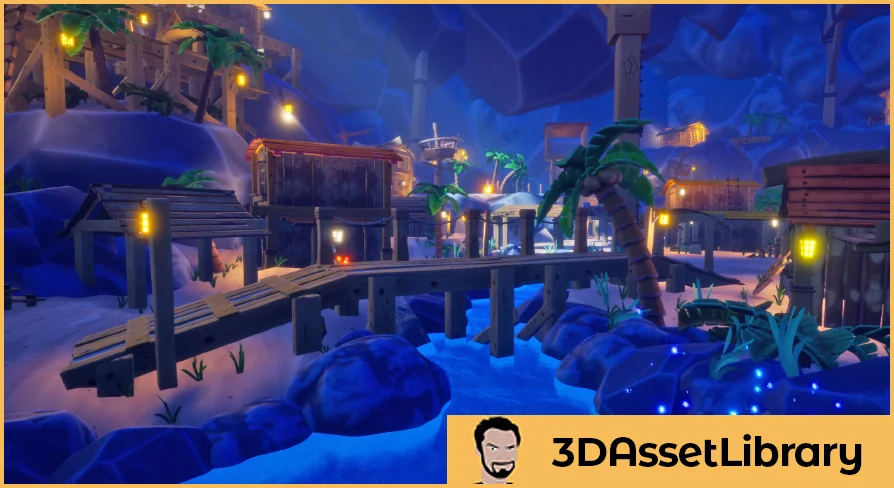
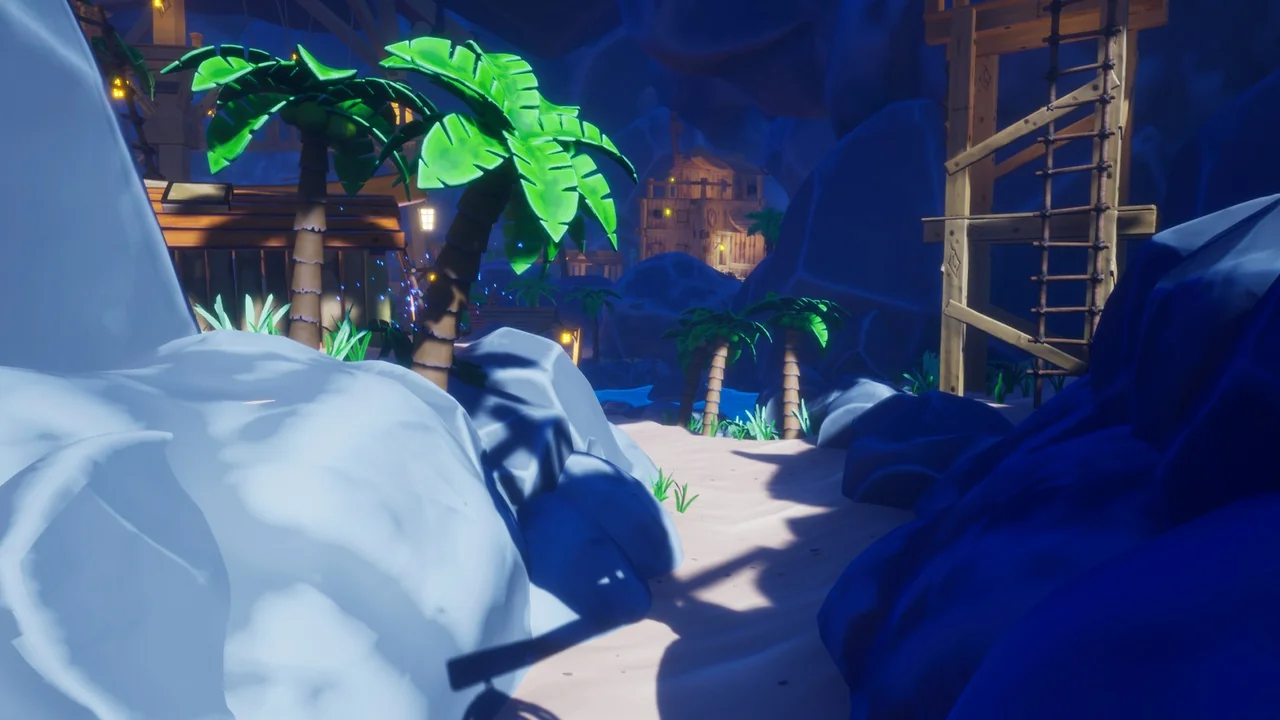
Fantasy Pirate Island Vol 1 is a stylized environment set for Unreal Engine 4.22 and later. It contains more than 50 assets for pirate-island scenes, prefabs that show how individual pieces can be combined into more complex assets, simple particle effects for fire and glowing bugs, and an example level. The set's visual vocabulary covers shacks, towers, huts, trees, and sand, the parts that make up a recognizable pirate island rather than a generic outdoor kit.
A Stylized Pirate Island with More Than 50 Assets
The core of the set is its asset count and its stylized treatment. With more than 50 assets, Fantasy Pirate Island Vol 1 is not limited to a single structure or a handful of props. It provides separate pieces that can be composed into a pirate island from shacks, towers, huts, trees, and sandy surfaces. Because those elements share a stylized look, the set can read as one environment instead of a collection of unrelated models.
The theme is specific: pirate, fantasy, island. That specificity is useful when a scene needs a clear setting. A hut, a tower, a shack, and a tree can be arranged in different combinations while staying within the same visual language. The set supplies the parts; the arrangement is left to the scene builder.
For environment work, the value of a kit like this is in how the pieces hold together. A tower can sit beside a shack, a hut can be placed among trees, and sand can tie the ground plane to the island theme. None of those arrangements is fixed by the set. The assets are the raw material for an island layout, and the prefabs show what some of those combinations can look like.
Prefabs That Demonstrate How the Pieces Combine
The prefabs are one of the more practical parts of Fantasy Pirate Island Vol 1. They are included as examples of how the individual pieces can be used together to create more complex assets. That means a prefab can be read as a recipe: it shows a finished combination and, by extension, the smaller parts that make it up. An artist can study a prefab and then reuse the same pieces in a different arrangement.
Prefabs also shorten the distance between an empty level and a populated island. Instead of starting with every piece separated, an artist can begin from a combination that already demonstrates a workable structure. The prefabs do not replace the individual assets; they show what those assets can become when grouped.
Because the set includes both individual assets and prefabs, the same parts can be approached at two scales: single pieces for custom arrangements, and prefab groups for faster scene assembly. A prefab can act as a base, with its parts swapped or rearranged to produce a variation. It remains an example, not a locked composition.
Recoloring Nearly Every Prefab
Nearly all prefabs can have their colors changed. That single feature expands the set's range without requiring new geometry. A shack, tower, or hut can shift in tone to suit a different scene palette, and the same prefab can be reused with a different color treatment. Because the color flexibility applies to nearly all prefabs, it is not an exception reserved for one or two standout pieces.
For scene work, recoloring is a way to separate repeated structures. If several prefabs share the same silhouette, color becomes a differentiator. It also lets an artist test a warmer or cooler island look before committing to a final arrangement. The color control is therefore part of the composition workflow, not just a cosmetic extra.
Repeated use of a prefab in a scene can be broken up by color rather than by replacing the model. That makes the prefab system more flexible for builders who want a consistent style across an island while avoiding an overly uniform result. The color changes stay within the same set of prefab pieces, so the scene keeps its pirate-island identity even as the palette shifts.
Fire, Glowing Bugs, and the Example Level
Two simple particle effects are included: one simulates fire, and another simulates glowing bugs. They are deliberately simple effects, which fits a stylized island set. Fire can add a point of motion to a scene, while glowing bugs introduce small, scattered lights. Both are the kind of ambient detail that makes an island feel inhabited without adding complex simulation work.
The particles are described as simple, so they suit a stylized presentation where the effect needs to read clearly rather than simulate every detail of combustion or insect movement. They can be placed as scene accents, adding a little life to the environment without becoming the focus.
The example level puts the set's parts into a complete scene. It is the same scene shown in the creator's video, and it gives a direct reference for how the island, prefabs, and effects can sit together. Rather than describing a hypothetical layout, the example level shows one assembled version of Fantasy Pirate Island Vol 1. It is useful as a comparison point after changing colors or rearranging prefabs: the example level shows one complete island scene, while the prefabs show smaller combinations within that scene.
The UE 4.25+ Auto Exposure Note
For Unreal Engine 4.25 and newer, the lighting can appear bright. The fix is straightforward: open Project Settings, untick Auto Exposure, and set Auto Exposure Bias to 0. This is a project-level adjustment, so it applies to how the scene is viewed in the engine rather than changing the island assets themselves.
Anyone opening the set in a 4.25+ project should check this setting before evaluating the scene's brightness. The adjustment is small, but it prevents the lighting from reading brighter than intended. It is also the version-specific note attached to the set: the asset compatibility begins at Unreal Engine 4.22, with the Auto Exposure change applying from 4.25 onward.
Building Pirate Scenes from Shacks, Towers, Huts, Trees, and Sand
Fantasy Pirate Island Vol 1 is most useful when treated as a compositional kit. Start with the prefabs to see how the individual pieces form more complex assets, then recolor nearly any prefab to create a distinct palette. Shacks, towers, huts, trees, and sand provide the island's structure; the fire and glowing-bug particles supply small ambient details; the example level gives one complete arrangement to compare against.
Because the set targets Unreal Engine 4.22 and later and includes more than 50 assets, it can support a pirate-themed scene that needs a stylized island rather than a realistic one. The prefabs and color controls make the set practical for builders who want to rearrange parts and shift the look, while the example level and particle effects provide a starting scene and a few points of life. For a project that needs shacks, towers, huts, trees, and sand in a single pirate-island style, the contents are already set up to be combined.
 Environments
 Fantasy
 Mountain
 Fantasy