"d037b61901c110d2"{"id":"1002657","slug":"deep-water-station","title":"Deep Water Station","category":"Aquatic","engine":"5.1+","assetVersion":"","engineVersion":"Engine Version: 5.1+","tag":"Aquatic","accent":"blue","visual":"mech","summary":"Build modular deep-sea research outposts in Unreal Engine with Deep Water Station, complete with exterior modules, Niagara marine VFX, and virtual textures.","platform":"Unreal Engine","indexPolicy":"index","publishedAt":"2026-11-16T21:58:39.666Z","updatedAt":"2026-11-16T21:58:39.666Z","sourceNotes":[],"fileContents":[],"compatibility":["Unreal Engine","Engine Version: 5.1+"],"featuredImage":{"alt":"Deep Water Station","src":"/wp-content/uploads/published/2026/11/5ee4959b2f9d-ca0319d7-1de8-444c-a1c4-add784ecae1a-8f19d79bc3.webp"},"fileSizeBytes":8284496693,"hasDownloadLink":true,"downloads":0,"terms":[{"taxonomy":"category","slug":"aquatic","name":"Aquatic"}],"galleryImages":[{"src":"/wp-content/uploads/published/2026/11/66594854c117-9a99b2a7-1af5-40b3-ae54-fc386cce46fa-e7a7bd9ce4.webp","alt":"Deep Water Station"},{"src":"/wp-content/uploads/published/2026/11/cdc4d0590f74-124a8868-a653-4516-a387-7fcb73afbc40-47d1e7fe3d.webp","alt":"Deep Water Station"},{"src":"/wp-content/uploads/published/2026/11/0924da844b48-48bbe318-b103-4ad8-af3e-2b54e0fd6498-d21670f35c.webp","alt":"Deep Water Station"},{"src":"/wp-content/uploads/published/2026/11/6a66ebd4bc10-af75d3c7-dc29-4e2d-b3e5-25a2ba71d796-d4446d778e.webp","alt":"Deep Water Station"},{"src":"/wp-content/uploads/published/2026/11/da168832a69e-772d1441-5883-4c3a-b967-b8e269fe2e40-9dd9c613f7.webp","alt":"Deep Water Station"},{"src":"/wp-content/uploads/published/2026/11/bf42af653375-2aad6097-052e-4ebb-8897-406f0517ac05-e1c6302774.webp","alt":"Deep Water Station"},{"src":"/wp-content/uploads/published/2026/11/c89a3fbe438f-1fe92e2d-a763-4e56-bb81-8159ba365783-2e6079ff3e.webp","alt":"Deep Water Station"},{"src":"/wp-content/uploads/published/2026/11/39158c6ae675-33b7d389-f538-4fe9-9f08-4f21eb7e7b38-0826846c9c.webp","alt":"Deep Water Station"},{"src":"/wp-content/uploads/published/2026/11/8e4d54a2d701-cd046a2a-6e0d-4372-8d74-5356455b48b0-5ad10dd4e7.webp","alt":"Deep Water Station"},{"src":"/wp-content/uploads/published/2026/11/6d943ff66461-b6bb9455-8242-4883-8d95-8a59872e8510-e1e202302b.webp","alt":"Deep Water Station"}],"accessPanel":{"kind":"resource","title":"Get this resource","eyebrow":"Free resource","message":"Download this resource in your browser.","fileName":"Content.7z","safetyNote":"Resources are manually reviewed before listing to improve quality and reduce obvious risks.","actionLabel":"Get this resource","resourceType":"Resource archive","versions":[]},"contentHtml":"\u003cp\u003eSubmerged beneath vast ocean depths, a marine outpost faces intense pressure, shifting currents, and total isolation. Constructing an environment that conveys this mood requires careful attention to both heavy structural engineering and atmospheric water rendering. Deep Water Station delivers a complete framework for building such environments within Unreal Engine, supplying modular assets intended for both exterior outposts and pressurized interior compartments. Built to support everything from deep-sea scientific laboratories to futuristic survival shelters and industrial storage hubs, the package balances visual fidelity with runtime optimization across varied production contexts.\u003c/p\u003e \u003ch2\u003eModular Shells and Pressure Compartments in Deep Water Station\u003c/h2\u003e\n\u003cp\u003eThe foundation of any underwater installation is its structural integrity. Deep Water Station approaches level construction through a dual-layer modular system, dividing elements into specialized exterior shells and fully enclosed interior modules. This division gives creators the flexibility to shape the outward silhouette of a research installation resting on the ocean floor while independently configuring the layout of walkable internal corridors.\u003c/p\u003e \u003cp\u003eExterior modules feature industrial paneling, heavy frame supports, and architectural forms suited for research outposts, marine bunkers, and submarine docking stations. These exterior components can be pieced together into compact scientific pods or expanded into sprawling underwater complexes spanning multiple levels. Because each asset comes equipped with collision, assembling an exterior scene ready for interactive navigation or rigid-body physics requires no manual collision tracing.\u003c/p\u003e \u003cp\u003eInside the facility, interior modules accommodate multiple room archetypes. Level designers can assemble tight submarine-style compartments, sterile laboratory sectors for deep-sea specimen analysis, reinforced emergency shelters, and spacious storage bunkers. The materials applied across these interior spaces provide detailed surfaces that react accurately to realistic lighting setups, enabling creators to establish contrasting atmospheres—from the cold, hum of a functioning science lab to the claustrophobic dread of a deserted ocean bunker.\u003c/p\u003e \u003ch2\u003eSimulating Marine Life and Water Atmosphere via Niagara\u003c/h2\u003e\n\u003cp\u003ePlacing structural assets beneath an ocean plane is only half the battle when crafting a believable deep-sea scene. The space between the camera and the station walls must convey the density and living nature of open water. Deep Water Station incorporates ambient visual effects driven by Unreal Engine's Niagara particle system to establish this surrounding marine ecosystem.\u003c/p\u003e \u003cp\u003eDynamic schools of fish navigate around station modules, breaking up the rigid lines of metallic bulkheads with natural movement. These schooling effects simulate marine life coexisting with human infrastructure, giving the waters outside viewing ports or external airlocks an authentic pulse. Complementing the wildlife, Niagara-driven plankton particles drift continuously through the water column. Suspended plankton catches the volumetric lighting emitted from station floodlights and viewport lamps, visualizing water clarity and micro-currents in real time without bogging down rendering budgets.\u003c/p\u003e \u003ch2\u003eActivating Virtual Texture Support for High-Detail Surfaces\u003c/h2\u003e\n\u003cp\u003eTo deliver rich surface fidelity across large station exteriors and intricate interior rooms without exceeding memory thresholds, the asset package relies on Unreal Engine's virtual texturing pipeline. Virtual textures stream small tiles of texture data into memory on demand, allowing massive surface areas and high-resolution material layers to maintain crisp visual fidelity up close.\u003c/p\u003e \u003cp\u003eEnabling virtual textures requires a specific project setting adjustment to ensure materials render correctly:\u003c/p\u003e\n\u003cul\u003e\n\u003cli\u003eOpen the Unreal Engine project containing the asset files.\u003c/li\u003e\n\u003cli\u003eNavigate through the top menu bar to Edit and select Project Settings.\u003c/li\u003e\n\u003cli\u003eInside the Project Settings window, browse to the Engine section and select Rendering.\u003c/li\u003e\n\u003cli\u003eScroll down to the Virtual Textures group.\u003c/li\u003e\n\u003cli\u003eLocate and check the option labeled Enable Virtual Texture Support.\u003c/li\u003e\n\u003cli\u003eRestart Unreal Engine to apply the configuration change and recompile the relevant shaders.\u003c/li\u003e\n\u003c/ul\u003e\n\u003cp\u003eCompleting this setup enables the engine to process the high-quality textures and layered materials across all station modules as intended, preventing material corruption or rendering fallbacks during level construction.\u003c/p\u003e \u003ch2\u003eDeploying Demo Maps Across Deep Water Station Scalability Profiles\u003c/h2\u003e\n\u003cp\u003eProduction targets vary significantly depending on whether a project is aimed at real-time game loops, interactive VR simulations, or offline cinematic rendering. Deep Water Station includes two ready-to-use demonstration maps that replicate the full station layout, each configured for distinct visual scalability tiers.\u003c/p\u003e \u003cp\u003eFor standard high-end production pipelines targeting real-time interaction, the package provides DemoMapScalabilityEpic.umap. When loading this map, developers should verify that the engine Scalability settings are set to Epic. This configuration provides a balanced baseline where detailed textures, realistic illumination, collision systems, and Niagara marine particles operate smoothly within standard real-time performance envelopes.\u003c/p\u003e \u003cp\u003eProjects targeting virtual production, linear media, cinematics, or high-fidelity renders can deploy DemoMapScalabilityCinematic.umap. This map is built specifically to pair with the engine's Cinematic scalability profile. When this profile is active, visual features like lighting passes, shadow precision, and atmospheric particle limits scale upward to deliver maximum visual quality for filmic presentations and pre-rendered footage.\u003c/p\u003e \u003ch2\u003eIntegrating Assets into Production Pipelines\u003c/h2\u003e\n\u003cp\u003eWhether assembling an interactive deep-sea exploration game, a sci-fi research simulation, or a narrative VR experience, Deep Water Station fits directly into Unreal Engine workflows without extensive rework. Its pre-optimized geometry and ready-made collisions allow environment artists to prototype layouts quickly, while technical artists can immediately leverage the dual scalability demo maps to establish project-wide rendering benchmarks.\u003c/p\u003e\n\n\u003ch2\u003eRelated Resources Worth Checking\u003c/h2\u003e\n\u003cul\u003e\n\u003cli\u003e\u003ca href=\"https://3dcghub.com/ocean-environment-pack-2-coral-reef/\" rel=\"noopener noreferrer\"\u003eOcean Environment Pack 2 - Coral Reef\u003c/a\u003e\u003c/li\u003e\n\u003cli\u003e\u003ca href=\"https://3dcghub.com/underwater-sunken-ship-environment-underwater-sunken-ship-ship-underwater/\" rel=\"noopener noreferrer\"\u003eUnderwater Sunken Ship Environment ( Underwater Sunken Ship Ship Underwater )\u003c/a\u003e\u003c/li\u003e\n\u003cli\u003e\u003ca href=\"https://3dcghub.com/water-magic-niagara/\" rel=\"noopener noreferrer\"\u003eWater Magic Niagara\u003c/a\u003e\u003c/li\u003e\n\u003cli\u003e\u003ca href=\"https://3dcghub.com/realistic-materials-vol-7-water-ice-25-materials/\" rel=\"noopener noreferrer\"\u003eRealistic Materials Vol. 7 - Water \u0026amp; Ice (25+ Materials)\u003c/a\u003e\u003c/li\u003e\n\u003cli\u003e\u003ca href=\"https://3dcghub.com/dynamic-real-water/\" rel=\"noopener noreferrer\"\u003eDynamic Real Water\u003c/a\u003e\u003c/li\u003e\n\u003c/ul\u003e","contentTextLength":6495,"navigation":{"current":32,"total":4611,"previous":{"id":"1002658","slug":"dieselpunk","title":"DieselPunk","category":"Cities","platform":"Unreal Engine","updatedAt":"2026-11-16T22:01:32.299Z"},"next":{"id":"1002656","slug":"deep-elder-caves","title":"Deep Elder Caves","category":"Dungeon","platform":"Unreal Engine","updatedAt":"2026-11-16T21:55:21.915Z"}},"relatedResources":[{"id":"1001779","slug":"ocean-environment-pack-2-coral-reef","title":"Ocean Environment Pack 2 - Coral Reef","category":"Aquatic","engine":"5.0+","assetVersion":"","engineVersion":"Engine Version: 5.0+","tag":"Aquatic","accent":"blue","visual":"city","summary":"Explore the Ocean Environment Pack 2 - Coral Reef, featuring deep-sea lighting setups, modular wooden shipwreck meshes, diverse coral types, and sunfish.","platform":"Unreal Engine","indexPolicy":"index","publishedAt":"2026-10-20T03:26:47.429Z","updatedAt":"2026-10-20T03:26:47.429Z","sourceNotes":[],"fileContents":[],"compatibility":["Unreal Engine","Engine Version: 5.0+"],"featuredImage":{"alt":"Ocean Environment Pack 2 - Coral Reef","src":"/wp-content/uploads/published/2026/10/ebc0507d2b35-c25a422f-f9dd-4675-a49d-0d1e0f92d780-58dd1a054a.webp"},"fileSizeBytes":2025909652,"hasDownloadLink":true,"downloads":0},{"id":"6967","slug":"underwater-sunken-ship-environment-underwater-sunken-ship-ship-underwater","title":"Underwater Sunken Ship Environment ( Underwater Sunken Ship Ship Underwater )","category":"Aquatic","engine":"5.0+","assetVersion":"Engine version: 5.0+","engineVersion":"5.0","tag":"Aquatic","accent":"blue","visual":"city","summary":"Discover a comprehensive collection of over 180 unique meshes designed to create stunning deep-sea shipwrecks and aquatic landscapes in Unreal Engine.","platform":"Unreal Engine","indexPolicy":"noindex","publishedAt":"2026-02-20T16:27:06.000Z","updatedAt":"2026-04-19T15:56:05.000Z","sourceNotes":[],"fileContents":[],"compatibility":["Unreal Engine","Engine version: 5.0+"],"featuredImage":{"alt":"Underwater Sunken Ship Environment ( Underwater Sunken Ship Ship Underwater )","src":"https://3dcghub.com/wp-content/uploads/2026/02/b368d4dd-d265-4c54-b07d-0669fe9e71e2.webp"},"fileSizeBytes":1303581877,"hasDownloadLink":true,"downloads":0},{"id":"16838","slug":"water-magic-niagara","title":"Water Magic Niagara","category":"Spells \u0026 Combat","engine":"5.0+","assetVersion":"Engine version: 5.0+","engineVersion":"5.0","tag":"Spells \u0026 Combat","accent":"blue","visual":"animation","summary":"Enhance your project with Water Magic Niagara, a specialized collection of aquatic visual effects. This pack allows for easy customization of size and color to fit any magical gameplay scenario.","platform":"Unreal Engine","indexPolicy":"noindex","publishedAt":"2026-03-12T18:03:54.000Z","updatedAt":"2026-04-19T15:43:41.000Z","sourceNotes":[],"fileContents":[],"compatibility":["Unreal Engine","Engine version: 5.0+"],"featuredImage":{"alt":"Water Magic Niagara","src":"https://3dcghub.com/wp-content/uploads/2026/03/cb921e64-127c-40c5-869f-c9c1dbc93b27.webp"},"fileSizeBytes":364586728,"hasDownloadLink":true,"downloads":7}]}
Resource screenshots
1 / 10
Aquatic
Deep Water Station
Build modular deep-sea research outposts in Unreal Engine with Deep Water Station, complete with exterior modules, Niagara marine VFX, and virtual textures.
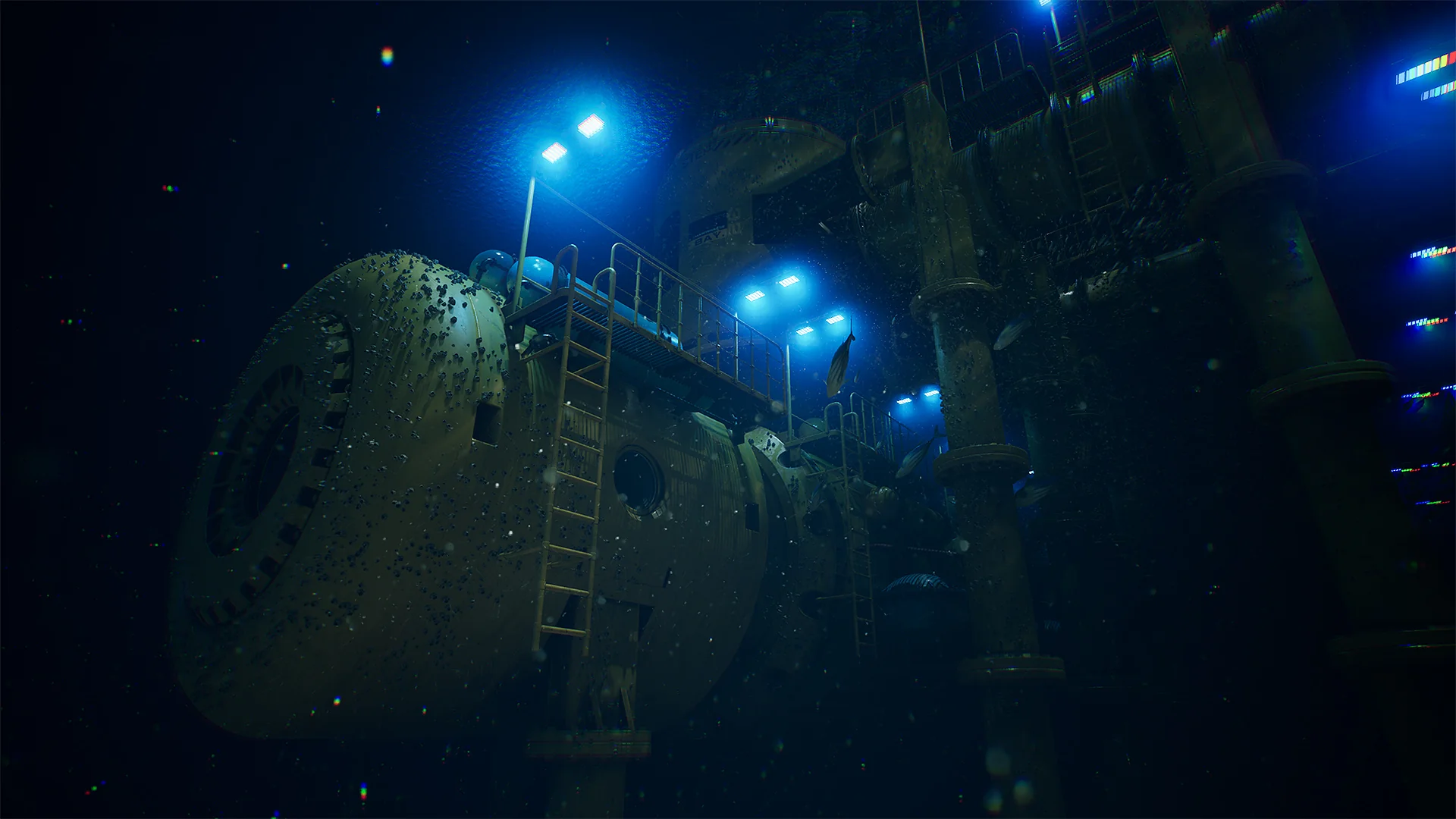
Submerged beneath vast ocean depths, a marine outpost faces intense pressure, shifting currents, and total isolation. Constructing an environment that conveys this mood requires careful attention to both heavy structural engineering and atmospheric water rendering. Deep Water Station delivers a complete framework for building such environments within Unreal Engine, supplying modular assets intended for both exterior outposts and pressurized interior compartments. Built to support everything from deep-sea scientific laboratories to futuristic survival shelters and industrial storage hubs, the package balances visual fidelity with runtime optimization across varied production contexts.
Modular Shells and Pressure Compartments in Deep Water Station
The foundation of any underwater installation is its structural integrity. Deep Water Station approaches level construction through a dual-layer modular system, dividing elements into specialized exterior shells and fully enclosed interior modules. This division gives creators the flexibility to shape the outward silhouette of a research installation resting on the ocean floor while independently configuring the layout of walkable internal corridors.
Exterior modules feature industrial paneling, heavy frame supports, and architectural forms suited for research outposts, marine bunkers, and submarine docking stations. These exterior components can be pieced together into compact scientific pods or expanded into sprawling underwater complexes spanning multiple levels. Because each asset comes equipped with collision, assembling an exterior scene ready for interactive navigation or rigid-body physics requires no manual collision tracing.
Inside the facility, interior modules accommodate multiple room archetypes. Level designers can assemble tight submarine-style compartments, sterile laboratory sectors for deep-sea specimen analysis, reinforced emergency shelters, and spacious storage bunkers. The materials applied across these interior spaces provide detailed surfaces that react accurately to realistic lighting setups, enabling creators to establish contrasting atmospheres—from the cold, hum of a functioning science lab to the claustrophobic dread of a deserted ocean bunker.
Simulating Marine Life and Water Atmosphere via Niagara
Placing structural assets beneath an ocean plane is only half the battle when crafting a believable deep-sea scene. The space between the camera and the station walls must convey the density and living nature of open water. Deep Water Station incorporates ambient visual effects driven by Unreal Engine's Niagara particle system to establish this surrounding marine ecosystem.
Dynamic schools of fish navigate around station modules, breaking up the rigid lines of metallic bulkheads with natural movement. These schooling effects simulate marine life coexisting with human infrastructure, giving the waters outside viewing ports or external airlocks an authentic pulse. Complementing the wildlife, Niagara-driven plankton particles drift continuously through the water column. Suspended plankton catches the volumetric lighting emitted from station floodlights and viewport lamps, visualizing water clarity and micro-currents in real time without bogging down rendering budgets.
Activating Virtual Texture Support for High-Detail Surfaces
To deliver rich surface fidelity across large station exteriors and intricate interior rooms without exceeding memory thresholds, the asset package relies on Unreal Engine's virtual texturing pipeline. Virtual textures stream small tiles of texture data into memory on demand, allowing massive surface areas and high-resolution material layers to maintain crisp visual fidelity up close.
Enabling virtual textures requires a specific project setting adjustment to ensure materials render correctly:
Open the Unreal Engine project containing the asset files.
Navigate through the top menu bar to Edit and select Project Settings.
Inside the Project Settings window, browse to the Engine section and select Rendering.
Scroll down to the Virtual Textures group.
Locate and check the option labeled Enable Virtual Texture Support.
Restart Unreal Engine to apply the configuration change and recompile the relevant shaders.
Completing this setup enables the engine to process the high-quality textures and layered materials across all station modules as intended, preventing material corruption or rendering fallbacks during level construction.
Deploying Demo Maps Across Deep Water Station Scalability Profiles
Production targets vary significantly depending on whether a project is aimed at real-time game loops, interactive VR simulations, or offline cinematic rendering. Deep Water Station includes two ready-to-use demonstration maps that replicate the full station layout, each configured for distinct visual scalability tiers.
For standard high-end production pipelines targeting real-time interaction, the package provides DemoMapScalabilityEpic.umap. When loading this map, developers should verify that the engine Scalability settings are set to Epic. This configuration provides a balanced baseline where detailed textures, realistic illumination, collision systems, and Niagara marine particles operate smoothly within standard real-time performance envelopes.
Projects targeting virtual production, linear media, cinematics, or high-fidelity renders can deploy DemoMapScalabilityCinematic.umap. This map is built specifically to pair with the engine's Cinematic scalability profile. When this profile is active, visual features like lighting passes, shadow precision, and atmospheric particle limits scale upward to deliver maximum visual quality for filmic presentations and pre-rendered footage.
Integrating Assets into Production Pipelines
Whether assembling an interactive deep-sea exploration game, a sci-fi research simulation, or a narrative VR experience, Deep Water Station fits directly into Unreal Engine workflows without extensive rework. Its pre-optimized geometry and ready-made collisions allow environment artists to prototype layouts quickly, while technical artists can immediately leverage the dual scalability demo maps to establish project-wide rendering benchmarks.
 Aquatic
 Aquatic
 Spells & Combat