"7aa4acc705f0d80b"{"id":"1001958","slug":"b2bp-slide-show","title":"B2BP Slide Show","category":"Procedural Systems","engine":"4.25+,5.0+","assetVersion":"","engineVersion":"Engine Version: 4.25+,5.0+","tag":"Procedural Systems","accent":"blue","visual":"mech","summary":"Configure in-engine presentations with B2BP Slide Show, featuring a single modular Blueprint, 20 screen meshes, Texture Arrays, and custom camera views.","platform":"Unreal Engine","publishedAt":"2026-10-24T11:35:46.167Z","updatedAt":"2026-10-24T11:35:46.167Z","sourceNotes":[],"fileContents":[],"compatibility":["Unreal Engine","Engine Version: 4.25+,5.0+"],"featuredImage":{"alt":"B2BP Slide Show","src":"/wp-content/uploads/published/2026/10/62b78778ea8d-ba8238b4-c29c-43f9-b7a8-cd2b74ca6dfa-e3855dd0e8.webp"},"hasDownloadLink":true,"downloads":0,"terms":[{"taxonomy":"category","slug":"procedural-systems","name":"Procedural Systems"}],"galleryImages":[{"src":"/wp-content/uploads/published/2026/10/e13fd86788a2-9c94d72b-2941-43ae-9279-03ebbe784317-1c2af2ad1e.webp","alt":"B2BP Slide Show"},{"src":"/wp-content/uploads/published/2026/10/1a58cc592e73-9326ca64-cbf4-4dcc-b4de-c89b9fd92ca1-2ecdddf27f.webp","alt":"B2BP Slide Show"}],"accessPanel":{"kind":"resource","title":"Download this resource","eyebrow":"Free Download","message":"Log in or create a free account to start your download.","fileName":"Content.7z","safetyNote":"Resources are manually reviewed before listing to improve quality and reduce obvious risks.","actionLabel":"Download Free","resourceType":"Resource archive"},"contentHtml":"\u003ch2\u003eActor Details and Initial Blueprint Placement\u003c/h2\u003e\u003cp\u003eIntegrating presentation displays into a scene begins with dragging the primary Blueprint actor directly into the world environment. Setup requires only minor technical knowledge, as the configuration relies on exposed public attributes gathered inside the standard Actor Details panel. Users can import their own graphic assets as standard image Textures and feed them into the tool to establish display content.\u003c/p\u003e\u003cp\u003eBecause the system functions as a modular Blueprint script, individual instances placed across a map remain independent. Designers can select any placed instance and freely adjust its Transform properties—including scale, rotation, and location—to align with exhibition stands, meeting spaces, virtual auditoriums, or realistic architectural stages without disturbing neighboring setups.\u003c/p\u003e\u003ch2\u003eConfiguring the Texture Array, Cover Pages, and Playback Cycles\u003c/h2\u003e\u003cp\u003eContent delivery is focused on a single Blueprint that utilizes a Texture Array to host and index all slide graphics. Managing presentation material inside an array allows creators to maintain an organized sequence of visuals directly on the Actor Details panel without wiring manual texture-switching nodes across the event graph.\u003c/p\u003e\u003cp\u003ePresentation management offers multiple sequencing behaviors depending on how an in-engine event or walkthrough is structured:\u003c/p\u003e\u003cul\u003e\u003cli\u003e\u003cstrong\u003eAutomatic Slide Show Mode:\u003c/strong\u003e Slides advance automatically according to configurable basic timings, letting scenes run hands-free display loops.\u003c/li\u003e\u003cli\u003e\u003cstrong\u003eInfinite Page Cycle:\u003c/strong\u003e Displays can be set to loop continuously, returning to the start after reaching the final slide.\u003c/li\u003e\u003cli\u003e\u003cstrong\u003eTerminating Playback:\u003c/strong\u003e Slide cycles can halt once they hit the final frame, preventing accidental repetition during formal demonstrations.\u003c/li\u003e\u003cli\u003e\u003cstrong\u003eDedicated Cover Page:\u003c/strong\u003e A presentation-specific cover slide can be established to introduce the sequence while staying completely isolated from the main page loop.\u003c/li\u003e\u003c/ul\u003e\u003cp\u003eThe exclusion of the cover page from the regular cycle ensures that once an audience moves past the title screen into the primary presentation, subsequent cycles or user inputs navigate only through the actual briefing material rather than cycling back through introductory branding.\u003c/p\u003e\u003ch2\u003eScreen Camera Transitions and Active Page Persistence\u003c/h2\u003e\u003cp\u003eManaging the viewpoint and user engagement is handled through a built-in Screen Camera designed to give viewers full visual focus on the active display. Switching over to this focused perspective can be executed in two distinct operational ways: bound directly to an input key command for manual presentation control, or triggered automatically when a player character enters an overlap volume positioned in front of the screen.\u003c/p\u003e\u003cp\u003eInteractive sessions often involve participants wandering in and out of presentation areas, which makes state tracking essential. The Blueprint addresses display memory with two distinct handling modes upon departure:\u003c/p\u003e\u003cul\u003e\u003cli\u003e\u003cstrong\u003eActive Page Retention:\u003c/strong\u003e The screen preserves whichever slide was active when the viewer leaves the interaction zone, ensuring presentations pick up exactly where they paused.\u003c/li\u003e\u003cli\u003e\u003cstrong\u003eCustom Page Reset:\u003c/strong\u003e The screen automatically clears the current slide upon exit and defaults back to a predetermined custom page index, restoring a tidy idle state for the next user.\u003c/li\u003e\u003c/ul\u003e\u003ch2\u003eDeploying the 20 Screen Meshes Across Varied Aspect Ratios\u003c/h2\u003e\u003cp\u003ePhysical presentation hardware in 3D spaces requires varied proportions to reflect diverse monitor sizes, projection surfaces, and mobile or interface mockups. The asset package includes 20 individual Screen meshes designed around multiple aspect ratios that reference established Adobe XD artboard templates.\u003c/p\u003e\u003cp\u003eThese pre-configured proportions allow developers to map graphics built inside UI and graphic design workflows directly onto corresponding 3D frames without introducing stretched UVs, unwanted letterboxing, or distorted presentation typography. Whether building panoramic briefing walls or compact handheld display units, developers can select an appropriately dimensioned mesh that matches their imported image dimensions.\u003c/p\u003e\u003ch2\u003eIncluded Blender and Photoshop Source Assets\u003c/h2\u003e\u003cp\u003eTo support visual iteration outside the engine, the package supplies native external source files alongside the Blueprint actors. A dedicated Photoshop file contains TestSlide textures, giving creators a calibrated reference canvas to layout new slides, verify alignment guidelines, and export correctly formatted graphics directly into engine textures.\u003c/p\u003e\u003cp\u003eFor structural adjustments, an external Blender file containing the 20 Screen meshes is provided. 3D artists can inspect the mesh geometry, adjust bezels, customize physical stands, or make custom proportion tweaks. When modifying these models, standard Unreal Engine export workflows for Blender should be followed to ensure scale, axes, and material assignments translate properly upon re-import.\u003c/p\u003e\u003ch2\u003eProject Footprint and Lightweight Architecture\u003c/h2\u003e\u003cp\u003eTo keep project dependencies minimal, the architecture relies on a singular Blueprint design rather than fragmented sub-actors or complex master-child class hierarchies. Discussion around future maintenance includes the potential omission of the demonstration level from the base store asset. Removing the heavy demo environment allows teams to bring only the lightweight, functional Blueprint, core screen meshes, and critical presentation logic into production maps without dragging unnecessary sample scenes or level data into clean project repositories.\u003c/p\u003e\n\n\u003ch2\u003eRelated Resources Worth Checking\u003c/h2\u003e\n\u003cul\u003e\n\u003cli\u003e\u003ca href=\"https://3dcghub.com/water-slide-system/\" title=\"Water Slide System\"\u003eWater Slide System\u003c/a\u003e\u003c/li\u003e\n\u003cli\u003e\u003ca href=\"https://3dcghub.com/beefy-bass-niagara-fish-system/\" title=\"Beefy Bass (Niagara Fish System)\"\u003eBeefy Bass (Niagara Fish System)\u003c/a\u003e\u003c/li\u003e\n\u003cli\u003e\u003ca href=\"https://3dcghub.com/fluid-flux/\" title=\"Fluid Flux\"\u003eFluid Flux\u003c/a\u003e\u003c/li\u003e\n\u003cli\u003e\u003ca href=\"https://3dcghub.com/water-fountain/\" title=\"Water Fountain\"\u003eWater Fountain\u003c/a\u003e\u003c/li\u003e\n\u003cli\u003e\u003ca href=\"https://3dcghub.com/realistic-moon/\" title=\"Realistic Moon\"\u003eRealistic Moon\u003c/a\u003e\u003c/li\u003e\n\u003c/ul\u003e","contentTextLength":5593,"navigation":{"current":32,"total":3925,"previous":{"id":"1001959","slug":"bags-backpack-and-survival-kit","title":"Bags, Backpack \u0026 Survival Kit","category":"Clothing \u0026 Accessories","platform":"Unreal Engine","updatedAt":"2026-10-24T11:36:59.351Z"},"next":{"id":"1001957","slug":"automotive-extras","title":"Automotive Extras","category":"Building \u0026 Human-made","platform":"Unreal Engine","updatedAt":"2026-10-24T11:34:53.196Z"}},"relatedResources":[{"id":"1001569","slug":"water-slide-system","title":"Water Slide System","category":"Procedural Systems","engine":"5.2+","assetVersion":"","engineVersion":"Engine Version: 5.2+","tag":"Procedural Systems","accent":"blue","visual":"mech","summary":"Add customizable spline-based water slides, physics-driven pawns, and modular flumes to aquatic environments with the Water Slide System.","platform":"Unreal Engine","publishedAt":"2026-10-10T04:03:38.258Z","updatedAt":"2026-10-10T04:03:38.258Z","sourceNotes":[],"fileContents":[],"compatibility":["Unreal Engine","Engine Version: 5.2+"],"featuredImage":{"alt":"Water Slide System","src":"/wp-content/uploads/published/2026/10/2791f88aa424-40896a86-de8a-43a7-8b8c-bf1fdea153ba-d64f8a3aa8.webp"},"hasDownloadLink":true,"downloads":1},{"id":"1000779","slug":"beefy-bass-niagara-fish-system","title":"Beefy Bass (Niagara Fish System)","category":"Procedural Systems","engine":"4.26+,5.0+","assetVersion":"","engineVersion":"Engine Version: 4.26+,5.0+","tag":"Procedural Systems","accent":"blue","visual":"mech","summary":"Unreal 5.2 Niagara fish system with five freshwater species, reusable stylized materials, and five flocking behavior modes for populating water environments.","platform":"Unreal Engine","publishedAt":"2026-07-29T15:47:27.384Z","updatedAt":"2026-07-29T15:47:27.384Z","sourceNotes":[],"fileContents":[],"compatibility":["Unreal Engine","Engine Version: 4.26+,5.0+"],"featuredImage":{"alt":"Beefy Bass (Niagara Fish System)","src":"/wp-content/uploads/published/2026/07/8b74a6c2ec35-48c0ff12-97e7-440c-86be-4f6286f215e3-dc328a73ef.webp"},"hasDownloadLink":true,"downloads":2},{"id":"11402","slug":"fluid-flux","title":"Fluid Flux","category":"Procedural Systems","engine":"4.26+,5.0+","assetVersion":"Engine version: 4.26+,5.0+","engineVersion":"Asset Version:2.2 - 3.0.4","tag":"Procedural Systems","accent":"blue","visual":"city","summary":"Fluid Flux is a powerful tool for real-time shallow water simulation and high-quality surface rendering. It features a GPU-friendly implementation designed for efficiency and visual fidelity in modern game projects.","platform":"Unreal Engine","publishedAt":"2026-03-05T17:11:44.000Z","updatedAt":"2026-04-19T15:48:12.000Z","sourceNotes":[],"fileContents":[],"compatibility":["Unreal Engine","Engine version: 4.26+,5.0+","Asset Version: 2.2 - 3.0.4"],"featuredImage":{"alt":"Fluid Flux","src":"https://3dcghub.com/wp-content/uploads/2026/03/1fe4696d-28ca-47a0-87e1-8b8daa320977.webp"},"hasDownloadLink":true,"downloads":19}]}
Procedural Systems
B2BP Slide Show
Configure in-engine presentations with B2BP Slide Show, featuring a single modular Blueprint, 20 screen meshes, Texture Arrays, and custom camera views.
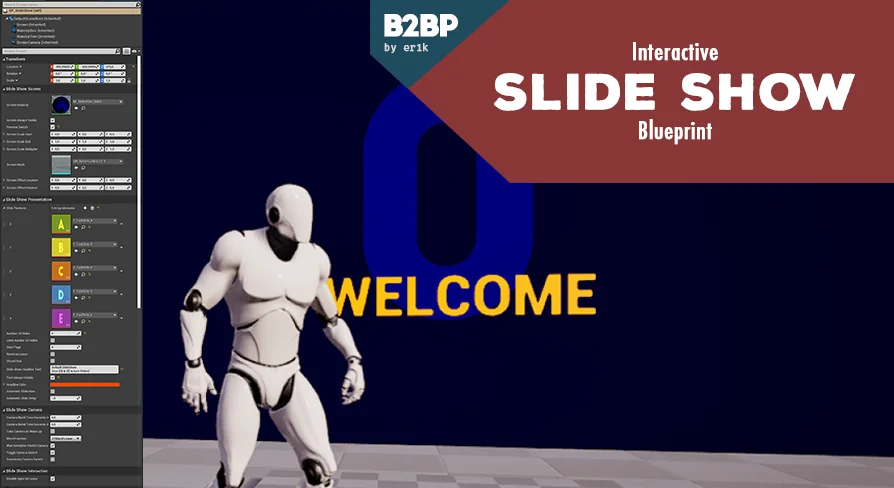
Integrating presentation displays into a scene begins with dragging the primary Blueprint actor directly into the world environment. Setup requires only minor technical knowledge, as the configuration relies on exposed public attributes gathered inside the standard Actor Details panel. Users can import their own graphic assets as standard image Textures and feed them into the tool to establish display content.
Because the system functions as a modular Blueprint script, individual instances placed across a map remain independent. Designers can select any placed instance and freely adjust its Transform properties—including scale, rotation, and location—to align with exhibition stands, meeting spaces, virtual auditoriums, or realistic architectural stages without disturbing neighboring setups.
Configuring the Texture Array, Cover Pages, and Playback Cycles
Content delivery is focused on a single Blueprint that utilizes a Texture Array to host and index all slide graphics. Managing presentation material inside an array allows creators to maintain an organized sequence of visuals directly on the Actor Details panel without wiring manual texture-switching nodes across the event graph.
Presentation management offers multiple sequencing behaviors depending on how an in-engine event or walkthrough is structured:
Automatic Slide Show Mode: Slides advance automatically according to configurable basic timings, letting scenes run hands-free display loops.
Infinite Page Cycle: Displays can be set to loop continuously, returning to the start after reaching the final slide.
Terminating Playback: Slide cycles can halt once they hit the final frame, preventing accidental repetition during formal demonstrations.
Dedicated Cover Page: A presentation-specific cover slide can be established to introduce the sequence while staying completely isolated from the main page loop.
The exclusion of the cover page from the regular cycle ensures that once an audience moves past the title screen into the primary presentation, subsequent cycles or user inputs navigate only through the actual briefing material rather than cycling back through introductory branding.
Screen Camera Transitions and Active Page Persistence
Managing the viewpoint and user engagement is handled through a built-in Screen Camera designed to give viewers full visual focus on the active display. Switching over to this focused perspective can be executed in two distinct operational ways: bound directly to an input key command for manual presentation control, or triggered automatically when a player character enters an overlap volume positioned in front of the screen.
Interactive sessions often involve participants wandering in and out of presentation areas, which makes state tracking essential. The Blueprint addresses display memory with two distinct handling modes upon departure:
Active Page Retention: The screen preserves whichever slide was active when the viewer leaves the interaction zone, ensuring presentations pick up exactly where they paused.
Custom Page Reset: The screen automatically clears the current slide upon exit and defaults back to a predetermined custom page index, restoring a tidy idle state for the next user.
Deploying the 20 Screen Meshes Across Varied Aspect Ratios
Physical presentation hardware in 3D spaces requires varied proportions to reflect diverse monitor sizes, projection surfaces, and mobile or interface mockups. The asset package includes 20 individual Screen meshes designed around multiple aspect ratios that reference established Adobe XD artboard templates.
These pre-configured proportions allow developers to map graphics built inside UI and graphic design workflows directly onto corresponding 3D frames without introducing stretched UVs, unwanted letterboxing, or distorted presentation typography. Whether building panoramic briefing walls or compact handheld display units, developers can select an appropriately dimensioned mesh that matches their imported image dimensions.
Included Blender and Photoshop Source Assets
To support visual iteration outside the engine, the package supplies native external source files alongside the Blueprint actors. A dedicated Photoshop file contains TestSlide textures, giving creators a calibrated reference canvas to layout new slides, verify alignment guidelines, and export correctly formatted graphics directly into engine textures.
For structural adjustments, an external Blender file containing the 20 Screen meshes is provided. 3D artists can inspect the mesh geometry, adjust bezels, customize physical stands, or make custom proportion tweaks. When modifying these models, standard Unreal Engine export workflows for Blender should be followed to ensure scale, axes, and material assignments translate properly upon re-import.
Project Footprint and Lightweight Architecture
To keep project dependencies minimal, the architecture relies on a singular Blueprint design rather than fragmented sub-actors or complex master-child class hierarchies. Discussion around future maintenance includes the potential omission of the demonstration level from the base store asset. Removing the heavy demo environment allows teams to bring only the lightweight, functional Blueprint, core screen meshes, and critical presentation logic into production maps without dragging unnecessary sample scenes or level data into clean project repositories.
 Procedural Systems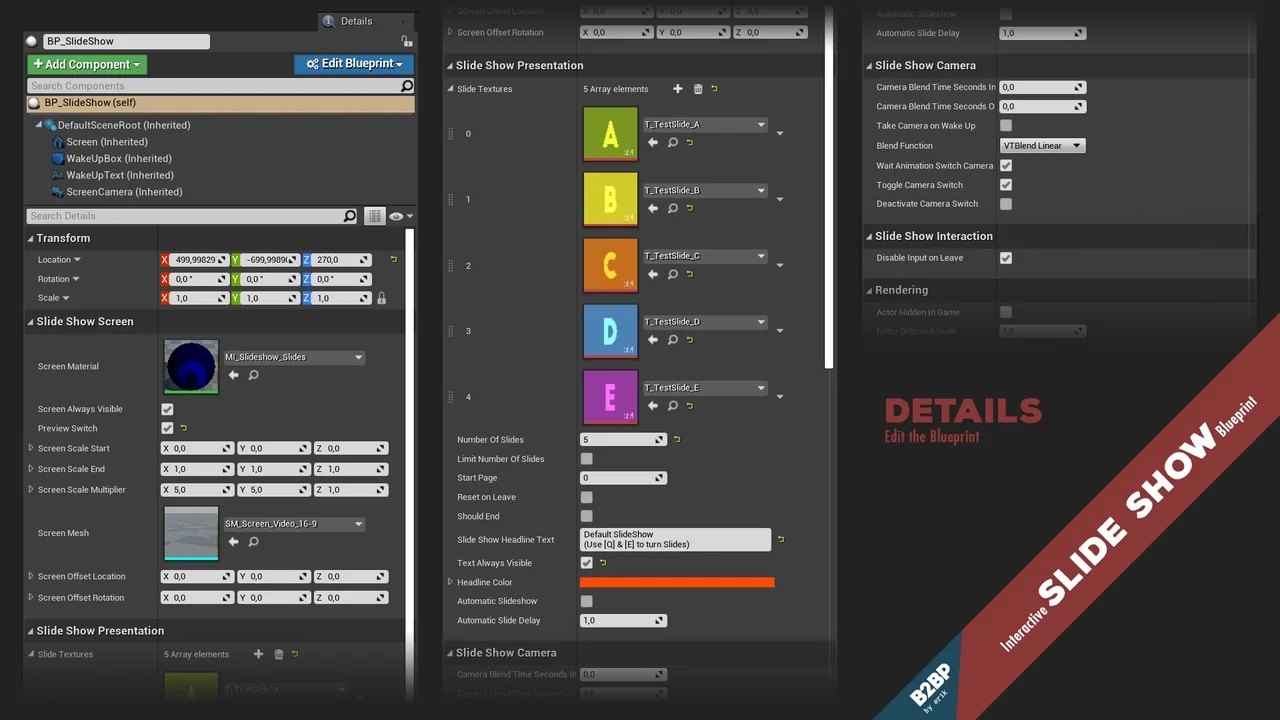
 Procedural Systems
 Procedural Systems
 Procedural Systems