"c68a05d5e51405b3"{"id":"22571","slug":"audio-sync-pro","title":"Audio Sync Pro","category":"Audio","engine":"Original Unity version: 2022.3.20","assetVersion":"Original Unity version: 2022.3.20","engineVersion":"Asset Version:1.2","tag":"Audio","accent":"cyan","visual":"audio","summary":"Audio Sync Pro provides a streamlined suite for connecting game logic to sound, featuring an Inspector-based timeline and over 20 dynamic reactor components. It allows for beat-perfect event triggering and real-time audio visualization without requiring dev...","platform":"Unity","publishedAt":"2026-04-06T13:16:08.000Z","updatedAt":"2026-04-19T15:37:11.000Z","sourceNotes":[],"fileContents":[],"compatibility":["Unity","Original Unity version: 2022.3.20","Asset Version: 1.2"],"featuredImage":{"alt":"Audio Sync Pro","src":"https://3dcghub.com/wp-content/uploads/2026/04/1f0af8868340_55e95b24-0e45-4e32-b9a5-c36ed386ce85_1280x720_stretch.webp"},"hasDownloadLink":true,"downloads":0,"terms":[{"taxonomy":"category","slug":"audio-tools-unity-2","name":"Audio"},{"taxonomy":"post_tag","slug":"animation","name":"Animation"},{"taxonomy":"post_tag","slug":"audio","name":"Audio"},{"taxonomy":"post_tag","slug":"unity","name":"Unity"}],"galleryImages":[{"src":"https://3dcghub.com/wp-content/uploads/2026/04/34130889629f_b4a77b41-8082-443b-afac-28725cdb18a6_scaled.webp","alt":"Audio Sync Pro"},{"src":"https://3dcghub.com/wp-content/uploads/2026/04/aae785c7abea_aaf2cbb8-a3f5-46ba-917c-e2ce417ff71a_scaled.webp","alt":"Audio Sync Pro"},{"src":"https://3dcghub.com/wp-content/uploads/2026/04/fea03e84f5c0_fc0de934-98cc-4ba6-8801-53a6ad9ecc6f_scaled.webp","alt":"Audio Sync Pro"},{"src":"https://3dcghub.com/wp-content/uploads/2026/04/dd09a3dca180_abbae8cc-12a5-442a-b44f-9edc5e7a978c_scaled.webp","alt":"Audio Sync Pro"},{"src":"https://3dcghub.com/wp-content/uploads/2026/04/fd586848f600_8db52f41-f38b-4bf9-94f5-42d2f6701292_scaled.webp","alt":"Audio Sync Pro"}],"accessPanel":{"kind":"resource","title":"Access this resource","eyebrow":"Free Download","message":"Log in or create a free account to start your download.","fileName":"Audio Sync Pro v1.2.7z","safetyNote":"All resources are 100% manually reviewed to eliminate all risks.","actionLabel":"Download Free","resourceType":"Resource archive"},"contentHtml":"\u003ch2\u003eVisualizing Sound through the Audio Timeline\u003c/h2\u003e\u003cp\u003eAudio Sync Pro centers its workflow on the Audio Timeline, a dedicated interface located directly within the Unity Inspector. This tool provides a visual representation of audio files, allowing developers to see the waveform and place event calls at exact timestamps. By moving away from manual timing or approximate code-based triggers, the timeline ensures that game events align perfectly with specific beats or sonic peaks. These events are not limited to simple triggers; they support multiple parameters, enabling the execution of complex behaviors such as shifting game states, swapping materials, or adjusting character variables at precise moments in a musical track or sound effect.\u003c/p\u003e\u003cp\u003eThe integration of the timeline into the Inspector is designed to reduce the friction of the development cycle. Rather than jumping between different windows or external software, the creator can manage the relationship between sound and logic in one place. This architectural choice supports a more rhythmic approach to level design and cinematic sequencing, where the audio serves as the primary driver for the visual experience.\u003c/p\u003e\u003ch2\u003eDynamic Responses with Reactor Components\u003c/h2\u003e\u003cp\u003eBeyond the manual placement of events, Audio Sync Pro includes a suite of over 20 Reactor components. These components are designed to automate the process of making game objects react to live audio data. The reactors can be applied to various elements within a scene, including lights, particle systems, and transforms. For instance, a transform reactor might scale an object in time with a bass drum, while a light reactor could pulse the intensity of a neon sign based on the frequency of a soundtrack.\u003c/p\u003e\u003cp\u003eThis system is flexible enough to handle various creative needs, such as generating automatic 2D lip-sync for characters or creating intricate music visualizers. Because the reactors are component-based, they can be added to existing objects without requiring extensive custom scripting. This modularity allows for rapid prototyping of audio-driven environments where every light and movement feels intrinsically tied to the soundscape. The creator has indicated that the library of reactors is intended to grow, providing even more ways to map audio data to visual outputs as the tool evolves.\u003c/p\u003e\u003ch2\u003eWorkflow Efficiency and Inspector Previews\u003c/h2\u003e\u003cp\u003eA significant functional advantage of Audio Sync Pro is its ability to function outside of Play Mode. Developers can play, pause, and stop audio directly in the Inspector to see how Reaction Effects will behave in the final build. This immediate feedback loop eliminates the need to repeatedly launch the game to test minor timing adjustments. Seeing the reactors move and the events fire in the editor view allows for fine-tuning the intensity and timing of effects with much higher speed and accuracy.\u003c/p\u003e\u003cp\u003eThe lightweight nature of the suite ensures that it remains intuitive for both small projects and more complex scenes. By streamlining the way audio data is accessed and applied to game objects, the tool lowers the barrier for creating immersive, beat-driven gameplay. Whether the goal is a subtle ambient reaction or a full-scale rhythmic action sequence, the toolset provides the necessary infrastructure to bridge the gap between the audio engine and the visual renderer.\u003c/p\u003e\u003ch2\u003eTechnical Pipeline and Compatibility\u003c/h2\u003e\u003cp\u003eAudio Sync Pro is built to support a wide range of Unity projects, maintaining compatibility with both the 2022.3.20 and 6000.2.1 versions of the engine. It is designed to work across various render pipelines, including the Built-in Render Pipeline, Universal Render Pipeline (URP), High Definition Render Pipeline (HDRP), and Custom Scriptable Render Pipelines (SRP). This broad compatibility ensures that the audio-syncing capabilities can be integrated into projects regardless of their visual style or technical requirements.\u003c/p\u003e\u003cp\u003eWhile the tool is robust across most platforms, there are specific considerations for certain export targets. Currently, WebGL does not support beat detection, though other features of the suite remain functional in that environment. The package itself is contained within a 16.4 MB unitypackage, comprising approximately 100 assets that make up the core logic, components, and timeline interface. This compact size makes it a specialized addition to a project's audio toolkit without adding significant overhead.\u003c/p\u003e\u003ch2\u003eStrategic Implementation for Immersive Audio\u003c/h2\u003e\u003cp\u003eThe primary utility of Audio Sync Pro lies in its ability to transform audio from a background element into an active participant in the game world. By utilizing the timeline for scripted, high-impact moments and the reactor components for continuous, dynamic movement, developers can craft experiences that feel more cohesive. The tool is particularly suited for genres where rhythm is a core mechanic or for developers looking to add a layer of polish to their environments through reactive lighting and effects. As a relatively new tool in the ecosystem, it focuses on providing a stable, tested foundation for audio-visual synchronization while remaining open to customization and further expansion of its component library.\u003c/p\u003e\n\n\u003ch2\u003eExplore Similar Assets\u003c/h2\u003e\n\u003cul\u003e\n\u003cli\u003e\u003ca href=\"https://3dcghub.com/niagara-audio-visualizer/\" title=\"Niagara Audio Visualizer\"\u003eNiagara Audio Visualizer\u003c/a\u003e\u003c/li\u003e\n\u003cli\u003e\u003ca href=\"https://3dcghub.com/halloween-audio-kit/\" title=\"Halloween Audio Kit\"\u003eHalloween Audio Kit\u003c/a\u003e\u003c/li\u003e\n\u003cli\u003e\u003ca href=\"https://3dcghub.com/geppetto-ai-powered-lip-sync-animation/\" title=\"Geppetto – AI-Powered Lip Sync Animation\"\u003eGeppetto – AI-Powered Lip Sync Animation\u003c/a\u003e\u003c/li\u003e\n\u003cli\u003e\u003ca href=\"https://3dcghub.com/fps-framework-2-0/\" title=\"FPS Framework 2.0\"\u003eFPS Framework 2.0\u003c/a\u003e\u003c/li\u003e\n\u003cli\u003e\u003ca href=\"https://3dcghub.com/fps-engine/\" title=\"FPS Engine\"\u003eFPS Engine\u003c/a\u003e\u003c/li\u003e\n\u003c/ul\u003e","contentTextLength":5361,"navigation":{"current":3691,"total":3860,"previous":{"id":"22574","slug":"audio-visualization-playlist-system","title":"Audio Visualization \u0026 Playlist System","category":"Audio","platform":"Unity","updatedAt":"2026-04-19T15:37:11.000Z"},"next":{"id":"22587","slug":"a-pathfinding-project-pro","title":"A* Pathfinding Project Pro","category":"Behavior AI","platform":"Unity","updatedAt":"2026-04-19T15:37:10.000Z"}},"relatedResources":[{"id":"22563","slug":"ambient-sounds-interactive-soundscapes-for-unity-6","title":"Ambient Sounds - Interactive Soundscapes for Unity 6","category":"Audio","engine":"Original Unity version: 2017.4.1","assetVersion":"Original Unity version: 2017.4.1","engineVersion":"Asset Version:1.2.17","tag":"Audio","accent":"cyan","visual":"audio","summary":"Ambient Sounds provides a structured framework for Unity 6 developers to create dynamic audio environments. Using a system of sequences and no-code modifiers, it replaces manual audio scripting with a centralized management workflow.","platform":"Unity","publishedAt":"2026-04-06T13:15:34.000Z","updatedAt":"2026-04-19T15:37:12.000Z","sourceNotes":[],"fileContents":[],"compatibility":["Unity","Original Unity version: 2017.4.1","Asset Version: 1.2.17"],"featuredImage":{"alt":"Ambient Sounds - Interactive Soundscapes for Unity 6","src":"https://3dcghub.com/wp-content/uploads/2026/04/c16abf0a11ac_96684359-75a9-457f-8865-5d39ffdb1a5a_1280x720_stretch.webp"},"hasDownloadLink":true,"downloads":1},{"id":"22574","slug":"audio-visualization-playlist-system","title":"Audio Visualization \u0026 Playlist System","category":"Audio","engine":"Original Unity version: 2021.3.15","assetVersion":"Original Unity version: 2021.3.15","engineVersion":"Asset Version:1.0","tag":"Audio","accent":"cyan","visual":"audio","summary":"This package offers a collection of scripts designed to synchronize game objects with audio data, allowing for real-time changes in shape, color, and movement based on music.","platform":"Unity","publishedAt":"2026-04-06T13:20:14.000Z","updatedAt":"2026-04-19T15:37:11.000Z","sourceNotes":[],"fileContents":[],"compatibility":["Unity","Original Unity version: 2021.3.15","Asset Version: 1.0"],"featuredImage":{"alt":"Audio Visualization \u0026 Playlist System","src":"https://3dcghub.com/wp-content/uploads/2026/04/516e978be199_0f255db6-a7a5-43a1-bac6-4e6c37e01f63_1280x720_stretch.webp"},"hasDownloadLink":true,"downloads":0},{"id":"22429","slug":"geppetto-ai-powered-lip-sync-animation","title":"Geppetto - AI-Powered Lip Sync Animation","category":"Animation","engine":"Original Unity version: 2021.3.8","assetVersion":"Original Unity version: 2021.3.8","engineVersion":"Asset Version:4.7.1","tag":"Animation","accent":"cyan","visual":"animation","summary":"Geppetto streamlines the character animation pipeline by using artificial intelligence to convert audio or text files into expressive facial movements. Designed for Unity, the tool focuses on automating timing and tone to match character speech.","platform":"Unity","publishedAt":"2026-04-06T08:05:40.000Z","updatedAt":"2026-04-19T15:37:18.000Z","sourceNotes":[],"fileContents":[],"compatibility":["Unity","Original Unity version: 2021.3.8"],"featuredImage":{"alt":"Geppetto - AI-Powered Lip Sync Animation","src":"https://3dcghub.com/wp-content/uploads/2026/04/d3da86aba0c5_27d76a59-680c-4c33-8d1f-1b2cf11e6d5b_1280x720_stretch.webp"},"hasDownloadLink":true,"downloads":0}]}
Audio
Audio Sync Pro
Audio Sync Pro provides a streamlined suite for connecting game logic to sound, featuring an Inspector-based timeline and over 20 dynamic reactor components. It allows for beat-perfect event triggering and real-time audio visualization without requiring dev...
Audio Sync Pro centers its workflow on the Audio Timeline, a dedicated interface located directly within the Unity Inspector. This tool provides a visual representation of audio files, allowing developers to see the waveform and place event calls at exact timestamps. By moving away from manual timing or approximate code-based triggers, the timeline ensures that game events align perfectly with specific beats or sonic peaks. These events are not limited to simple triggers; they support multiple parameters, enabling the execution of complex behaviors such as shifting game states, swapping materials, or adjusting character variables at precise moments in a musical track or sound effect.
The integration of the timeline into the Inspector is designed to reduce the friction of the development cycle. Rather than jumping between different windows or external software, the creator can manage the relationship between sound and logic in one place. This architectural choice supports a more rhythmic approach to level design and cinematic sequencing, where the audio serves as the primary driver for the visual experience.
Dynamic Responses with Reactor Components
Beyond the manual placement of events, Audio Sync Pro includes a suite of over 20 Reactor components. These components are designed to automate the process of making game objects react to live audio data. The reactors can be applied to various elements within a scene, including lights, particle systems, and transforms. For instance, a transform reactor might scale an object in time with a bass drum, while a light reactor could pulse the intensity of a neon sign based on the frequency of a soundtrack.
This system is flexible enough to handle various creative needs, such as generating automatic 2D lip-sync for characters or creating intricate music visualizers. Because the reactors are component-based, they can be added to existing objects without requiring extensive custom scripting. This modularity allows for rapid prototyping of audio-driven environments where every light and movement feels intrinsically tied to the soundscape. The creator has indicated that the library of reactors is intended to grow, providing even more ways to map audio data to visual outputs as the tool evolves.
Workflow Efficiency and Inspector Previews
A significant functional advantage of Audio Sync Pro is its ability to function outside of Play Mode. Developers can play, pause, and stop audio directly in the Inspector to see how Reaction Effects will behave in the final build. This immediate feedback loop eliminates the need to repeatedly launch the game to test minor timing adjustments. Seeing the reactors move and the events fire in the editor view allows for fine-tuning the intensity and timing of effects with much higher speed and accuracy.
The lightweight nature of the suite ensures that it remains intuitive for both small projects and more complex scenes. By streamlining the way audio data is accessed and applied to game objects, the tool lowers the barrier for creating immersive, beat-driven gameplay. Whether the goal is a subtle ambient reaction or a full-scale rhythmic action sequence, the toolset provides the necessary infrastructure to bridge the gap between the audio engine and the visual renderer.
Technical Pipeline and Compatibility
Audio Sync Pro is built to support a wide range of Unity projects, maintaining compatibility with both the 2022.3.20 and 6000.2.1 versions of the engine. It is designed to work across various render pipelines, including the Built-in Render Pipeline, Universal Render Pipeline (URP), High Definition Render Pipeline (HDRP), and Custom Scriptable Render Pipelines (SRP). This broad compatibility ensures that the audio-syncing capabilities can be integrated into projects regardless of their visual style or technical requirements.
While the tool is robust across most platforms, there are specific considerations for certain export targets. Currently, WebGL does not support beat detection, though other features of the suite remain functional in that environment. The package itself is contained within a 16.4 MB unitypackage, comprising approximately 100 assets that make up the core logic, components, and timeline interface. This compact size makes it a specialized addition to a project's audio toolkit without adding significant overhead.
Strategic Implementation for Immersive Audio
The primary utility of Audio Sync Pro lies in its ability to transform audio from a background element into an active participant in the game world. By utilizing the timeline for scripted, high-impact moments and the reactor components for continuous, dynamic movement, developers can craft experiences that feel more cohesive. The tool is particularly suited for genres where rhythm is a core mechanic or for developers looking to add a layer of polish to their environments through reactive lighting and effects. As a relatively new tool in the ecosystem, it focuses on providing a stable, tested foundation for audio-visual synchronization while remaining open to customization and further expansion of its component library.
 Audio
Audio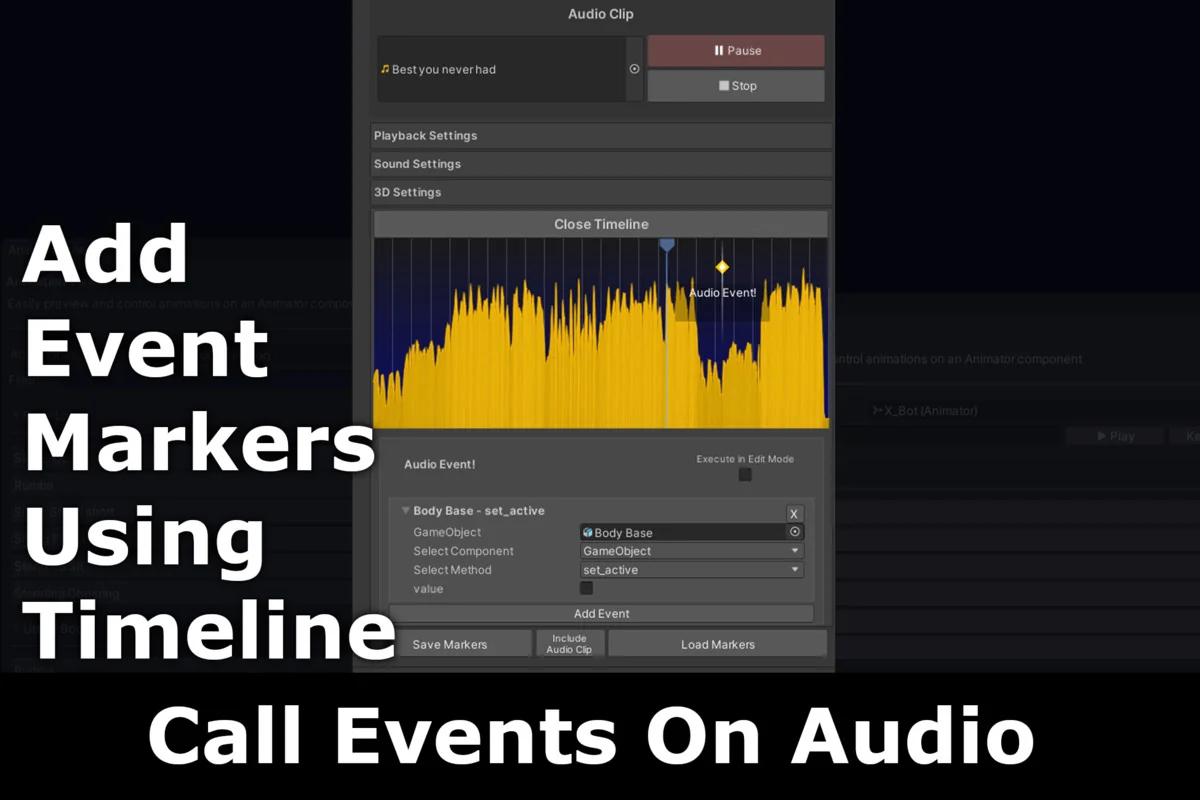
 Audio
Audio Audio
Audio Animation