"c68a05d5e51405b3"{"id":"1000116","slug":"archviz-essential-series-1","title":"ArchViz Essential Series 1","category":"Industrial","engine":"4.26+,5.0+","assetVersion":"","engineVersion":"Engine Version: 4.26+,5.0+","tag":"Industrial","accent":"cyan","visual":"mech","summary":"ArchViz Essential Series 1 delivers 16 optimized furniture models and a highly parameterized Master Opaque Material for Unreal Engine 4 architectural visualizat","platform":"Unity","publishedAt":"2026-06-09T14:10:56.557Z","updatedAt":"2026-06-09T14:10:56.557Z","sourceNotes":[],"fileContents":[],"compatibility":["Unreal Engine","Engine Version: 4.26+,5.0+"],"featuredImage":{"alt":"ArchViz Essential Series 1","src":"/wp-content/uploads/published/2026/06/a4c6b4fa3056-04eb219b-9d8b-4cc0-a6f4-c720c55ff6ac-1c72581d1a.webp"},"hasDownloadLink":true,"downloads":2,"terms":[{"taxonomy":"category","slug":"unity-3d-environments-industrial","name":"Industrial"}],"galleryImages":[{"src":"/wp-content/uploads/published/2026/06/b5756d117c2c-c6aac9ea-3595-4438-9595-8f850a557dd9-fea6ab7df7.webp","alt":"ArchViz Essential Series 1"},{"src":"/wp-content/uploads/published/2026/06/3e12a8e0ce21-7e344f19-481a-4882-bb31-1dfffbb5711e-20cb47a4f0.webp","alt":"ArchViz Essential Series 1"},{"src":"/wp-content/uploads/published/2026/06/c2b7149c362d-3813a06d-b082-4c4b-ae44-40ccbde067c0-f917a0051c.webp","alt":"ArchViz Essential Series 1"},{"src":"/wp-content/uploads/published/2026/06/4aec8cad4c93-09f53ace-55ed-487e-a5a3-abb545f47999-8be7fcda3d.webp","alt":"ArchViz Essential Series 1"},{"src":"/wp-content/uploads/published/2026/06/849652c1b1f9-c4386437-ff2d-4067-b6ac-ddd20bdac2da-90b62206a4.webp","alt":"ArchViz Essential Series 1"},{"src":"/wp-content/uploads/published/2026/06/f23799986296-6512900a-4f86-4648-b2a7-12ef32528206-8a8668ecec.webp","alt":"ArchViz Essential Series 1"},{"src":"/wp-content/uploads/published/2026/06/d2afec4fff08-7cb43f04-566a-4266-b012-3318016c7ba7-eb14496a2a.webp","alt":"ArchViz Essential Series 1"},{"src":"/wp-content/uploads/published/2026/06/57616161c5db-aa9c6d51-82b6-49af-93f9-63c523545474-045f10e72e.webp","alt":"ArchViz Essential Series 1"}],"accessPanel":{"kind":"resource","title":"Access this resource","eyebrow":"Free Download","message":"Log in or create a free account to start your download.","fileName":"Content.7z","safetyNote":"Resources are manually reviewed before listing to improve quality and reduce obvious risks.","actionLabel":"Download Free","resourceType":"Resource archive"},"contentHtml":"\u003cp\u003eSetting up realistic interior and industrial scenes in Unreal Engine 4 requires a careful balance between high-fidelity visuals and strict performance budgets. ArchViz Essential Series 1 addresses this specific production need by focusing on optimized assets paired with a highly controllable material pipeline. Designed specifically for architectural visualizations, the collection equips developers and artists with realistic furniture models and a deeply parameterized material system that prioritizes both aesthetic quality and engine performance.\u003c/p\u003e \u003cp\u003eRather than relying on brute-force polygon counts, the assets leverage a streamlined approach to scene population. The package centers on 16 different high-quality furniture models that fit seamlessly within interior, architectural, and industrial design contexts. By maintaining a decent, optimized polycount, these lowpoly yet realistic assets ensure good graphic performance without sacrificing the visual standards expected in modern architectural rendering workflows.\u003c/p\u003e \u003ch2\u003eUVW Setup and Lightmap Baking Precision\u003c/h2\u003e \u003cp\u003eA critical challenge in Unreal Engine 4 architectural visualization is achieving clean, artifact-free static lighting. To support this requirement natively, the 16 furniture models feature a specialized UVW setup. This foundational UV mapping is engineered specifically to ensure seamless tiling across the geometry and to guarantee perfect results during lightmap baking. Clean lightmap UVs are absolutely essential for capturing accurate global illumination, preventing unwanted light bleeds, and maintaining crisp shadow details across the structural surfaces of the furniture. By resolving these UV requirements directly at the model level, the assets integrate smoothly into real-time environments that rely heavily on baked lighting solutions to achieve photorealism.\u003c/p\u003e \u003ch2\u003eThe Master Opaque Material Architecture\u003c/h2\u003e \u003cp\u003eThe core of the visual flexibility in ArchViz Essential Series 1 lies in its overarching material framework. Every material instance applied to the furniture models is parented to a single, highly versatile Master Opaque Material. This centralized approach drastically simplifies the production workflow, allowing global adjustments while maintaining organizational consistency across the entire project. The master material is built with a multitude of parameter controls, giving users granular authority over the final look of the models directly within the Unreal Engine 4 editor.\u003c/p\u003e \u003cp\u003eA standout feature of this master material is its robust support for two channels of diffuse texture blending. This allows for more complex surface descriptions, blending different base color inputs to achieve unique, realistic finishes on the furniture assets. Furthermore, the material exposes comprehensive color and contrast controls. Every single input texture can be individually adjusted for contrast and brightness. This specific level of per-texture control means that environment artists can fine-tune the visual balance of the furniture without needing to constantly switch back and forth between Unreal Engine and external image editing software.\u003c/p\u003e \u003ch2\u003eSurface Reflections and Fresnel Control\u003c/h2\u003e \u003cp\u003eTo achieve convincing realism in architectural visualization, accurately simulating how light interacts with different physical surfaces is paramount. The Master Opaque Material tackles this necessity through dedicated reflection glossiness controls and targeted Fresnel parameters. By adjusting the reflection and glossiness values, users can precisely define the exact micro-surface details of the furniture. This makes it possible to easily distinguish between matte industrial finishes, polished woods, or sleek modern plastics using the same underlying shader network. The inclusion of Fresnel control allows the material to accurately replicate how reflectivity naturally increases at grazing angles, which is a crucial physical property for generating photorealistic interior renders.\u003c/p\u003e \u003ch2\u003eGranular UV Coordinate Adjustments\u003c/h2\u003e \u003cp\u003eBeyond color manipulation and reflectivity, the material system offers extensive UV coordinate controls. Users are granted the ability to scale, rotate, and offset the UV coordinates for each individual texture applied to the material instances. Because the furniture models are already structurally set up for seamless tiling, these parameter controls allow for rapid iteration on the scale and orientation of wood grains, fabric weaves, or industrial metal textures. This capability ensures that the surface patterns align perfectly with the geometry and scale of the scene, all handled procedurally within the engine's material instance editor rather than requiring an external 3D modeling application.\u003c/p\u003e \u003ch2\u003eTexture Resolution Range and Project Optimization\u003c/h2\u003e \u003cp\u003eOptimization in Unreal Engine 4 extends well beyond the polycount of the 16 structural models; it heavily relies on strict memory management. ArchViz Essential Series 1 addresses this by providing all textures in a broad range of resolutions, spanning from 256 to 2048 pixels. This variety empowers the user to make conscious, scene-specific choices regarding optimization based on their project requirements. A hero asset placed prominently in the foreground of an interior shot can utilize the crisp 2048 textures, while background furniture or assets in less demanding industrial scenes can be efficiently scaled down to 256. This flexibility ensures that the visual impact is maximized precisely where it is needed most, without unnecessarily inflating the texture memory budget of the application.\u003c/p\u003e \u003ch2\u003eMaterial Presets as a Workflow Guide\u003c/h2\u003e \u003cp\u003eUnderstanding a complex master material node network can sometimes be a hurdle when integrating new assets into an established pipeline. To bridge this knowledge gap, the package includes 15 material preset samples. These samples are produced directly from the exact same Master Opaque Material used on the furniture. They serve as a small complimentary addition designed specifically to help users understand the internal material setup. By examining these 15 presets, artists can see exactly how the diffuse blending, Fresnel controls, UV offsets, and individual texture contrast settings are configured to achieve different realistic material archetypes.\u003c/p\u003e \u003cp\u003eArchViz Essential Series 1 operates as a fully integrated visual system for Unreal Engine 4 architectural pipelines. By combining 16 lowpoly, lightmap-ready furniture models with a deeply customizable Master Opaque Material and flexible texture resolutions up to 2048, it provides a highly controllable foundation for building interior and industrial environments. The inclusion of the 15 material presets ensures that the technical depth of the material parameters is immediately accessible, allowing developers to effectively balance high visual impact with strict engine performance.\u003c/p\u003e\n\n\u003ch2\u003eMore From The Same Workflow\u003c/h2\u003e\n\u003cul\u003e\n\u003cli\u003e\u003ca href=\"https://3dcghub.com/weapons-series-japan-weapons-mini-pack/\" title=\"Weapons Series - Japan Weapons - Mini Pack\"\u003eWeapons Series - Japan Weapons - Mini Pack\u003c/a\u003e\u003c/li\u003e\n\u003cli\u003e\u003ca href=\"https://3dcghub.com/dinosaur-mosasaurus-sea-monster-series-4/\" title=\"Dinosaur Mosasaurus - Sea Monster Series 4\"\u003eDinosaur Mosasaurus - Sea Monster Series 4\u003c/a\u003e\u003c/li\u003e\n\u003cli\u003e\u003ca href=\"https://3dcghub.com/tempest-ninja-shadows-series-stealth/\" title=\"Tempest Ninja - Shadows Series Stealth\"\u003eTempest Ninja - Shadows Series Stealth\u003c/a\u003e\u003c/li\u003e\n\u003cli\u003e\u003ca href=\"https://3dcghub.com/military-ninja-shadows-series/\" title=\"Military Ninja - Shadows Series\"\u003eMilitary Ninja - Shadows Series\u003c/a\u003e\u003c/li\u003e\n\u003cli\u003e\u003ca href=\"https://3dcghub.com/archviz-template-lite/\" title=\"| ArchViz Template Lite |\"\u003e| ArchViz Template Lite |\u003c/a\u003e\u003c/li\u003e\n\u003c/ul\u003e","contentTextLength":7040,"navigation":{"current":1889,"total":3860,"previous":{"id":"1000117","slug":"desert-oasis","title":"Desert Oasis","category":"Desert","platform":"Unreal Engine","updatedAt":"2026-06-09T14:40:55.104Z"},"next":{"id":"1000115","slug":"air-balloons","title":"Air Balloons","category":"Aircraft","platform":"Unreal Engine","updatedAt":"2026-06-09T13:51:38.785Z"}},"relatedResources":[{"id":"1000158","slug":"sci-fi-city-hub-kit","title":"Sci-Fi City Hub Kit","category":"Industrial","engine":"4.26+,5.0+","assetVersion":"","engineVersion":"Engine Version: 4.26+,5.0+","tag":"Industrial","accent":"cyan","visual":"city","summary":"A cyberpunk sci-fi environment kit with walls, corridors, props, decals, hard surface meshes, PBR materials, and cityscape architecture pieces.","platform":"Unity","publishedAt":"2026-06-18T22:29:43.919Z","updatedAt":"2026-06-18T22:29:43.919Z","sourceNotes":[],"fileContents":[],"compatibility":["Unreal Engine","Engine Version: 4.26+,5.0+"],"featuredImage":{"alt":"Sci-Fi City Hub Kit","src":"/wp-content/uploads/published/2026/06/feb886b5df95-f250762c-75f9-4761-bc8a-0042f3f712d2-918bdd4756.webp"},"hasDownloadLink":true,"downloads":0},{"id":"20922","slug":"cube-bundle-pbr-handpainted-series","title":"Cube Bundle - PBR Handpainted Series","category":"Environments","engine":"Original Unity version: 2017.4.20","assetVersion":"Original Unity version: 2017.4.20","engineVersion":"Asset Version:1.0","tag":"Environments","accent":"cyan","visual":"city","summary":"Designed for grid-based construction, this bundle provides 1x1x1 meter blocks with hand-painted PBR textures and multiple levels of detail for optimized environment building.","platform":"Unity","publishedAt":"2026-03-26T10:05:34.000Z","updatedAt":"2026-04-19T15:42:51.000Z","sourceNotes":[],"fileContents":[],"compatibility":["Unity","Original Unity version: 2017.4.20","Asset Version: 1.0"],"featuredImage":{"alt":"Cube Bundle - PBR Handpainted Series","src":"https://3dcghub.com/wp-content/uploads/2026/03/0ea958850991_cd87d641-08b8-4717-b0d0-ce15b4eaaffe_1280x720_stretch.webp"},"hasDownloadLink":true,"downloads":0},{"id":"21076","slug":"archvizpro-photostudio-hdrp","title":"ArchVizPRO Photostudio HDRP","category":"Industrial","engine":"Original Unity version: 2020.1.13","assetVersion":"Original Unity version: 2020.1.13","engineVersion":"Asset Version:1.2","tag":"Industrial","accent":"cyan","visual":"city","summary":"This high-detail reproduction of a professional photographic studio provides a modular framework for Unity developers working within the High Definition Render Pipeline. With over 100 prefabs and specialized camera controllers, it offers a robust foundation...","platform":"Unity","publishedAt":"2026-03-26T10:33:33.000Z","updatedAt":"2026-04-19T15:42:50.000Z","sourceNotes":[],"fileContents":[],"compatibility":["Unity","Original Unity version: 2020.1.13","Asset Version: 1.2"],"featuredImage":{"alt":"ArchVizPRO Photostudio HDRP","src":"https://3dcghub.com/wp-content/uploads/2026/03/e8192b3bdfa9_c036d1e5-dea2-4168-9f80-eaceb1e4c8b5_1280x720_stretch.webp"},"hasDownloadLink":true,"downloads":0}]}
Industrial
ArchViz Essential Series 1
ArchViz Essential Series 1 delivers 16 optimized furniture models and a highly parameterized Master Opaque Material for Unreal Engine 4 architectural visualizat
Category:Unity,IndustrialPlatform: UnityEngine Version: 4.26+,5.0+Published: Jun 9, 2026
Industrial
Resource overview
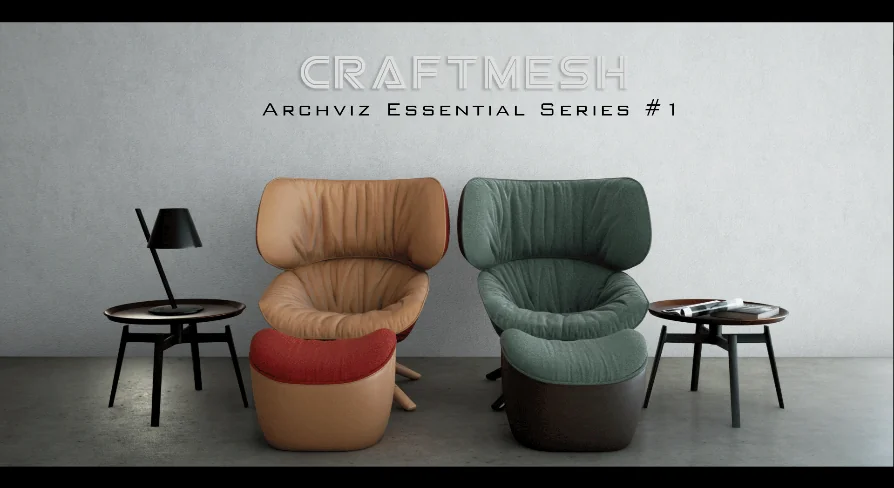
Setting up realistic interior and industrial scenes in Unreal Engine 4 requires a careful balance between high-fidelity visuals and strict performance budgets. ArchViz Essential Series 1 addresses this specific production need by focusing on optimized assets paired with a highly controllable material pipeline. Designed specifically for architectural visualizations, the collection equips developers and artists with realistic furniture models and a deeply parameterized material system that prioritizes both aesthetic quality and engine performance.
Rather than relying on brute-force polygon counts, the assets leverage a streamlined approach to scene population. The package centers on 16 different high-quality furniture models that fit seamlessly within interior, architectural, and industrial design contexts. By maintaining a decent, optimized polycount, these lowpoly yet realistic assets ensure good graphic performance without sacrificing the visual standards expected in modern architectural rendering workflows.
UVW Setup and Lightmap Baking Precision
A critical challenge in Unreal Engine 4 architectural visualization is achieving clean, artifact-free static lighting. To support this requirement natively, the 16 furniture models feature a specialized UVW setup. This foundational UV mapping is engineered specifically to ensure seamless tiling across the geometry and to guarantee perfect results during lightmap baking. Clean lightmap UVs are absolutely essential for capturing accurate global illumination, preventing unwanted light bleeds, and maintaining crisp shadow details across the structural surfaces of the furniture. By resolving these UV requirements directly at the model level, the assets integrate smoothly into real-time environments that rely heavily on baked lighting solutions to achieve photorealism.
The Master Opaque Material Architecture
The core of the visual flexibility in ArchViz Essential Series 1 lies in its overarching material framework. Every material instance applied to the furniture models is parented to a single, highly versatile Master Opaque Material. This centralized approach drastically simplifies the production workflow, allowing global adjustments while maintaining organizational consistency across the entire project. The master material is built with a multitude of parameter controls, giving users granular authority over the final look of the models directly within the Unreal Engine 4 editor.
A standout feature of this master material is its robust support for two channels of diffuse texture blending. This allows for more complex surface descriptions, blending different base color inputs to achieve unique, realistic finishes on the furniture assets. Furthermore, the material exposes comprehensive color and contrast controls. Every single input texture can be individually adjusted for contrast and brightness. This specific level of per-texture control means that environment artists can fine-tune the visual balance of the furniture without needing to constantly switch back and forth between Unreal Engine and external image editing software.
Surface Reflections and Fresnel Control
To achieve convincing realism in architectural visualization, accurately simulating how light interacts with different physical surfaces is paramount. The Master Opaque Material tackles this necessity through dedicated reflection glossiness controls and targeted Fresnel parameters. By adjusting the reflection and glossiness values, users can precisely define the exact micro-surface details of the furniture. This makes it possible to easily distinguish between matte industrial finishes, polished woods, or sleek modern plastics using the same underlying shader network. The inclusion of Fresnel control allows the material to accurately replicate how reflectivity naturally increases at grazing angles, which is a crucial physical property for generating photorealistic interior renders.
Granular UV Coordinate Adjustments
Beyond color manipulation and reflectivity, the material system offers extensive UV coordinate controls. Users are granted the ability to scale, rotate, and offset the UV coordinates for each individual texture applied to the material instances. Because the furniture models are already structurally set up for seamless tiling, these parameter controls allow for rapid iteration on the scale and orientation of wood grains, fabric weaves, or industrial metal textures. This capability ensures that the surface patterns align perfectly with the geometry and scale of the scene, all handled procedurally within the engine's material instance editor rather than requiring an external 3D modeling application.
Texture Resolution Range and Project Optimization
Optimization in Unreal Engine 4 extends well beyond the polycount of the 16 structural models; it heavily relies on strict memory management. ArchViz Essential Series 1 addresses this by providing all textures in a broad range of resolutions, spanning from 256 to 2048 pixels. This variety empowers the user to make conscious, scene-specific choices regarding optimization based on their project requirements. A hero asset placed prominently in the foreground of an interior shot can utilize the crisp 2048 textures, while background furniture or assets in less demanding industrial scenes can be efficiently scaled down to 256. This flexibility ensures that the visual impact is maximized precisely where it is needed most, without unnecessarily inflating the texture memory budget of the application.
Material Presets as a Workflow Guide
Understanding a complex master material node network can sometimes be a hurdle when integrating new assets into an established pipeline. To bridge this knowledge gap, the package includes 15 material preset samples. These samples are produced directly from the exact same Master Opaque Material used on the furniture. They serve as a small complimentary addition designed specifically to help users understand the internal material setup. By examining these 15 presets, artists can see exactly how the diffuse blending, Fresnel controls, UV offsets, and individual texture contrast settings are configured to achieve different realistic material archetypes.
ArchViz Essential Series 1 operates as a fully integrated visual system for Unreal Engine 4 architectural pipelines. By combining 16 lowpoly, lightmap-ready furniture models with a deeply customizable Master Opaque Material and flexible texture resolutions up to 2048, it provides a highly controllable foundation for building interior and industrial environments. The inclusion of the 15 material presets ensures that the technical depth of the material parameters is immediately accessible, allowing developers to effectively balance high visual impact with strict engine performance.
 Industrial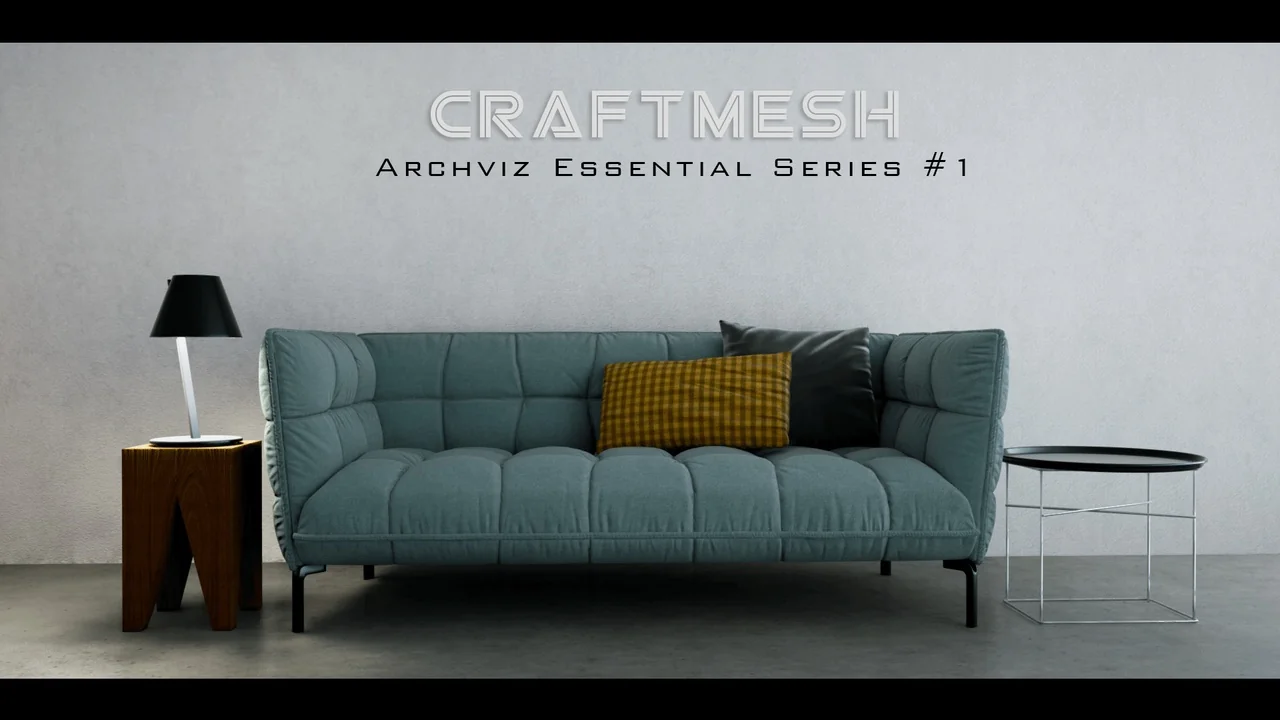
 Industrial
 Environments
 Industrial