"6ac84fdb0bd06614"{"id":"17913","slug":"3d-object-image-for-ugui-minimap-inventory-portrait","title":"3D Object Image for UGUI - MiniMap Inventory Portrait","category":"GUI","engine":"Original Unity version: 2021.3.5","assetVersion":"Original Unity version: 2021.3.5","engineVersion":"Asset Version:1.0.5 - 1.0.6","tag":"GUI","accent":"cyan","visual":"character","summary":"Easily render 3D world objects and prefabs directly within your Unity UI. This tool is perfect for creating high-quality inventory icons, character portraits, and dynamic mini-maps.","platform":"Unity","publishedAt":"2026-03-14T17:27:09.000Z","updatedAt":"2026-04-19T15:43:25.000Z","sourceNotes":[],"fileContents":[],"compatibility":["Unity","Original Unity version: 2021.3.5","Asset Version: 1.0.5 - 1.0.6"],"featuredImage":{"alt":"3D Object Image for UGUI - MiniMap Inventory Portrait","src":"https://3dcghub.com/wp-content/uploads/2026/03/84944995-7aa5-49ef-a7dc-840e621cd9c9.webp"},"hasDownloadLink":true,"downloads":0,"terms":[{"taxonomy":"category","slug":"gui-2d","name":"GUI"},{"taxonomy":"post_tag","slug":"characters","name":"Characters"},{"taxonomy":"post_tag","slug":"environment","name":"Environment"},{"taxonomy":"post_tag","slug":"game-systems","name":"Game Systems"},{"taxonomy":"post_tag","slug":"materials","name":"Materials"},{"taxonomy":"post_tag","slug":"ui","name":"UI"},{"taxonomy":"post_tag","slug":"unity","name":"Unity"}],"galleryImages":[{"src":"https://3dcghub.com/wp-content/uploads/2026/03/aa25e533da5d_3e696b36-655e-41c7-8ff8-157aeefc343d_scaled.webp","alt":"3D Object Image for UGUI - MiniMap Inventory Portrait"},{"src":"https://3dcghub.com/wp-content/uploads/2026/03/1ac3f7988419_c1be4d3d-2b3b-4aa8-9a13-b23af1f17790_scaled.webp","alt":"3D Object Image for UGUI - MiniMap Inventory Portrait"},{"src":"https://3dcghub.com/wp-content/uploads/2026/03/4c634097ca71_4fe46351-dde9-4399-8e86-dd91d18213fd_scaled.webp","alt":"3D Object Image for UGUI - MiniMap Inventory Portrait"},{"src":"https://3dcghub.com/wp-content/uploads/2026/03/e70334f9a9f5_87314adc-eae7-45d9-8c9c-0b57dbe6a9fd_scaled.webp","alt":"3D Object Image for UGUI - MiniMap Inventory Portrait"},{"src":"https://3dcghub.com/wp-content/uploads/2026/03/bfa49aa0b697_479b6792-23dd-4de9-b7d4-0e000bd33f14_scaled.webp","alt":"3D Object Image for UGUI - MiniMap Inventory Portrait"}],"accessPanel":{"kind":"resource","title":"Access this resource","eyebrow":"Free Download","message":"Log in or create a free account to start your download.","fileName":"3D Object Image for UGUI - MiniMap Inventory Portrait V1.0.5 - 1.0.6.7z","safetyNote":"All resources are 100% manually reviewed to eliminate all risks.","actionLabel":"Download Free","resourceType":"Resource archive"},"contentHtml":"\u003ch2\u003eRendering 3D Objects in Unity UI\u003c/h2\u003e\n\u003cp\u003e\u003cstrong\u003e3D Object Image for UGUI - MiniMap Inventory Portrait\u003c/strong\u003e provides a streamlined solution for displaying 3D world objects within your user interface. This asset allows developers to render prefabs or scene-based items directly into the UI layer. Consequently, it is an essential tool for projects requiring high-fidelity visual representations of 3D assets in menus or HUDs.\u003c/p\u003e\n\u003cp\u003eThe system is highly versatile and fits various game genres. For instance, you can use it to display 3D items in an inventory UI. To achieve this, you simply add the PrefabInstantiator to the WorldImage component and drag in your desired prefabs. Moreover, the asset is compatible with the default UI (uGUI) system, ensuring it integrates seamlessly with your existing projects.\u003c/p\u003e\n\n\u003ch2\u003eVersatile Use Cases\u003c/h2\u003e\n\u003cp\u003eThe \u003cstrong\u003e3D Object Image for UGUI - MiniMap Inventory Portrait\u003c/strong\u003e is designed for flexibility. Beyond simple item displays, it is ideal for creating 3D NPC portraits. By dragging the transform of an NPC into the object list, you can generate a live portrait within a UI image. This adds a level of polish and depth to dialogue systems or character selection screens.\u003c/p\u003e\n\u003cp\u003eIn addition, the tool functions perfectly as a top-down mini-map. By clearing the object list and utilizing the \"Camera Look At\" and \"Camera Position\" settings, you can position a camera high above the level. This setup creates a real-time view of the world from a bird's-eye perspective. Therefore, developers can implement functional maps without complex custom coding.\u003c/p\u003e\n\n\u003ch2\u003eSimplified Workflow and Technical Compatibility\u003c/h2\u003e\n\u003cp\u003eThe developer has prioritized ease of use with a three-step workflow. First, you right-click the canvas and select UI \u003e World Image. Second, you select the specific objects from your scene that you wish to render. Finally, the setup is complete and ready for use. This efficiency allows for rapid prototyping and implementation.\u003c/p\u003e\n\u003cp\u003eRegarding technical requirements, \u003cstrong\u003e3D Object Image for UGUI - MiniMap Inventory Portrait\u003c/strong\u003e supports all major render pipelines. It works identically in the Built-In Render Pipeline, URP, and HDRP. Furthermore, it is compatible with Unity versions 2021.3 LTS, 2022, 2023, and Unity 6. Because it is based on the default Maskable Graphic, it supports standard UI features like masking and custom materials.\u003c/p\u003e\n\n\u003ch2\u003eAdvanced Features and Optimization\u003c/h2\u003e\n\u003cp\u003eFor developers who require deep customization, the creator includes the full source code. This transparency allows for better integration into complex projects. Additionally, the asset includes specific tools to handle motion and transparency. If an object is animating, the \"FollowTransform\" feature can be used to eliminate jittery motion that might occur when bounds change frequently.\u003c/p\u003e\n\u003cp\u003eTransparency is supported out of the box, though there are specific workflows for different needs. For example, disabling \"Use Render Textures\" enables an improved transparency workflow through camera stacking. This flexibility ensures that 3D objects look their best regardless of the UI background. However, developers should consult the included manual for specific caveats regarding transparent objects.\u003c/p\u003e\n\n\u003ch2\u003eClosing Notes\u003c/h2\u003e\n\u003cp\u003eThe \u003cstrong\u003e3D Object Image for UGUI - MiniMap Inventory Portrait\u003c/strong\u003e is a robust solution for any developer using uGUI. It simplifies the process of bringing 3D world elements into the 2D interface. Whether you are building a complex RPG inventory or a simple mini-map, this asset provides the necessary tools for professional results. With support for modern Unity versions and all render pipelines, it remains a reliable choice for game development.\u003c/p\u003e\n\n\u003ch2\u003eMore From The Same Workflow\u003c/h2\u003e\n\u003cul\u003e\n\u003cli\u003e\u003ca href=\"https://3dcghub.com/gui-emerald-treasure-the-emerald-interface/\" title=\"[GUI] Emerald Treasure — THE EMERALD INTERFACE\"\u003e[GUI] Emerald Treasure — THE EMERALD INTERFACE\u003c/a\u003e\u003c/li\u003e\n\u003cli\u003e\u003ca href=\"https://3dcghub.com/skybox-plus/\" title=\"Skybox Plus\"\u003eSkybox Plus\u003c/a\u003e\u003c/li\u003e\n\u003cli\u003e\u003ca href=\"https://3dcghub.com/pixel-art-platformer-dungeon/\" title=\"Pixel Art Platformer – Dungeon\"\u003ePixel Art Platformer – Dungeon\u003c/a\u003e\u003c/li\u003e\n\u003cli\u003e\u003ca href=\"https://3dcghub.com/fences-pack/\" title=\"Fences Pack\"\u003eFences Pack\u003c/a\u003e\u003c/li\u003e\n\u003cli\u003e\u003ca href=\"https://3dcghub.com/animated-2d-hell-platformer-game-ready-environments-asset/\" title=\"Animated 2d Hell Platformer Game Ready Environments Asset\"\u003eAnimated 2d Hell Platformer Game Ready Environments Asset\u003c/a\u003e\u003c/li\u003e\n\u003c/ul\u003e","contentTextLength":3823,"navigation":{"current":2765,"total":3181,"previous":{"id":"17926","slug":"4k-full-fantasy-gui-over-400-png-samples","title":"4k Full Fantasy GUI + over 400 png + samples","category":"GUI","platform":"Unity","updatedAt":"2026-04-19T15:43:25.000Z"},"next":{"id":"18073","slug":"gui-the-stone","title":"GUI - The Stone","category":"GUI","platform":"Unity","updatedAt":"2026-04-19T15:43:24.000Z"}},"relatedResources":[{"id":"15092","slug":"tile-based-minimap","title":"Tile Based Minimap","category":"Gameplay Features","engine":"5.4 - 5.5","assetVersion":"Engine version: 5.4 - 5.5","engineVersion":"Asset Version:2.1.0 - 2.1.1","tag":"Gameplay Features","accent":"blue","visual":"mech","summary":"The Tile Based Minimap system provides a robust solution for creating tiled in-game maps using pre-rendered level images. It features GPS-style routing, multi-grid support, and full Blueprint extensibility.","platform":"Unreal Engine","publishedAt":"2026-03-12T07:51:23.000Z","updatedAt":"2026-04-19T15:45:35.000Z","sourceNotes":[],"fileContents":[],"compatibility":["Unreal Engine","Engine version: 5.4 - 5.5","Asset Version: 2.1.0 - 2.1.1"],"featuredImage":{"alt":"Tile Based Minimap","src":"https://3dcghub.com/wp-content/uploads/2026/03/768cc7d5-0ca5-439b-b02a-f4807a2c39bd.webp"},"hasDownloadLink":true,"downloads":4},{"id":"18167","slug":"gui-pro-casual-game","title":"GUI Pro - Casual Game","category":"GUI","engine":"Original Unity version: 2021.3.30","assetVersion":"Original Unity version: 2021.3.30","engineVersion":"Asset Version:4.0.7","tag":"GUI","accent":"cyan","visual":"mech","summary":"Enhance your mobile project with GUI Pro - Casual Game, a highly recommended UI kit featuring a bright cartoon style. This package includes over 1200 PNG sources and 240 prefabs to streamline your development.","platform":"Unity","publishedAt":"2026-03-15T16:21:14.000Z","updatedAt":"2026-04-19T15:43:23.000Z","sourceNotes":[],"fileContents":[],"compatibility":["Unity","Original Unity version: 2021.3.30","Asset Version: 4.0.7"],"featuredImage":{"alt":"GUI Pro - Casual Game","src":"https://3dcghub.com/wp-content/uploads/2026/03/30c7168fa2ff_761a1841-54ff-4f0f-a26f-f649ec475ce0_1280x720_stretch.webp"},"hasDownloadLink":true,"downloads":3},{"id":"18179","slug":"gui-pro-fantasy-rpg","title":"GUI Pro - Fantasy RPG","category":"GUI","engine":"Original Unity version: 2021.3.30","assetVersion":"Original Unity version: 2021.3.30","engineVersion":"Asset Version:4.0.2","tag":"GUI","accent":"cyan","visual":"audio","summary":"Enhance your game's visual appeal with GUI Pro - Fantasy RPG, a comprehensive UI kit designed for immersive fantasy worlds. This package includes over 1200 PNG assets and 46 demo scenes to streamline your development process.","platform":"Unity","publishedAt":"2026-03-15T16:24:43.000Z","updatedAt":"2026-04-19T15:43:23.000Z","sourceNotes":[],"fileContents":[],"compatibility":["Unity","Original Unity version: 2021.3.30","Asset Version: 4.0.2"],"featuredImage":{"alt":"GUI Pro - Fantasy RPG","src":"https://3dcghub.com/wp-content/uploads/2026/03/ca5aefd18da3_28372329-7f06-42bb-b495-42308e7162ae_1280x720_stretch.webp"},"hasDownloadLink":true,"downloads":2}]}
GUI
3D Object Image for UGUI - MiniMap Inventory Portrait
Easily render 3D world objects and prefabs directly within your Unity UI. This tool is perfect for creating high-quality inventory icons, character portraits, and dynamic mini-maps.
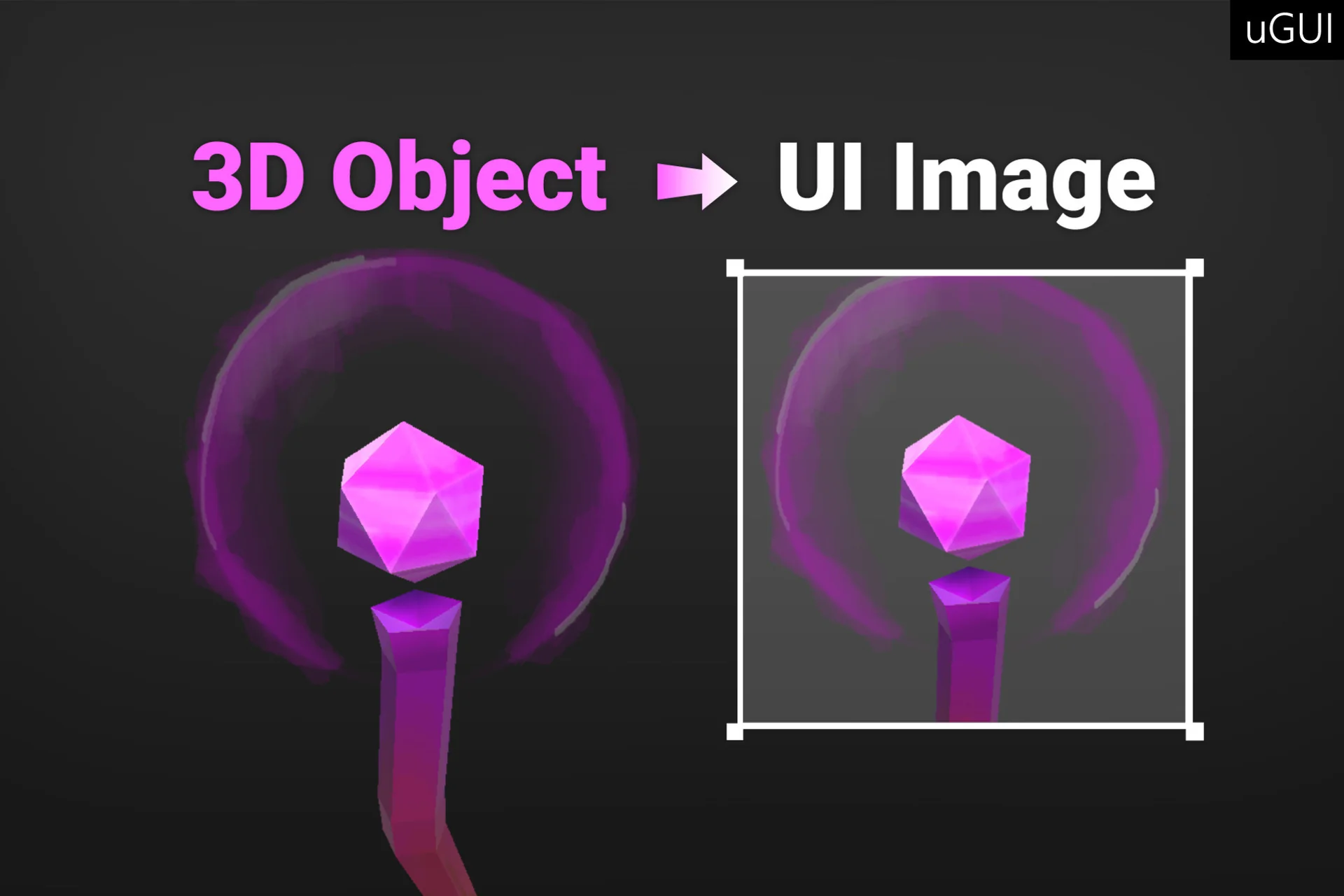
3D Object Image for UGUI - MiniMap Inventory Portrait provides a streamlined solution for displaying 3D world objects within your user interface. This asset allows developers to render prefabs or scene-based items directly into the UI layer. Consequently, it is an essential tool for projects requiring high-fidelity visual representations of 3D assets in menus or HUDs.
The system is highly versatile and fits various game genres. For instance, you can use it to display 3D items in an inventory UI. To achieve this, you simply add the PrefabInstantiator to the WorldImage component and drag in your desired prefabs. Moreover, the asset is compatible with the default UI (uGUI) system, ensuring it integrates seamlessly with your existing projects.
Versatile Use Cases
The 3D Object Image for UGUI - MiniMap Inventory Portrait is designed for flexibility. Beyond simple item displays, it is ideal for creating 3D NPC portraits. By dragging the transform of an NPC into the object list, you can generate a live portrait within a UI image. This adds a level of polish and depth to dialogue systems or character selection screens.
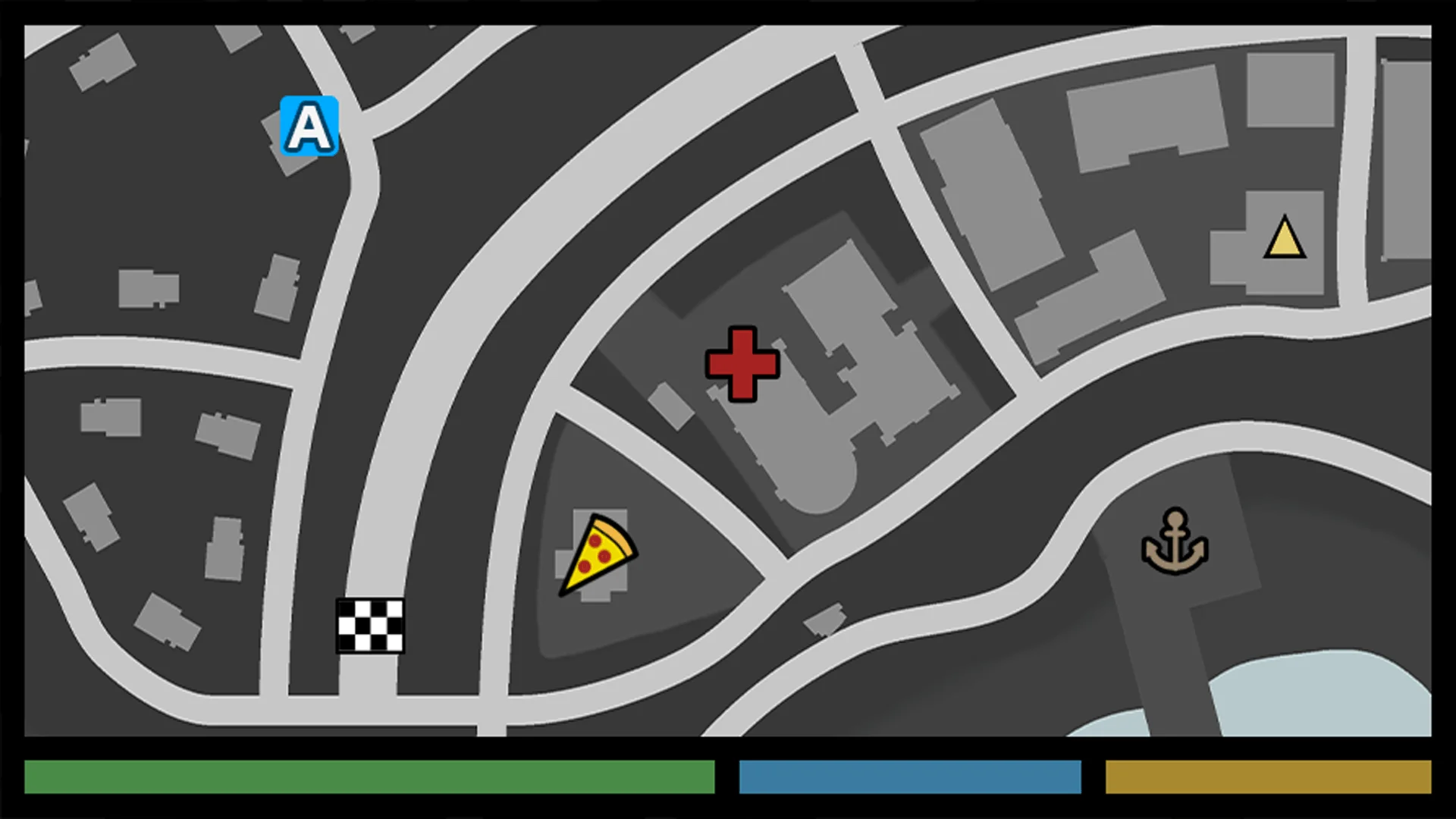
In addition, the tool functions perfectly as a top-down mini-map. By clearing the object list and utilizing the "Camera Look At" and "Camera Position" settings, you can position a camera high above the level. This setup creates a real-time view of the world from a bird's-eye perspective. Therefore, developers can implement functional maps without complex custom coding.
Simplified Workflow and Technical Compatibility
The developer has prioritized ease of use with a three-step workflow. First, you right-click the canvas and select UI > World Image. Second, you select the specific objects from your scene that you wish to render. Finally, the setup is complete and ready for use. This efficiency allows for rapid prototyping and implementation.
Regarding technical requirements, 3D Object Image for UGUI - MiniMap Inventory Portrait supports all major render pipelines. It works identically in the Built-In Render Pipeline, URP, and HDRP. Furthermore, it is compatible with Unity versions 2021.3 LTS, 2022, 2023, and Unity 6. Because it is based on the default Maskable Graphic, it supports standard UI features like masking and custom materials.
Advanced Features and Optimization
For developers who require deep customization, the creator includes the full source code. This transparency allows for better integration into complex projects. Additionally, the asset includes specific tools to handle motion and transparency. If an object is animating, the "FollowTransform" feature can be used to eliminate jittery motion that might occur when bounds change frequently.
Transparency is supported out of the box, though there are specific workflows for different needs. For example, disabling "Use Render Textures" enables an improved transparency workflow through camera stacking. This flexibility ensures that 3D objects look their best regardless of the UI background. However, developers should consult the included manual for specific caveats regarding transparent objects.
Closing Notes
The 3D Object Image for UGUI - MiniMap Inventory Portrait is a robust solution for any developer using uGUI. It simplifies the process of bringing 3D world elements into the 2D interface. Whether you are building a complex RPG inventory or a simple mini-map, this asset provides the necessary tools for professional results. With support for modern Unity versions and all render pipelines, it remains a reliable choice for game development.
 GUI
GUI
 Gameplay Features
 GUI
GUI GUI
GUI