High-Fidelity Panoramic Video Capture in Unity
The VR Panorama 360 PRO Renderer V5, developed by OliVR, is a specialized toolset designed for the creation and export of immersive video content directly from the Unity engine. Positioned within the animation tools category, this version represents a significant iteration of the renderer, optimized for the 2023.2.8 version of Unity. Its primary function is to facilitate the generation of 180-degree and 360-degree panoramic videos, providing a bridge between real-time engine environments and pre-rendered immersive media.
A central feature of the V5 release is its comprehensive support for Unity’s diverse rendering ecosystems. The tool is compatible with the Built-in Render Pipeline, the Universal Render Pipeline (URP), and the High Definition Render Pipeline (HDRP). This level of integration ensures that creators can utilize the package regardless of their project’s visual complexity or target hardware. For projects utilizing HDRP, the tool can leverage high-end graphical features to produce high-fidelity video output, while URP support allows for efficient workflows tailored toward mobile or standalone VR platforms.
Stereoscopic Output and Immersive Formats
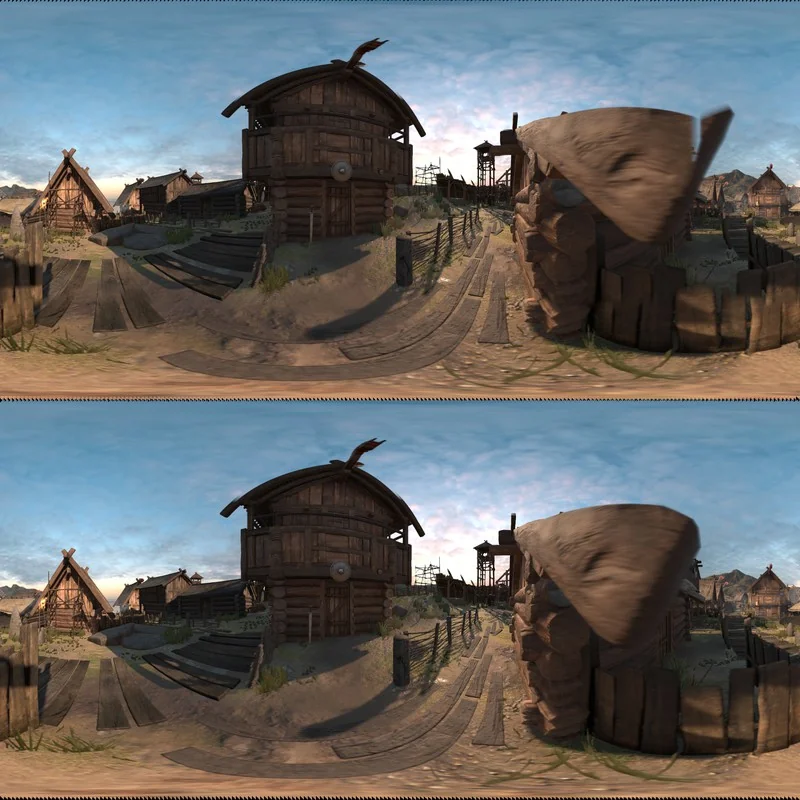
The renderer is built to handle the specific requirements of modern virtual reality hardware, such as the Oculus Quest. One of the core capabilities highlighted in the technical documentation is the support for stereoscopic video. Unlike standard monoscopic panoramas, stereoscopic rendering captures depth information, which is essential for creating a convincing sense of presence in a VR headset. By supporting both 180 and 360-degree formats, the tool accommodates different cinematic styles—ranging from front-facing immersive experiences that preserve performance to full spherical environments where the viewer has total freedom of orientation.
The inclusion of raytracing capabilities is also a notable aspect of the V5 framework. This allows the renderer to capture complex lighting, reflections, and shadows that are often difficult to achieve in standard real-time captures, resulting in more polished and realistic video files. Because the tool operates as a renderer rather than a real-time capture device, it can prioritize visual quality by processing frames with a level of detail that might exceed the limits of live application performance.
Technical Package Composition
The package is delivered as a 33.3 MB unitypackage, containing a total of 109 individual assets. This asset count includes the necessary scripts, shaders, and components required to integrate the rendering engine into an existing Unity scene. As an animation tool, it is designed to work in tandem with Unity’s sequence and timing systems, allowing for the export of complex movements and environmental changes over time.
The developer has structured the tool to be accessible for those working on diverse production scales. Whether the goal is a short 180-degree stereoscopic clip for mobile VR or a high-resolution 360-degree raytraced experience, the renderer provides the technical framework to output these files without requiring external capture software. This internal approach helps maintain the integrity of the scene’s lighting and post-processing effects during the transition from the engine to a video format.
Practical Implementation for Content Creators
For those focused on VR cinematography, the VR Panorama 360 PRO Renderer V5 serves as a pipeline solution for turning real-time assets into distributable video. It is particularly relevant for developers creating promotional materials, architectural visualizations, or immersive storytelling experiences where the end-user may not have the hardware to run the project in real-time but can view high-quality 360-degree video.
The tool’s alignment with the latest Unity releases and its support for multiple render pipelines make it a versatile asset for professional animation workflows. By providing a direct path to stereoscopic and panoramic output, it simplifies the technical hurdles typically associated with immersive video production, allowing the focus to remain on the visual composition and the technical execution of the scene within the Unity environment.
Preview Images
Protected download
Access this resource
All resources are 100% manually reviewed to eliminate all risks.