"95fdaf16012263fa"{"id":"1002358","slug":"stylized-magic-icons-pack","title":"Stylized Magic Icons Pack","category":"Environments","engine":"4.26+,5.0+","assetVersion":"","engineVersion":"Engine Version: 4.26+,5.0+","tag":"Environments","accent":"blue","visual":"city","summary":"136 hand drawn stylized magic icons for fantasy and RPG interfaces — spell slots, ability bars, inventory grids, and tooltips that stay readable at small sizes.","platform":"Unreal Engine","indexPolicy":"index","publishedAt":"2026-11-06T07:07:10.972Z","updatedAt":"2026-11-06T07:07:10.972Z","sourceNotes":[],"fileContents":[],"compatibility":["Unreal Engine","Engine Version: 4.26+,5.0+"],"featuredImage":{"alt":"Stylized Magic Icons Pack","src":"/wp-content/uploads/published/2026/11/5d3dc47c1062-226fcf0d-89ff-4fee-9860-c0304e25b364-d511b82f3c.webp"},"hasDownloadLink":true,"downloads":0,"terms":[{"taxonomy":"category","slug":"environments-sprites-and-flipbooks","name":"Environments"}],"galleryImages":[{"src":"/wp-content/uploads/published/2026/11/2fe879f473f3-5cee2711-833b-486d-bc71-3a3bc6d872a9-8e6cbac37a.webp","alt":"Stylized Magic Icons Pack"},{"src":"/wp-content/uploads/published/2026/11/d607fef7c0aa-8cc38dc7-006b-4e8c-af1d-93d242f91dc0-31d4421e37.webp","alt":"Stylized Magic Icons Pack"},{"src":"/wp-content/uploads/published/2026/11/4b1bc274b77b-4375be4b-9e05-4452-84cc-5e43d0a9eeb5-322a192fa9.webp","alt":"Stylized Magic Icons Pack"},{"src":"/wp-content/uploads/published/2026/11/50c5a8121060-553cd493-f0fc-422d-9da7-c7011a883f51-51580bafbf.webp","alt":"Stylized Magic Icons Pack"},{"src":"/wp-content/uploads/published/2026/11/15c5ff3219e3-e06d0c26-e1b7-43da-965e-fc5ec0a2a8b6-7fcac8a5e6.webp","alt":"Stylized Magic Icons Pack"},{"src":"/wp-content/uploads/published/2026/11/5068108e95fc-95dce977-025e-49a8-87c9-1779774b9c9f-9a7c68817d.webp","alt":"Stylized Magic Icons Pack"},{"src":"/wp-content/uploads/published/2026/11/36c1c07607be-cb85f01d-e332-4eb0-8e0b-370c645632e0-8317ddc43f.webp","alt":"Stylized Magic Icons Pack"}],"accessPanel":{"kind":"resource","title":"Get this resource","eyebrow":"Free resource","message":"3DCGHUB is the service provider for this listing. Access is fulfilled through the official publisher channel.","fileName":"Content.7z","safetyNote":"Resources are manually reviewed before listing to improve quality and reduce obvious risks.","actionLabel":"Get this resource","resourceType":"Resource archive","versions":[]},"contentHtml":"\u003ch2\u003e136 magic icons, drawn by hand\u003c/h2\u003e\n\u003cp\u003eA spell slot has one job on screen: be recognized before the player finishes reading the tooltip. That is the pressure the Stylized Magic Icons Pack is built to relieve. It contains 136 icons, all hand drawn, all carrying a stylized treatment rather than a straight-rendered look.\u003c/p\u003e\n\u003cp\u003eThe number is worth pausing on. An ability bar, a spellbook page, a talent tree, and an inventory grid all pull from the same visual vocabulary, and they overlap. At 136 icons a project can cover a full spell list plus the peripheral magic-adjacent items — reagents, enchantments, curses, buffs — without duplicating a glyph two rows apart and hoping nobody notices.\u003c/p\u003e\n\u003cp\u003eEach icon is hand drawn, which shows up most clearly where icons are smallest. Hand-drawn shapes keep character at thumbnail scale; they don't collapse into vague blobs the way mechanically uniform symbols can.\u003c/p\u003e \u003ch2\u003eStylized shapes in fantasy and RPG contexts\u003c/h2\u003e\n\u003cp\u003eThe set is tagged for fantasy, RPG, magic, and magical use, and that grouping describes the kind of screen it belongs on. These are not neutral interface symbols. They read as spellcraft — the visual language of a game where a fireball and a healing ward need to be told apart at a glance from across a crowded hotbar.\u003c/p\u003e\n\u003cp\u003eStylization does specific work here. In a fantasy or RPG interface, the icons sit beside hand-painted environments, ornate frames, and textured panels. A flat, literal pictogram fights that art direction. A stylized one joins it. The icons hold their own against decorated UI chrome instead of looking pasted on top of it.\u003c/p\u003e\n\u003cp\u003eThey also survive scaling, which is the less obvious benefit. The same icon appears at 24 pixels in a cooldown corner and at four times that size in a spell detail panel. Stylized drawing tends to hold up across that range better than detailed rendering, because the silhouette is doing the identifying rather than internal detail that vanishes when the icon shrinks.\u003c/p\u003e \u003ch2\u003eSpell slots, ability bars, inventory grids\u003c/h2\u003e\n\u003cp\u003eWhere the pack earns its place is in the repeated, high-traffic regions of an interface. Ability and spell slots are the obvious first stop: assign a different icon to each ability, and the bar becomes readable without labels.\u003c/p\u003e\n\u003cp\u003eInventory and loot grids are the second. Magic items need distinguishing marks — a potion is not a wand is not a scroll — and a set this size can carry those distinctions without falling back on the same three symbols tinted differently.\u003c/p\u003e\n\u003cp\u003eThen there are the smaller surfaces that quietly consume icon art: tooltip headers, buff and debuff strips, quest reward panels, crafting recipe rows, shop listings, and codex entries. Each of those pulls from the same pool, which is why a set of 136 hand drawn magic icons covers more ground than it first appears to.\u003c/p\u003e\n\u003cp\u003eFor a UI artist, the integration path is uncomplicated. These are icons — they slot into buttons, list rows, grid cells, and framed panels wherever a symbol is needed. A pack with a consistent stylized treatment and a deep enough count lets you populate a full screen of interface without mixing sources and ending up with three visual dialects in one menu.\u003c/p\u003e \u003ch2\u003eAlongside the 100 Fantasy Book Icons set\u003c/h2\u003e\n\u003cp\u003eThe magic icons sit naturally next to a collection of 100 Fantasy Book Icons, and the pairing covers the two halves of a fantasy interface that most often get neglected. Magic icons handle the combat and ability layer. Book icons handle the reading layer — lore libraries, journals, quest logs, and menus shaped by documents and tomes.\u003c/p\u003e\n\u003cp\u003ePut together, the two sets cover a wider spread of a fantasy HUD than either manages alone, and they speak the same stylized language, which keeps a lore screen and a combat screen from looking like they came from different projects.\u003c/p\u003e \u003ch2\u003eWhat to weigh before committing\u003c/h2\u003e\n\u003cp\u003eDepth of coverage is the first thing to check. If your spell list runs to a hundred-plus abilities with variants, 136 icons gives room to work. If it runs to several hundred, plan for how you'll handle the overflow.\u003c/p\u003e\n\u003cp\u003eStyle fit is the second. The hand drawn, stylized treatment is a definite look — it belongs in fantasy and RPG projects with a painted or illustrative interface, not in a minimal, flat, or sci-fi HUD.\u003c/p\u003e\n\u003cp\u003eThe count, the hand-drawn finish, and the fantasy and RPG framing are the concrete facts to weigh. For a team building a magic-heavy interface, the practical takeaway is straightforward: 136 hand drawn stylized icons give you one coherent visual language for spell slots, ability bars, and inventory grids, with enough symbols in reserve that the same glyph doesn't have to appear twice in the same menu.\u003c/p\u003e\n\n\u003ch2\u003eMore From The Same Workflow\u003c/h2\u003e\n\u003cul\u003e\n\u003cli\u003e\u003ca href=\"https://3dcghub.com/2d-pixel-scene-3/\" rel=\"noopener noreferrer\"\u003e2D Pixel Scene 3\u003c/a\u003e\u003c/li\u003e\n\u003cli\u003e\u003ca href=\"https://3dcghub.com/stylized-staves-rpg-weapons/\" rel=\"noopener noreferrer\"\u003eStylized Staves - RPG Weapons\u003c/a\u003e\u003c/li\u003e\n\u003cli\u003e\u003ca href=\"https://3dcghub.com/magic-beams/\" rel=\"noopener noreferrer\"\u003eMagic Beams\u003c/a\u003e\u003c/li\u003e\n\u003cli\u003e\u003ca href=\"https://3dcghub.com/magic-projectiles-vol-1-niagara/\" rel=\"noopener noreferrer\"\u003eMagic Projectiles Vol. 1 - Niagara\u003c/a\u003e\u003c/li\u003e\n\u003cli\u003e\u003ca href=\"https://3dcghub.com/the-vagrant-background-construction-pack-01/\" rel=\"noopener noreferrer\"\u003eThe Vagrant: Background Construction Pack 01\u003c/a\u003e\u003c/li\u003e\n\u003c/ul\u003e","contentTextLength":4760,"navigation":{"current":10,"total":4291,"previous":{"id":"1002359","slug":"survival-props-pack","title":"Survival props pack","category":"Apocalyptic / Post-apocalyptic","platform":"Unreal Engine","updatedAt":"2026-11-06T07:08:23.651Z"},"next":{"id":"1002357","slug":"stylized-foliage-pack-v-01","title":"Stylized Foliage Pack V.01","category":"Trees","platform":"Unreal Engine","updatedAt":"2026-11-06T07:03:34.264Z"}},"relatedResources":[{"id":"13352","slug":"2d-pixel-scene-3","title":"2D Pixel Scene 3","category":"Environments","engine":"4.26+,5.0+","assetVersion":"Engine version: 4.26+,5.0+","engineVersion":"4.24","tag":"Environments","accent":"blue","visual":"city","summary":"Enhance your project with 2D Pixel Scene 3, a collection of 70 unique pixel art images. These versatile assets are ideal for immersive game backgrounds and stylized user interface elements.","platform":"Unreal Engine","indexPolicy":"index","publishedAt":"2026-03-10T16:54:29.000Z","updatedAt":"2026-04-19T15:46:29.000Z","sourceNotes":[],"fileContents":[],"compatibility":["Unreal Engine","Engine version: 4.26+,5.0+"],"featuredImage":{"alt":"2D Pixel Scene 3","src":"https://3dcghub.com/wp-content/uploads/2026/03/64accedb-3522-47eb-ac77-d60113db1219.webp"},"hasDownloadLink":true,"downloads":0},{"id":"5472","slug":"stylized-staves-rpg-weapons","title":"Stylized Staves - RPG Weapons","category":"Weapons \u0026 Combat","engine":"4.27,5.0+","assetVersion":"Engine version: 4.27,5.0+","engineVersion":"4.24","tag":"Weapons \u0026 Combat","accent":"blue","visual":"animation","summary":"Enhance your fantasy RPG with 15 evolving stylized magic staves. Features emission textures, color variations, and optimized meshes for game developers.","platform":"Unreal Engine","indexPolicy":"index","publishedAt":"2026-02-15T15:28:40.000Z","updatedAt":"2026-04-19T15:56:56.000Z","sourceNotes":[],"fileContents":[],"compatibility":["Unreal Engine","Engine version: 4.27,5.0+"],"featuredImage":{"alt":"Stylized Staves - RPG Weapons","src":"https://3dcghub.com/wp-content/uploads/2026/02/c4013617-08a5-47f7-b686-eed05740dfea.webp"},"hasDownloadLink":true,"downloads":0},{"id":"1000846","slug":"magic-beams","title":"Magic Beams","category":"Spells \u0026 Combat","engine":"4.26+,5.0+","assetVersion":"","engineVersion":"Engine Version: 4.26+,5.0+","tag":"Spells \u0026 Combat","accent":"blue","visual":"mech","summary":"Eight magic beams split between realistic and stylized looks, covering fantasy spell effects, character appearance sequences, and dissolve transitions.","platform":"Unreal Engine","indexPolicy":"index","publishedAt":"2026-08-04T16:04:33.389Z","updatedAt":"2026-08-04T16:04:33.389Z","sourceNotes":[],"fileContents":[],"compatibility":["Unreal Engine","Engine Version: 4.26+,5.0+"],"featuredImage":{"alt":"Magic Beams","src":"/wp-content/uploads/published/2026/08/d87065952540-a2708adf-a40f-48d0-88e9-251e7e9d4be5-9d5fd3e79c.webp"},"hasDownloadLink":true,"downloads":2}]}
Environments
Stylized Magic Icons Pack
136 hand drawn stylized magic icons for fantasy and RPG interfaces — spell slots, ability bars, inventory grids, and tooltips that stay readable at small sizes.
Category:Unreal Engine,EnvironmentsPlatform: Unreal EngineEngine Version: 4.26+,5.0+Published: Nov 6, 2026
Environments
Resource overview
136 magic icons, drawn by hand
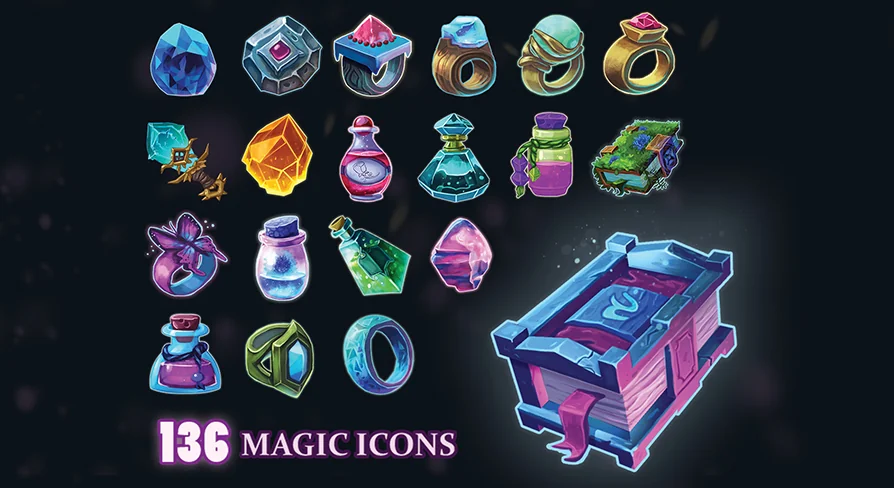
A spell slot has one job on screen: be recognized before the player finishes reading the tooltip. That is the pressure the Stylized Magic Icons Pack is built to relieve. It contains 136 icons, all hand drawn, all carrying a stylized treatment rather than a straight-rendered look.
The number is worth pausing on. An ability bar, a spellbook page, a talent tree, and an inventory grid all pull from the same visual vocabulary, and they overlap. At 136 icons a project can cover a full spell list plus the peripheral magic-adjacent items — reagents, enchantments, curses, buffs — without duplicating a glyph two rows apart and hoping nobody notices.
Each icon is hand drawn, which shows up most clearly where icons are smallest. Hand-drawn shapes keep character at thumbnail scale; they don't collapse into vague blobs the way mechanically uniform symbols can.
Stylized shapes in fantasy and RPG contexts
The set is tagged for fantasy, RPG, magic, and magical use, and that grouping describes the kind of screen it belongs on. These are not neutral interface symbols. They read as spellcraft — the visual language of a game where a fireball and a healing ward need to be told apart at a glance from across a crowded hotbar.
Stylization does specific work here. In a fantasy or RPG interface, the icons sit beside hand-painted environments, ornate frames, and textured panels. A flat, literal pictogram fights that art direction. A stylized one joins it. The icons hold their own against decorated UI chrome instead of looking pasted on top of it.
They also survive scaling, which is the less obvious benefit. The same icon appears at 24 pixels in a cooldown corner and at four times that size in a spell detail panel. Stylized drawing tends to hold up across that range better than detailed rendering, because the silhouette is doing the identifying rather than internal detail that vanishes when the icon shrinks.
Spell slots, ability bars, inventory grids
Where the pack earns its place is in the repeated, high-traffic regions of an interface. Ability and spell slots are the obvious first stop: assign a different icon to each ability, and the bar becomes readable without labels.
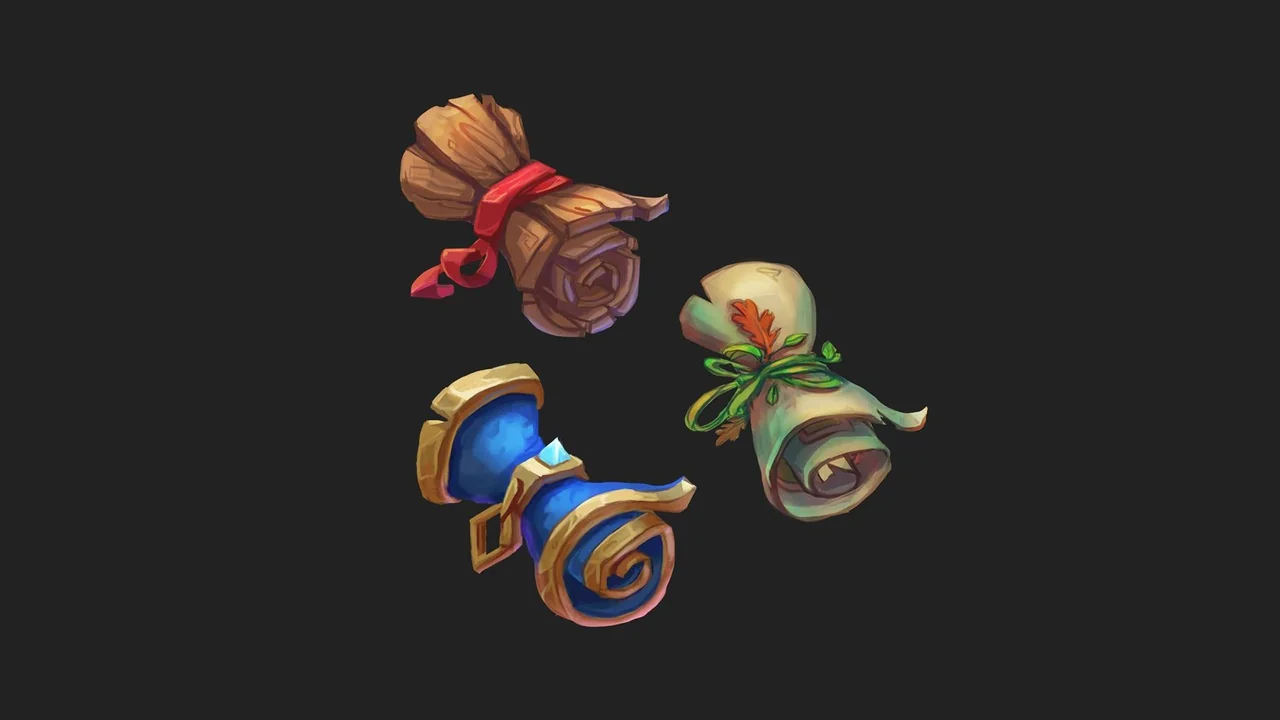
Inventory and loot grids are the second. Magic items need distinguishing marks — a potion is not a wand is not a scroll — and a set this size can carry those distinctions without falling back on the same three symbols tinted differently.
Then there are the smaller surfaces that quietly consume icon art: tooltip headers, buff and debuff strips, quest reward panels, crafting recipe rows, shop listings, and codex entries. Each of those pulls from the same pool, which is why a set of 136 hand drawn magic icons covers more ground than it first appears to.
For a UI artist, the integration path is uncomplicated. These are icons — they slot into buttons, list rows, grid cells, and framed panels wherever a symbol is needed. A pack with a consistent stylized treatment and a deep enough count lets you populate a full screen of interface without mixing sources and ending up with three visual dialects in one menu.
Alongside the 100 Fantasy Book Icons set
The magic icons sit naturally next to a collection of 100 Fantasy Book Icons, and the pairing covers the two halves of a fantasy interface that most often get neglected. Magic icons handle the combat and ability layer. Book icons handle the reading layer — lore libraries, journals, quest logs, and menus shaped by documents and tomes.
Put together, the two sets cover a wider spread of a fantasy HUD than either manages alone, and they speak the same stylized language, which keeps a lore screen and a combat screen from looking like they came from different projects.
What to weigh before committing
Depth of coverage is the first thing to check. If your spell list runs to a hundred-plus abilities with variants, 136 icons gives room to work. If it runs to several hundred, plan for how you'll handle the overflow.
Style fit is the second. The hand drawn, stylized treatment is a definite look — it belongs in fantasy and RPG projects with a painted or illustrative interface, not in a minimal, flat, or sci-fi HUD.
The count, the hand-drawn finish, and the fantasy and RPG framing are the concrete facts to weigh. For a team building a magic-heavy interface, the practical takeaway is straightforward: 136 hand drawn stylized icons give you one coherent visual language for spell slots, ability bars, and inventory grids, with enough symbols in reserve that the same glyph doesn't have to appear twice in the same menu.
 Environments
 Environments
 Weapons & Combat
 Spells & Combat