"0341a2901a4ae9aa"{"id":"7973","slug":"ground-fog","title":"Ground Fog","category":"Fantasy","engine":"5.1+","assetVersion":"Engine version: 5.1+","engineVersion":"4.24","tag":"Fantasy","accent":"blue","visual":"city","summary":"Enhance your game's atmosphere with this flexible Ground Fog system. It uses landscape grass and foliage painting to create low-lying mist on flat terrains efficiently.","platform":"Unreal Engine","publishedAt":"2026-02-22T16:11:25.000Z","updatedAt":"2026-04-19T15:55:51.000Z","sourceNotes":[],"fileContents":[],"compatibility":["Unreal Engine"],"featuredImage":{"alt":"Ground Fog","src":"https://3dcghub.com/wp-content/uploads/2026/02/948b8c29-30eb-4934-8b32-e4d5f97556c3.webp"},"hasDownloadLink":true,"downloads":0,"terms":[{"taxonomy":"category","slug":"fantasy","name":"Fantasy"},{"taxonomy":"post_tag","slug":"ground-fog","name":"Ground Fog"}],"galleryImages":[{"src":"https://3dcghub.com/wp-content/uploads/2026/02/c2bad115dc0e_8ceef924-b8bf-4668-9b68-51ae31f20477.webp","alt":"Ground Fog"},{"src":"https://3dcghub.com/wp-content/uploads/2026/02/d7807eb69dcc_7ef53241-8366-4367-8bda-4bfcb3da36a9.webp","alt":"Ground Fog"},{"src":"https://3dcghub.com/wp-content/uploads/2026/02/6dc1be40de29_885c1712-0f01-4e93-aadd-41ba4c57831a.webp","alt":"Ground Fog"},{"src":"https://3dcghub.com/wp-content/uploads/2026/02/e2b91a8fb3d2_16fd1b82-57e0-4e77-a8ff-a7c5e6f2e173.webp","alt":"Ground Fog"},{"src":"https://3dcghub.com/wp-content/uploads/2026/02/05f11438b59c_80e11956-3205-4932-8393-a4545e22ba05.webp","alt":"Ground Fog"}],"accessPanel":{"kind":"resource","title":"Access this resource","eyebrow":"Free Download","message":"Log in or create a free account to start your download.","fileName":"Ground Fog.7z","safetyNote":"All resources are 100% manually reviewed to eliminate all risks.","actionLabel":"Download Free","resourceType":"Resource archive"},"contentHtml":"\u003ch2\u003eEnhancing Atmosphere with Ground Fog\u003c/h2\u003e\n\u003cp\u003eGround Fog is an essential tool for digital artists who want to add atmospheric depth to their game environments. Moreover, this asset utilizes the landscape grass system to create realistic low-lying mist efficiently. It provides a lightweight solution for adding mood and mystery to flat terrain without heavy performance costs.\u003c/p\u003e\n\n\u003cp\u003eSpecifically, the system works by scattering meshes across your landscape. This method allows for dense coverage that reacts naturally to the environment. Consequently, developers can achieve a professional look with minimal effort. Furthermore, the asset is designed to be highly customizable to fit various art styles.\u003c/p\u003e\n\n\u003ch2\u003eKey Features and Customization\u003c/h2\u003e\n\u003cp\u003eThe system includes a variety of flexible settings to help you achieve the perfect look. You can easily adjust the color to match your scene's lighting. Additionally, wind speed and density controls allow for dynamic movement. This ensures that the mist feels alive rather than static.\u003c/p\u003e\n\n\u003cp\u003eIntensity and height can also be adjusted based on distance. This feature is particularly useful for maintaining visual clarity in the foreground. However, you can still keep a thick, atmospheric layer in the distance. Therefore, it provides a great balance between aesthetics and gameplay visibility.\u003c/p\u003e\n\n\u003ch3\u003ePractical Details\u003c/h3\u003e\n\u003cul\u003e\n \u003cli\u003eHigh-quality 2048x2048 texture sizes for crisp visuals.\u003c/li\u003e\n \u003cli\u003eExtremely low vertex count of only 4 per mesh.\u003c/li\u003e\n \u003cli\u003eIncludes 2 distinct meshes for varied distribution.\u003c/li\u003e\n \u003cli\u003eFeatures 2 materials and material instances for quick setup.\u003c/li\u003e\n \u003cli\u003eNo collision or LODs required, ensuring high performance.\u003c/li\u003e\n\u003c/ul\u003e\n\n\u003ch2\u003eBest Practices for Terrain\u003c/h2\u003e\n\u003cp\u003eFor the best results, you should use this Ground Fog on relatively flat terrain. Ideally, the surface should have a tilt between 0 and 15 degrees. If the terrain is too steep, visual artifacts may appear. Consequently, this asset is not recommended for jagged mountain landscapes.\u003c/p\u003e\n\n\u003cp\u003eIf you encounter issues on uneven surfaces, you can manually fix them. Using the foliage paint tool allows for precise placement in difficult areas. Therefore, you can ensure the mist sits perfectly against the ground. Always check your landscape suitability before starting the setup process.\u003c/p\u003e\n\n\u003ch2\u003eSimple Setup Guide\u003c/h2\u003e\n\u003cp\u003eSetting up the mist is a straightforward process. You can choose between two primary methods depending on your project needs. Both methods offer excellent control over the final appearance.\u003c/p\u003e\n\n\u003ch3\u003eUsing Foliage Paint\u003c/h3\u003e\n\u003cp\u003eFirst, add the foliage mesh to your foliage type list. You should set the scaling for the X and Y axes between 1.5 and 2. Meanwhile, the Z-axis scaling can range from 1.5 to 3 to control the height. Finally, ensure that 'Align to Normal' and 'Random Yaw' are set to false for the best appearance.\u003c/p\u003e\n\n\u003ch3\u003eUsing Landscape Grass Type\u003c/h3\u003e\n\u003cp\u003eAlternatively, you can integrate the mist into your landscape material. Add a new element to your Landscape Grass output and assign the grass mesh. Set the density between 25 and 125 for optimal coverage. Furthermore, using a grid layout with a 1.5 to 3 scale on the Z-axis will provide a consistent look across the field.\u003c/p\u003e\n\n\u003ch2\u003eBest Fit\u003c/h2\u003e\n\u003cp\u003eGround Fog is a powerful yet simple resource for environment artists. It offers a unique way to handle low-lying atmosphere using familiar landscape tools. By following the recommended settings, you can transform a flat field into a moody, immersive environment. Ultimately, it is a versatile addition to any developer's toolkit.\u003c/p\u003e\n\n\u003ch2\u003eContinue Browsing Similar Packs\u003c/h2\u003e\n\u003cul\u003e\n\u003cli\u003e\u003ca href=\"https://3dcghub.com/grave-of-the-serpent-king/\" title=\"Grave Of The Serpent King\"\u003eGrave Of The Serpent King\u003c/a\u003e\u003c/li\u003e\n\u003cli\u003e\u003ca href=\"https://3dcghub.com/lidar-desert-landscape/\" title=\"LiDAR DESERT LANDSCAPE\"\u003eLiDAR DESERT LANDSCAPE\u003c/a\u003e\u003c/li\u003e\n\u003cli\u003e\u003ca href=\"https://3dcghub.com/ancient-desert-ruins-environment-w-map-generator-pcg/\" title=\"Ancient Desert Ruins Environment w/ Map Generator PCG\"\u003eAncient Desert Ruins Environment w/ Map Generator PCG\u003c/a\u003e\u003c/li\u003e\n\u003cli\u003e\u003ca href=\"https://3dcghub.com/japanese-school-collection-5-asset-packs-over-200-assets/\" title=\"Japanese School Collection – 5 Asset Packs, Over 200 Assets\"\u003eJapanese School Collection – 5 Asset Packs, Over 200 Assets\u003c/a\u003e\u003c/li\u003e\n\u003cli\u003e\u003ca href=\"https://3dcghub.com/zombie-02-game-assets-extra/\" title=\"Zombie 02 – Game Assets + Extra\"\u003eZombie 02 – Game Assets + Extra\u003c/a\u003e\u003c/li\u003e\n\u003c/ul\u003e","contentTextLength":3679,"navigation":{"current":2903,"total":4017,"previous":{"id":"7981","slug":"low-poly-fantasy-forest","title":"LOW-POLY - Fantasy Forest","category":"Fantasy","platform":"Unreal Engine","updatedAt":"2026-04-19T15:55:51.000Z"},"next":{"id":"7965","slug":"grave-of-the-serpent-king","title":"Grave Of The Serpent King","category":"Fantasy","platform":"Unreal Engine","updatedAt":"2026-04-19T15:55:51.000Z"}},"relatedResources":[{"id":"1002020","slug":"fantasy-meadow-foliage-pack","title":"Fantasy Meadow Foliage Pack","category":"Fantasy","engine":"4.26+,5.0+","assetVersion":"","engineVersion":"Engine Version: 4.26+,5.0+","tag":"Fantasy","accent":"blue","visual":"mech","summary":"Explore the Fantasy Meadow Foliage Pack, featuring six foliage meshes with wind controls, six high-resolution ground textures, and terrain painting setups.","platform":"Unreal Engine","publishedAt":"2026-10-26T12:58:24.913Z","updatedAt":"2026-10-26T12:58:24.913Z","sourceNotes":[],"fileContents":[],"compatibility":["Unreal Engine","Engine Version: 4.26+,5.0+"],"featuredImage":{"alt":"Fantasy Meadow Foliage Pack","src":"/wp-content/uploads/published/2026/10/f108a5ee79ae-9a912b37-11d5-4f45-a6ac-e1be101b0685-d646353fd8.webp"},"hasDownloadLink":true,"downloads":0},{"id":"12797","slug":"ground-material-pack-v1","title":"Ground Material Pack v1","category":"Ground","engine":"5.2+","assetVersion":"Engine version: 5.2+","engineVersion":"5.2","tag":"Ground","accent":"blue","visual":"luts","summary":"Ground Material Pack v1 provides 11 ultra-high-resolution, real-life nature surfaces optimized for game engines and architectural visualizations. This collection features photogrammetry-based materials including snow, stone, and sand with optimized texture...","platform":"Unreal Engine","publishedAt":"2026-03-09T17:35:13.000Z","updatedAt":"2026-04-19T15:46:36.000Z","sourceNotes":[],"fileContents":[],"compatibility":["Unreal Engine","Engine version: 5.2+"],"featuredImage":{"alt":"Ground Material Pack v1","src":"https://3dcghub.com/wp-content/uploads/2026/03/38c2e724-7e02-4595-b626-fdb5c279b3e0.webp"},"hasDownloadLink":true,"downloads":0},{"id":"1000427","slug":"foliage-vol-17-ground-plants-low-poly","title":"Foliage VOL.17 - Ground Plants (Low Poly)","category":"Trees","engine":"5.1+","assetVersion":"","engineVersion":"Engine Version: 5.1+","tag":"Trees","accent":"blue","visual":"mech","summary":"Eighteen ground-plant meshes built for Unreal Engine 5.1–5.8 with Nanite, Lumen, 4K packed textures, and a master material for exterior, nature, and horror scen","platform":"Unreal Engine","publishedAt":"2026-07-09T20:53:17.190Z","updatedAt":"2026-07-09T20:53:17.190Z","sourceNotes":[],"fileContents":[],"compatibility":["Unreal Engine","Engine Version: 5.1+"],"featuredImage":{"alt":"Foliage VOL.17 - Ground Plants (Low Poly)","src":"/wp-content/uploads/published/2026/07/b024af3004fa-1edfecae-7b17-49a9-ace8-241f3017bf9f-e28f4b6c29.webp"},"hasDownloadLink":true,"downloads":1}]}
Fantasy
Ground Fog
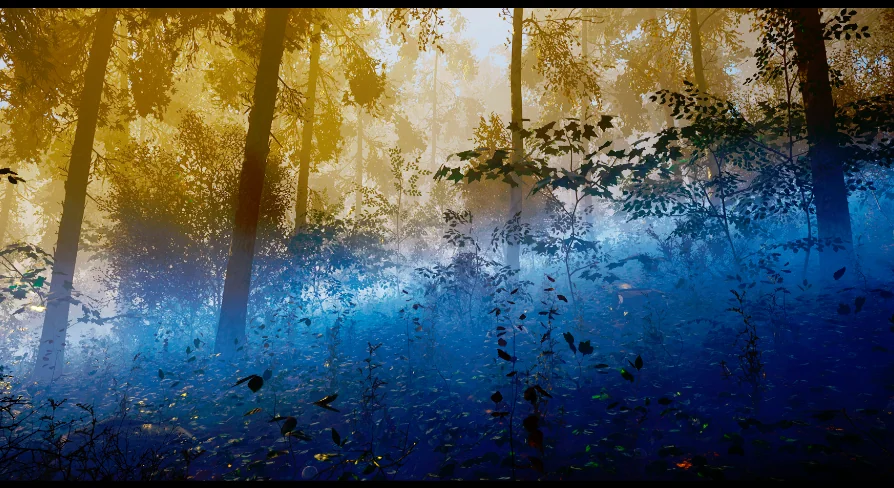
Enhance your game's atmosphere with this flexible Ground Fog system. It uses landscape grass and foliage painting to create low-lying mist on flat terrains efficiently.
Ground Fog is an essential tool for digital artists who want to add atmospheric depth to their game environments. Moreover, this asset utilizes the landscape grass system to create realistic low-lying mist efficiently. It provides a lightweight solution for adding mood and mystery to flat terrain without heavy performance costs.
Specifically, the system works by scattering meshes across your landscape. This method allows for dense coverage that reacts naturally to the environment. Consequently, developers can achieve a professional look with minimal effort. Furthermore, the asset is designed to be highly customizable to fit various art styles.
Key Features and Customization
The system includes a variety of flexible settings to help you achieve the perfect look. You can easily adjust the color to match your scene's lighting. Additionally, wind speed and density controls allow for dynamic movement. This ensures that the mist feels alive rather than static.
Intensity and height can also be adjusted based on distance. This feature is particularly useful for maintaining visual clarity in the foreground. However, you can still keep a thick, atmospheric layer in the distance. Therefore, it provides a great balance between aesthetics and gameplay visibility.
Practical Details
High-quality 2048x2048 texture sizes for crisp visuals.
Extremely low vertex count of only 4 per mesh.
Includes 2 distinct meshes for varied distribution.
Features 2 materials and material instances for quick setup.
No collision or LODs required, ensuring high performance.
Best Practices for Terrain
For the best results, you should use this Ground Fog on relatively flat terrain. Ideally, the surface should have a tilt between 0 and 15 degrees. If the terrain is too steep, visual artifacts may appear. Consequently, this asset is not recommended for jagged mountain landscapes.
If you encounter issues on uneven surfaces, you can manually fix them. Using the foliage paint tool allows for precise placement in difficult areas. Therefore, you can ensure the mist sits perfectly against the ground. Always check your landscape suitability before starting the setup process.
Simple Setup Guide
Setting up the mist is a straightforward process. You can choose between two primary methods depending on your project needs. Both methods offer excellent control over the final appearance.
Using Foliage Paint
First, add the foliage mesh to your foliage type list. You should set the scaling for the X and Y axes between 1.5 and 2. Meanwhile, the Z-axis scaling can range from 1.5 to 3 to control the height. Finally, ensure that 'Align to Normal' and 'Random Yaw' are set to false for the best appearance.
Using Landscape Grass Type
Alternatively, you can integrate the mist into your landscape material. Add a new element to your Landscape Grass output and assign the grass mesh. Set the density between 25 and 125 for optimal coverage. Furthermore, using a grid layout with a 1.5 to 3 scale on the Z-axis will provide a consistent look across the field.
Best Fit
Ground Fog is a powerful yet simple resource for environment artists. It offers a unique way to handle low-lying atmosphere using familiar landscape tools. By following the recommended settings, you can transform a flat field into a moody, immersive environment. Ultimately, it is a versatile addition to any developer's toolkit.
 Fantasy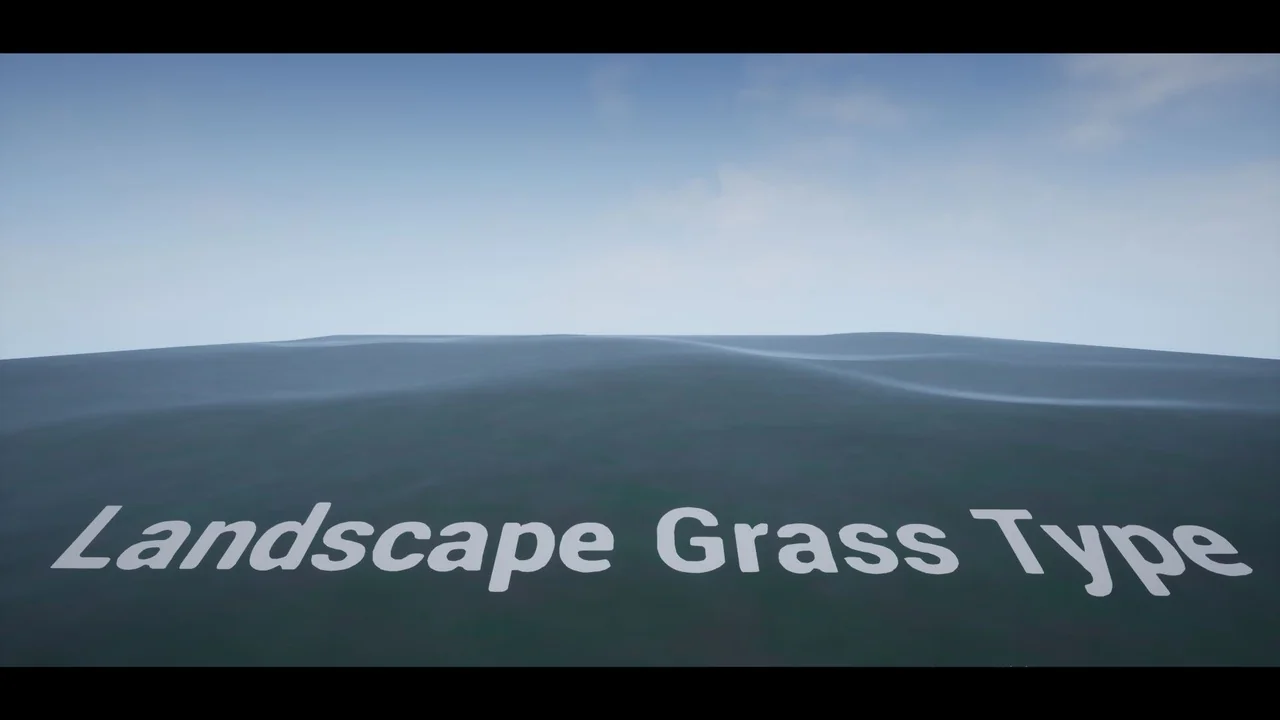
 Fantasy
 Ground
 Trees
Trees