"6f9bd6df1f44a86f"{"id":"1000837","slug":"grass-material-premium","title":"Grass Material - Premium","category":"Forest \u0026 Jungle","engine":"4.26+,5.0+","assetVersion":"","engineVersion":"Engine Version: 4.26+,5.0+","tag":"Forest \u0026 Jungle","accent":"blue","visual":"luts","summary":"Single master grass material with customizable coloring and wind effects. Apply material instances to any ground cover meshes for photorealistic foliage.","platform":"Unreal Engine","indexPolicy":"index","publishedAt":"2026-08-03T14:32:32.655Z","updatedAt":"2026-08-03T14:32:32.655Z","sourceNotes":[],"fileContents":[],"compatibility":["Unreal Engine","Engine Version: 4.26+,5.0+"],"featuredImage":{"alt":"Grass Material - Premium","src":"/wp-content/uploads/published/2026/08/ab691384f054-3eed16b5-7991-4107-a6f6-0ba44bc6d681-b999a82360.webp"},"hasDownloadLink":true,"downloads":2,"terms":[{"taxonomy":"category","slug":"forest-and-jungle","name":"Forest \u0026 Jungle"}],"galleryImages":[{"src":"/wp-content/uploads/published/2026/08/e9a02cd14e69-c818d01d-67e4-4917-b597-a8e581498a48-bf47016523.webp","alt":"Grass Material - Premium"},{"src":"/wp-content/uploads/published/2026/08/ca0b38d5863e-b1a2f2ac-5f41-4c85-9ed3-75a2a6ab079e-6cbddef888.webp","alt":"Grass Material - Premium"},{"src":"/wp-content/uploads/published/2026/08/2d4c6cb190c9-7be8818d-7497-4cf0-af37-71e4550c56dc-871acdc8aa.webp","alt":"Grass Material - Premium"},{"src":"/wp-content/uploads/published/2026/08/e5c997974ae0-d3ecd82e-3417-4241-b200-f0b586a12b05-f6dcd882e0.webp","alt":"Grass Material - Premium"},{"src":"/wp-content/uploads/published/2026/08/f9003d26f4c5-e5784960-9879-46e3-b47e-119b2d4c88dc-67c24a8015.webp","alt":"Grass Material - Premium"},{"src":"/wp-content/uploads/published/2026/08/468ecfd75b18-bdd4e5bf-0030-4abf-a2d4-6179905f6904-08c6e63dbd.webp","alt":"Grass Material - Premium"},{"src":"/wp-content/uploads/published/2026/08/e670b3175502-397c08f5-287b-4018-b5ee-65879dd798cd-8231c5079d.webp","alt":"Grass Material - Premium"},{"src":"/wp-content/uploads/published/2026/08/6735ecea80ea-6f045f7a-8043-46bb-8cd5-3e2e981a7185-874cacf9ac.webp","alt":"Grass Material - Premium"}],"accessPanel":{"kind":"resource","title":"Download this resource","eyebrow":"Free Download","message":"Log in or create a free account to start your download.","fileName":"Content.7z","safetyNote":"Resources are manually reviewed before listing to improve quality and reduce obvious risks.","actionLabel":"Download Free","resourceType":"Resource archive"},"contentHtml":"\u003cp\u003eThe setup path for this grass material is intentionally short. An artist applies a Material Instance to any grass mesh, and the field begins responding to the shader's parameters immediately. Every screenshot showcasing the product uses the same underlying grass, with different parameter values applied—all derived from a single Master Material. That means the visual range demonstrated across the product images is achievable without swapping meshes, textures, or creating new Material Graphs. The variation comes entirely from how the instance parameters are tuned.\u003c/p\u003e\n\n\u003ch2\u003eApplying the Grass Material Instance to Any Mesh\u003c/h2\u003e\n\u003cp\u003eThe material is built to work with any ground cover, not just a specific grass asset. Whether a scene uses sparse tufts, dense meadow meshes, or mixed foliage geometry, the Material Instance can be assigned directly to those meshes. The workflow is anchored in Material Instances rather than material edits, which keeps the Master Material intact while giving each scene its own character. This opens up a practical route for Level Design: 1 Master Material serves wide stretches of a project, and each area gets its own instance with adjusted values to match the local environment, season, or mood.\u003c/p\u003e\n\n\u003cp\u003eBecause the same grass appears in every screenshot, the visual differences between them are entirely driven by the shader's exposed parameters. This reinforces that the material is the creative tool, not the mesh. Artists who want a dried summer field, a lush spring meadow, or a windswept coastal grass can reach those looks from the same starting point.\u003c/p\u003e\n\n\u003ch2\u003eTuning Coloring Parameters Across Scenes\u003c/h2\u003e\n\u003cp\u003eColoring is one of the 2 pillars of the material's customization. The shader exposes parameters that let artists shift the grass color without leaving the Material Instance Editor. In practice, this means a meadow can be warm and golden for a late-afternoon sequence, then adjusted toward cooler greens for an overcast scene, all through parameter sliders rather than texture swaps or Material recompilation.\u003c/p\u003e\n\n\u003cp\u003eThe fact that all screenshots use the same grass but display noticeably different appearances validates the depth of the coloring controls. The material is not locked to one fixed look; it is a baseline from which new tonal possibilities branch out. For teams managing multiple biomes or seasons within a single project, this can reduce the number of distinct grass textures or materials that need to be maintained. 1 Master Material, instanced and tuned, can serve a broader range of visual contexts than a collection of static materials.\u003c/p\u003e\n\n\u003ch3\u003eWind Effects from Calm to Stormy\u003c/h3\u003e\n\u003cp\u003eThe second customization pillar is wind. The material provides wind controls that span from calm to stormy, giving artists a way to match grass motion to the emotional register of a scene. A quiet establishing shot can use subtle, low-amplitude movement that reads as a natural breeze. A dramatic weather event can push the wind parameters toward the stormy end of the spectrum, producing more aggressive motion across the field.\u003c/p\u003e\n\n\u003cp\u003eThe range matters because grass motion contributes heavily to how alive an outdoor scene feels. Static grass can read as artificial, especially when other elements in the frame are animated. By giving the wind a tunable range, the material lets artists dial motion to fit the moment rather than scaling it through external systems or animation overrides. The wind effects are part of the same Master Material, so they are available on any instance applied to any mesh.\u003c/p\u003e\n\n\u003ch2\u003eMaterial Instance Presets and Infinite Variations\u003c/h2\u003e\n\u003cp\u003eSeveral Material Instance Presets are included with the product. These act as ready-to-use starting points, each representing a configured combination of coloring and wind values. An artist can open 1 of these presets, inspect its parameter settings, and use it directly in a scene or branch from it to create a new variation. The presets are not endpoints; they are examples of what the parameter space can produce.\u003c/p\u003e\n\n\u003cp\u003eBeyond the included presets, the material supports infinite variations through Material Instance parameters. The word \"infinite\" here refers to the continuous nature of the parameter sliders—values can be adjusted across their ranges to produce combinations that go beyond the presets. This gives artists a creative space to explore: a preset might get a scene 80% of the way to a desired look, and fine-tuning the remaining parameters can push the grass into a space that the presets alone do not cover.\u003c/p\u003e\n\n\u003cp\u003eFor production pipelines, this means the grass material can adapt as art direction evolves. If a mood board shifts or a lighting pass changes how grass reads against the ground, the Material Instance can be re-tuned to compensate without requiring new asset creation.\u003c/p\u003e\n\n\u003ch2\u003eIncluded Lighting and Rendering Notes\u003c/h2\u003e\n\u003cp\u003eAll lighting used in the product images is included with the material. This is a practical detail: the looks shown in the screenshots are reproducible because the lighting that shapes them ships with the product. Artists can study how the lighting interacts with the material's coloring and wind response, then modify or replace that lighting as their scene requires. Having the reference lighting available shortens the gap between expectation and result—what appears in the screenshots is achievable with the included assets, not dependent on a separate lighting setup that needs to be sourced or reconstructed.\u003c/p\u003e\n\n\u003cp\u003eThe last 6 screenshots in the product gallery were captured with \u003ccode\u003eScreen Percentage\u003c/code\u003e set to 200%. \u003ccode\u003eScreen Percentage\u003c/code\u003e is a rendering setting that affects how sharply and cleanly the final image resolves. Understanding that these specific images were produced at that setting gives context for evaluating their visual fidelity. They represent an upper quality bound from the material and lighting combination, and that level of fidelity is tied to a specific configuration rather than a default viewport capture.\u003c/p\u003e\n\n\u003cp\u003eThe tags associated with this material—\u003cem\u003elighting\u003c/em\u003e, \u003cem\u003egrass\u003c/em\u003e, \u003cem\u003eplant\u003c/em\u003e, \u003cem\u003eshader\u003c/em\u003e, \u003cem\u003etime\u003c/em\u003e, \u003cem\u003efoliage\u003c/em\u003e, \u003cem\u003enatural\u003c/em\u003e, \u003cem\u003ewind\u003c/em\u003e, \u003cem\u003ephotorealistic\u003c/em\u003e, \u003cem\u003enature\u003c/em\u003e, \u003cem\u003ereal\u003c/em\u003e, \u003cem\u003elevel\u003c/em\u003e, and \u003cem\u003erealistic\u003c/em\u003e—map directly to the contexts where it fits. \u003cem\u003elevel\u003c/em\u003e and \u003cem\u003etime\u003c/em\u003e suggest the material's relevance to Level Design and scenes where time of day or temporal mood matters. \u003cem\u003ephotorealistic\u003c/em\u003e and \u003cem\u003erealistic\u003c/em\u003e signal the visual target the material is engineered to hit. \u003cem\u003enatural\u003c/em\u003e and \u003cem\u003enature\u003c/em\u003e position it within outdoor environment work, while \u003cem\u003efoliage\u003c/em\u003e and \u003cem\u003eplant\u003c/em\u003e connect it to broader vegetation rendering beyond grass alone.\u003c/p\u003e\n\n\u003ch2\u003eProduction Readiness and Creative Fitting\u003c/h2\u003e\n\u003cp\u003eFor teams evaluating this material against project needs, the core question is whether a single Master Material with strong instance controls fits the production workflow. The answer comes down to how the material handles range and reuse. The grass material covers coloring and wind across a broad spectrum, works with any ground cover mesh rather than a proprietary asset, and includes presets that demonstrate its capacity. The lighting used to present it is bundled, and the screenshots that showcase its highest fidelity are labeled with the rendering setting that produced them.\u003c/p\u003e\n\n\u003cp\u003eThe practical takeaway is that this material can serve as the foundation for grass rendering across a project, with each scene or biome receiving its own tuned instance. The artist's work moves from creating grass assets from scratch to curating parameter values that match scene intent. Wind and color become creative controls rather than technical blockers, and the included presets provide a catalog of starting points to accelerate that work.\u003c/p\u003e\n\n\u003ch2\u003eContinue Browsing Similar Packs\u003c/h2\u003e\n\u003cul\u003e\n\u003cli\u003e\u003ca href=\"https://3dcghub.com/realistic-foliage-pack/\" rel=\"noopener noreferrer\"\u003eRealistic Foliage Pack\u003c/a\u003e\u003c/li\u003e\n\u003cli\u003e\u003ca href=\"https://3dcghub.com/stylized-nature-vol-1-stylized-environment-bundle/\" rel=\"noopener noreferrer\"\u003eStylized Nature Vol. 1 | Stylized Environment Bundle\u003c/a\u003e\u003c/li\u003e\n\u003cli\u003e\u003ca href=\"https://3dcghub.com/grass-with-simple-interaction/\" rel=\"noopener noreferrer\"\u003eGrass with simple interaction\u003c/a\u003e\u003c/li\u003e\n\u003cli\u003e\u003ca href=\"https://3dcghub.com/foliage-pack/\" rel=\"noopener noreferrer\"\u003eFoliage Pack\u003c/a\u003e\u003c/li\u003e\n\u003cli\u003e\u003ca href=\"https://3dcghub.com/dreamscape-stylized-environment-mountains-stylized-nature-open-world-fantasy/\" rel=\"noopener noreferrer\"\u003eDreamscape: Stylized Environment Mountains - Stylized Nature Open World Fantasy\u003c/a\u003e\u003c/li\u003e\n\u003c/ul\u003e","contentTextLength":7768,"navigation":{"current":1526,"total":4218,"previous":{"id":"1000838","slug":"heroes-tribal-warrior","title":"Heroes - Tribal Warrior","category":"Humans","platform":"Unreal Engine","updatedAt":"2026-08-03T18:11:29.588Z"},"next":{"id":"1000836","slug":"gore","title":"GORE","category":"Sound Effects","platform":"Unreal Engine","updatedAt":"2026-08-03T13:24:05.980Z"}},"relatedResources":[{"id":"8244","slug":"realistic-foliage-pack","title":"Realistic Foliage Pack","category":"Forest \u0026 Jungle","engine":"4.26+,5.0+","assetVersion":"Engine version: 4.26+,5.0+","engineVersion":"4.20","tag":"Forest \u0026 Jungle","accent":"blue","visual":"city","summary":"Create lifelike outdoor environments with this professional collection of photorealistic foliage. This pack includes trees, grass, rocks, and terrain materials for high-quality level design.","platform":"Unreal Engine","indexPolicy":"index","publishedAt":"2026-02-23T16:23:17.000Z","updatedAt":"2026-04-19T15:55:31.000Z","sourceNotes":[],"fileContents":[],"compatibility":["Unreal Engine","Engine version: 4.26+,5.0+"],"featuredImage":{"alt":"Realistic Foliage Pack","src":"https://3dcghub.com/wp-content/uploads/2026/02/a3bad1ef-f189-4c7a-979d-8a10fbf1946b.webp"},"hasDownloadLink":true,"downloads":0},{"id":"1000481","slug":"stylized-nature-vol-1-stylized-environment-bundle","title":"Stylized Nature Vol. 1 | Stylized Environment Bundle","category":"Forest \u0026 Jungle","engine":"5.2+","assetVersion":"","engineVersion":"Engine Version: 5.2+","tag":"Forest \u0026 Jungle","accent":"blue","visual":"city","summary":"A stylized environment bundle for Unreal Engine featuring landscape tools for cliffs, grass distribution, runtime virtual textures, interactive foliage, and dyn","platform":"Unreal Engine","indexPolicy":"index","publishedAt":"2026-07-12T06:08:17.870Z","updatedAt":"2026-07-12T06:08:17.870Z","sourceNotes":[],"fileContents":[],"compatibility":["Unreal Engine","Engine Version: 5.2+"],"featuredImage":{"alt":"Stylized Nature Vol. 1 | Stylized Environment Bundle","src":"/wp-content/uploads/published/2026/07/26ef167c9a89-bc3026b6-a0c9-4dcc-82d5-8ee5de21e891-9887ed431f.webp"},"hasDownloadLink":true,"downloads":3},{"id":"1001678","slug":"winter-forest-set","title":"Winter Forest Set","category":"Forest \u0026 Jungle","engine":"4.26+,5.0+","assetVersion":"","engineVersion":"Engine Version: 4.26+,5.0+","tag":"Forest \u0026 Jungle","accent":"blue","visual":"mech","summary":"Build realistic snowy woodland environments in Unreal Engine with the Winter Forest Set, featuring trees, rocks, grass, stumps, twigs, and branches.","platform":"Unreal Engine","indexPolicy":"index","publishedAt":"2026-10-13T15:29:18.961Z","updatedAt":"2026-10-13T15:29:18.961Z","sourceNotes":[],"fileContents":[],"compatibility":["Unreal Engine","Engine Version: 4.26+,5.0+"],"featuredImage":{"alt":"Winter Forest Set","src":"/wp-content/uploads/published/2026/10/a8b1cfc95208-73164c04-d2bd-478f-957b-96219f0e6f31-21b5e7a28a.webp"},"hasDownloadLink":true,"downloads":1}]}
Forest & Jungle
Grass Material - Premium
Single master grass material with customizable coloring and wind effects. Apply material instances to any ground cover meshes for photorealistic foliage.
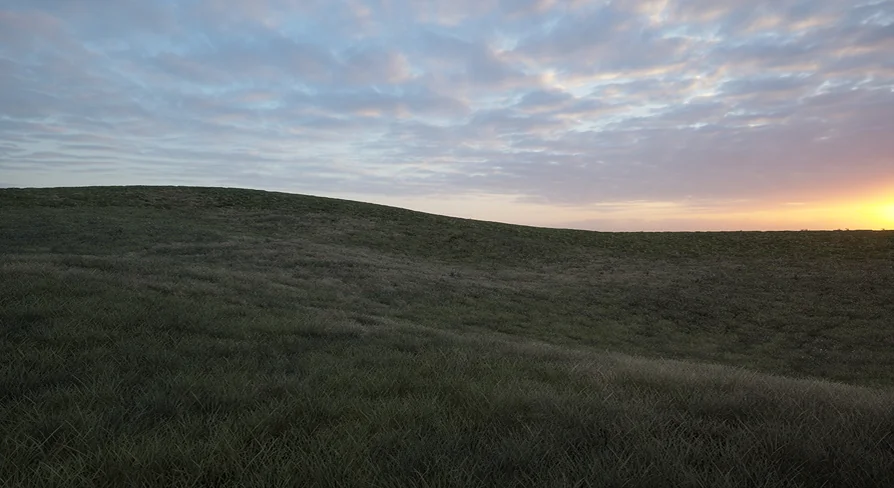
The setup path for this grass material is intentionally short. An artist applies a Material Instance to any grass mesh, and the field begins responding to the shader's parameters immediately. Every screenshot showcasing the product uses the same underlying grass, with different parameter values applied—all derived from a single Master Material. That means the visual range demonstrated across the product images is achievable without swapping meshes, textures, or creating new Material Graphs. The variation comes entirely from how the instance parameters are tuned.
Applying the Grass Material Instance to Any Mesh
The material is built to work with any ground cover, not just a specific grass asset. Whether a scene uses sparse tufts, dense meadow meshes, or mixed foliage geometry, the Material Instance can be assigned directly to those meshes. The workflow is anchored in Material Instances rather than material edits, which keeps the Master Material intact while giving each scene its own character. This opens up a practical route for Level Design: 1 Master Material serves wide stretches of a project, and each area gets its own instance with adjusted values to match the local environment, season, or mood.
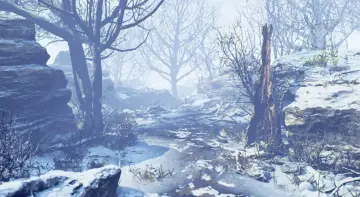
Because the same grass appears in every screenshot, the visual differences between them are entirely driven by the shader's exposed parameters. This reinforces that the material is the creative tool, not the mesh. Artists who want a dried summer field, a lush spring meadow, or a windswept coastal grass can reach those looks from the same starting point.
Tuning Coloring Parameters Across Scenes
Coloring is one of the 2 pillars of the material's customization. The shader exposes parameters that let artists shift the grass color without leaving the Material Instance Editor. In practice, this means a meadow can be warm and golden for a late-afternoon sequence, then adjusted toward cooler greens for an overcast scene, all through parameter sliders rather than texture swaps or Material recompilation.
The fact that all screenshots use the same grass but display noticeably different appearances validates the depth of the coloring controls. The material is not locked to one fixed look; it is a baseline from which new tonal possibilities branch out. For teams managing multiple biomes or seasons within a single project, this can reduce the number of distinct grass textures or materials that need to be maintained. 1 Master Material, instanced and tuned, can serve a broader range of visual contexts than a collection of static materials.
Wind Effects from Calm to Stormy
The second customization pillar is wind. The material provides wind controls that span from calm to stormy, giving artists a way to match grass motion to the emotional register of a scene. A quiet establishing shot can use subtle, low-amplitude movement that reads as a natural breeze. A dramatic weather event can push the wind parameters toward the stormy end of the spectrum, producing more aggressive motion across the field.
The range matters because grass motion contributes heavily to how alive an outdoor scene feels. Static grass can read as artificial, especially when other elements in the frame are animated. By giving the wind a tunable range, the material lets artists dial motion to fit the moment rather than scaling it through external systems or animation overrides. The wind effects are part of the same Master Material, so they are available on any instance applied to any mesh.
Material Instance Presets and Infinite Variations
Several Material Instance Presets are included with the product. These act as ready-to-use starting points, each representing a configured combination of coloring and wind values. An artist can open 1 of these presets, inspect its parameter settings, and use it directly in a scene or branch from it to create a new variation. The presets are not endpoints; they are examples of what the parameter space can produce.
Beyond the included presets, the material supports infinite variations through Material Instance parameters. The word "infinite" here refers to the continuous nature of the parameter sliders—values can be adjusted across their ranges to produce combinations that go beyond the presets. This gives artists a creative space to explore: a preset might get a scene 80% of the way to a desired look, and fine-tuning the remaining parameters can push the grass into a space that the presets alone do not cover.
For production pipelines, this means the grass material can adapt as art direction evolves. If a mood board shifts or a lighting pass changes how grass reads against the ground, the Material Instance can be re-tuned to compensate without requiring new asset creation.
Included Lighting and Rendering Notes
All lighting used in the product images is included with the material. This is a practical detail: the looks shown in the screenshots are reproducible because the lighting that shapes them ships with the product. Artists can study how the lighting interacts with the material's coloring and wind response, then modify or replace that lighting as their scene requires. Having the reference lighting available shortens the gap between expectation and result—what appears in the screenshots is achievable with the included assets, not dependent on a separate lighting setup that needs to be sourced or reconstructed.
The last 6 screenshots in the product gallery were captured with Screen Percentage set to 200%. Screen Percentage is a rendering setting that affects how sharply and cleanly the final image resolves. Understanding that these specific images were produced at that setting gives context for evaluating their visual fidelity. They represent an upper quality bound from the material and lighting combination, and that level of fidelity is tied to a specific configuration rather than a default viewport capture.
The tags associated with this material—lighting, grass, plant, shader, time, foliage, natural, wind, photorealistic, nature, real, level, and realistic—map directly to the contexts where it fits. level and time suggest the material's relevance to Level Design and scenes where time of day or temporal mood matters. photorealistic and realistic signal the visual target the material is engineered to hit. natural and nature position it within outdoor environment work, while foliage and plant connect it to broader vegetation rendering beyond grass alone.
Production Readiness and Creative Fitting
For teams evaluating this material against project needs, the core question is whether a single Master Material with strong instance controls fits the production workflow. The answer comes down to how the material handles range and reuse. The grass material covers coloring and wind across a broad spectrum, works with any ground cover mesh rather than a proprietary asset, and includes presets that demonstrate its capacity. The lighting used to present it is bundled, and the screenshots that showcase its highest fidelity are labeled with the rendering setting that produced them.
The practical takeaway is that this material can serve as the foundation for grass rendering across a project, with each scene or biome receiving its own tuned instance. The artist's work moves from creating grass assets from scratch to curating parameter values that match scene intent. Wind and color become creative controls rather than technical blockers, and the included presets provide a catalog of starting points to accelerate that work.
 Forest & Jungle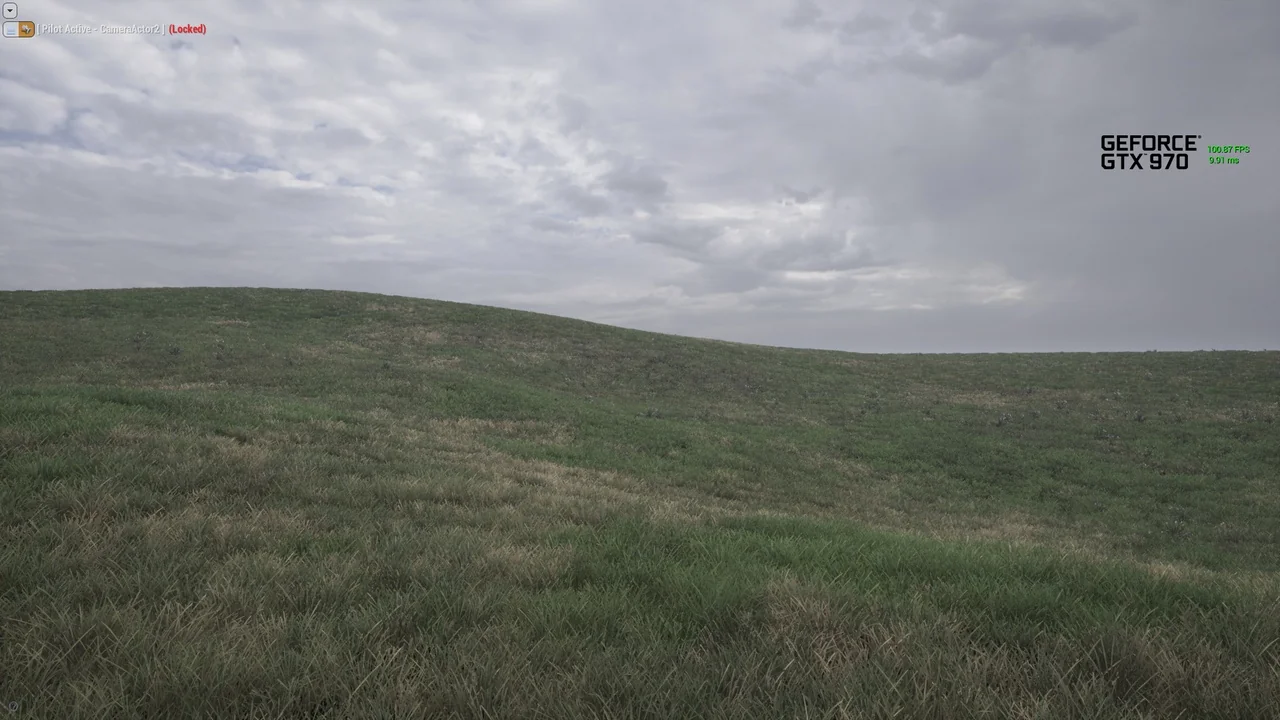
 Forest & Jungle
 Forest & Jungle
 Forest & Jungle