"24ed63134cdc868f"{"asset":{"id":16947,"slug":"grab3d-traffic-light","provider":"grab3d","providerLabel":"Grab3D","sourceSlug":"traffic-light","title":"Traffic Light","summary":"Three-lens vehicle traffic light on a galvanized pole with a black backplate and visors, where red, yellow and green switch on and off separately. [Procedural 3D model, CC0 1.0]","categorySlug":"3d-models","categoryName":"3D Models","subcategorySlug":"nature-plants","subcategoryName":"Nature \u0026 Plants","sourceKind":"procedural","creator":"Grab3D","coverUrl":"https://grab3d.com/m/traffic-light/thumb-400.webp","sourceUrl":"https://grab3d.com/models/city/traffic-light/","licenseUrl":"https://grab3d.com/dl/traffic-light/LICENSE.txt","resolutions":["2K"],"defaultVariant":"GLB","variants":[{"url":"https://grab3d.com/dl/traffic-light/traffic-light.blend","label":"BLEND","filename":"traffic-light.blend","sizeBytes":1120173},{"url":"https://grab3d.com/dl/traffic-light/traffic-light.glb","label":"GLB","filename":"traffic-light.glb","sizeBytes":1227548},{"url":"https://grab3d.com/dl/traffic-light/traffic-light-obj.zip","label":"OBJ-ZIP","filename":"traffic-light-obj.zip","sizeBytes":1369188},{"url":"https://grab3d.com/dl/traffic-light/traffic-light.usdz","label":"USDZ","filename":"traffic-light.usdz","sizeBytes":1811359},{"url":"https://grab3d.com/dl/traffic-light/traffic-light.fbx","label":"FBX","filename":"traffic-light.fbx","sizeBytes":1870764}],"tags":["city","street \u0026 city","realistic","procedural","traffic light","traffic signal","stoplight","light","street","urban","city builder"],"popularityScore":0,"publishedAt":"2026-09-26T00:00:00.000Z"},"related":[{"id":847,"slug":"polyhaven-grass-medium-01","provider":"polyhaven","providerLabel":"Poly Haven","sourceSlug":"grass_medium_01","title":"Grass Medium 01","summary":"Grass Medium 01 is a CC0 Nature \u0026 Plants asset by Rob Tuytel, Rico Cilliers on Poly Haven (1K, 2K, 4K, 8K+).","categorySlug":"3d-models","categoryName":"3D Models","subcategorySlug":"nature-plants","subcategoryName":"Nature \u0026 Plants","sourceKind":"models","creator":"Rob Tuytel, Rico Cilliers","coverUrl":"https://cdn.polyhaven.com/asset_img/thumbs/grass_medium_01.png?width=480\u0026height=480\u0026format=jpg\u0026v=dbbb23c5","sourceUrl":"https://polyhaven.com/a/grass_medium_01","licenseUrl":"https://polyhaven.com/license","resolutions":["1K","2K","4K","8K+"],"defaultVariant":"2K","variants":[],"tags":["grass","nature","ground cover","plant","green","shrub","outdoor","field","meadow","natural","foliage","small","botany","models"],"popularityScore":251948,"publishedAt":"2022-07-29T00:00:00.000Z"},{"id":2130,"slug":"polyhaven-tree-small-02","provider":"polyhaven","providerLabel":"Poly Haven","sourceSlug":"tree_small_02","title":"Tree Small 02","summary":"Tree Small 02 is a CC0 Nature \u0026 Plants asset by Rico Cilliers on Poly Haven (1K, 2K, 4K, 8K+).","categorySlug":"3d-models","categoryName":"3D Models","subcategorySlug":"nature-plants","subcategoryName":"Nature \u0026 Plants","sourceKind":"models","creator":"Rico Cilliers","coverUrl":"https://cdn.polyhaven.com/asset_img/thumbs/tree_small_02.png?width=480\u0026height=480\u0026format=jpg\u0026v=3743831d","sourceUrl":"https://polyhaven.com/a/tree_small_02","licenseUrl":"https://polyhaven.com/license","resolutions":["1K","2K","4K","8K+"],"defaultVariant":"2K","variants":[],"tags":["nature","plants","trees","tree","natural","plant","outdoor","green","botany","leaf","leaves","forest","jungle","foliage","geometry nodes","trunk","bark","medium","garden","branches","burkea africana","wild syringa","small","models"],"popularityScore":167467,"publishedAt":"2023-04-28T00:00:00.000Z"},{"id":981,"slug":"polyhaven-jacaranda-tree","provider":"polyhaven","providerLabel":"Poly Haven","sourceSlug":"jacaranda_tree","title":"Jacaranda Tree","summary":"Jacaranda Tree is a CC0 Nature \u0026 Plants asset by Rob Tuytel, Rico Cilliers on Poly Haven (1K, 2K, 4K, 8K+).","categorySlug":"3d-models","categoryName":"3D Models","subcategorySlug":"nature-plants","subcategoryName":"Nature \u0026 Plants","sourceKind":"models","creator":"Rob Tuytel, Rico Cilliers","coverUrl":"https://cdn.polyhaven.com/asset_img/thumbs/jacaranda_tree.png?width=480\u0026height=480\u0026format=jpg\u0026v=935ab3ba","sourceUrl":"https://polyhaven.com/a/jacaranda_tree","licenseUrl":"https://polyhaven.com/license","resolutions":["1K","2K","4K","8K+"],"defaultVariant":"2K","variants":[],"tags":["nature","plants","trees","tree","natural","green","plant","outdoor","leaf","botany","leaves","forest","jungle","foliage","geometry nodes","bark","trunk","jacaranda","models"],"popularityScore":151289,"publishedAt":"2022-10-12T00:00:00.000Z"},{"id":1680,"slug":"polyhaven-rock-moss-set-02","provider":"polyhaven","providerLabel":"Poly Haven","sourceSlug":"rock_moss_set_02","title":"Rock Moss Set 02","summary":"Rock Moss Set 02 is a CC0 Nature \u0026 Plants asset by Kless Gyzen on Poly Haven (1K, 2K, 4K, 8K+).","categorySlug":"3d-models","categoryName":"3D Models","subcategorySlug":"nature-plants","subcategoryName":"Nature \u0026 Plants","sourceKind":"models","creator":"Kless Gyzen","coverUrl":"https://cdn.polyhaven.com/asset_img/thumbs/rock_moss_set_02.png?width=480\u0026height=480\u0026format=jpg\u0026v=2acc6bcd","sourceUrl":"https://polyhaven.com/a/rock_moss_set_02","licenseUrl":"https://polyhaven.com/license","resolutions":["1K","2K","4K","8K+"],"defaultVariant":"2K","variants":[],"tags":["rocks","nature","outdoor","stones","pebbles","rock","dirt","models"],"popularityScore":101337,"publishedAt":"2021-07-02T08:51:47.000Z"},{"id":979,"slug":"polyhaven-island-tree-02","provider":"polyhaven","providerLabel":"Poly Haven","sourceSlug":"island_tree_02","title":"Island Tree 02","summary":"Island Tree 02 is a CC0 Nature \u0026 Plants asset by Rob Tuytel, Rico Cilliers on Poly Haven (1K, 2K, 4K, 8K+).","categorySlug":"3d-models","categoryName":"3D Models","subcategorySlug":"nature-plants","subcategoryName":"Nature \u0026 Plants","sourceKind":"models","creator":"Rob Tuytel, Rico Cilliers","coverUrl":"https://cdn.polyhaven.com/asset_img/thumbs/island_tree_02.png?width=480\u0026height=480\u0026format=jpg\u0026v=854bdc1f","sourceUrl":"https://polyhaven.com/a/island_tree_02","licenseUrl":"https://polyhaven.com/license","resolutions":["1K","2K","4K","8K+"],"defaultVariant":"2K","variants":[],"tags":["nature","plants","trees","tree","natural","green","plant","outdoor","leaf","botany","leaves","forest","bush","jungle","foliage","small","geometry nodes","trunk","bark","island","coastal","models"],"popularityScore":92143,"publishedAt":"2022-10-26T00:00:00.000Z"},{"id":1679,"slug":"polyhaven-rock-moss-set-01","provider":"polyhaven","providerLabel":"Poly Haven","sourceSlug":"rock_moss_set_01","title":"Rock Moss Set 01","summary":"Rock Moss Set 01 is a CC0 Nature \u0026 Plants asset by Kless Gyzen on Poly Haven (1K, 2K, 4K, 8K+).","categorySlug":"3d-models","categoryName":"3D Models","subcategorySlug":"nature-plants","subcategoryName":"Nature \u0026 Plants","sourceKind":"models","creator":"Kless Gyzen","coverUrl":"https://cdn.polyhaven.com/asset_img/thumbs/rock_moss_set_01.png?width=480\u0026height=480\u0026format=jpg\u0026v=e99703c4","sourceUrl":"https://polyhaven.com/a/rock_moss_set_01","licenseUrl":"https://polyhaven.com/license","resolutions":["1K","2K","4K","8K+"],"defaultVariant":"2K","variants":[],"tags":["rocks","nature","outdoor","stones","pebbles","rock","dirt","models"],"popularityScore":86935,"publishedAt":"2021-06-30T16:04:17.000Z"},{"id":356,"slug":"polyhaven-celandine-01","provider":"polyhaven","providerLabel":"Poly Haven","sourceSlug":"celandine_01","title":"Celandine 01","summary":"Celandine 01 is a CC0 Nature \u0026 Plants asset by Rob Tuytel, Rico Cilliers on Poly Haven (1K, 2K, 4K, 8K+).","categorySlug":"3d-models","categoryName":"3D Models","subcategorySlug":"nature-plants","subcategoryName":"Nature \u0026 Plants","sourceKind":"models","creator":"Rob Tuytel, Rico Cilliers","coverUrl":"https://cdn.polyhaven.com/asset_img/thumbs/celandine_01.png?width=480\u0026height=480\u0026format=jpg\u0026v=6e8383d4","sourceUrl":"https://polyhaven.com/a/celandine_01","licenseUrl":"https://polyhaven.com/license","resolutions":["1K","2K","4K","8K+"],"defaultVariant":"2K","variants":[],"tags":["nature","plants","ground cover","flowers","field","green","shrub","plant","outdoor","leaf","botany","leaves","meadow","floral","flower","small","natural","celandine","models"],"popularityScore":80897,"publishedAt":"2022-10-07T00:00:00.000Z"},{"id":734,"slug":"polyhaven-fir-tree-01","provider":"polyhaven","providerLabel":"Poly Haven","sourceSlug":"fir_tree_01","title":"Fir Tree 01","summary":"Fir Tree 01 is a CC0 Nature \u0026 Plants asset by Rob Tuytel, Rico Cilliers on Poly Haven (1K, 2K, 4K, 8K+).","categorySlug":"3d-models","categoryName":"3D Models","subcategorySlug":"nature-plants","subcategoryName":"Nature \u0026 Plants","sourceKind":"models","creator":"Rob Tuytel, Rico Cilliers","coverUrl":"https://cdn.polyhaven.com/asset_img/thumbs/fir_tree_01.png?width=480\u0026height=480\u0026format=jpg\u0026v=55f25e61","sourceUrl":"https://polyhaven.com/a/fir_tree_01","licenseUrl":"https://polyhaven.com/license","resolutions":["1K","2K","4K","8K+"],"defaultVariant":"2K","variants":[],"tags":["nature","plants","trees","fir","tree","geometry nodes","woodland","needles","branches","environment","coniferous","forest","tall","trunk","bark","foliage","twig","models"],"popularityScore":76681,"publishedAt":"2023-06-16T00:00:00.000Z"}]}
CC0 1.0 Public DomainGrab3D
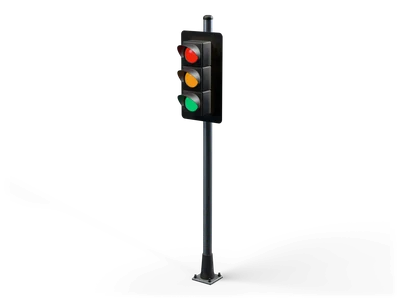
Traffic Light
by Grab3D
Three-lens vehicle traffic light on a galvanized pole with a black backplate and visors, where red, yellow and green switch on and off separately. [Procedural 3D model, CC0 1.0]
Can I use Traffic Light (Grab3D) in commercial projects without attribution?
Yes. Traffic Light is published by Grab3D under CC0 1.0 Public Domain Dedication, granting unrestricted commercial and non-commercial use without attribution.
What resolutions and delivery options exist for Traffic Light?
Traffic Light provides 2K packages (default GLB), available via direct browser download or the Unreal Studio plugin.
How do I import Traffic Light into Unreal Engine, Blender, or Unity?
Import the mesh and bundled PBR textures using Linear/Non-Color space for roughness, normal, and metallic maps, keeping Albedo in sRGB.
 Poly Haven
 Poly Haven
 Poly Haven
 Poly Haven
 Poly Haven
 Poly Haven
 Poly Haven
 Poly Haven