"24ed63134cdc868f"{"asset":{"id":16874,"slug":"grab3d-studio-light","provider":"grab3d","providerLabel":"Grab3D","sourceSlug":"studio-light","title":"Studio Light","summary":"Peach fresnel studio light with four barn doors and a warm glowing lens on a sturdy tripod, the head tilts and each barn door flap swings on its own hinge. [Procedural 3D model, CC0 1.0]","categorySlug":"3d-models","categoryName":"3D Models","subcategorySlug":"props-tools","subcategoryName":"Props \u0026 Tools","sourceKind":"procedural","creator":"Grab3D","coverUrl":"https://grab3d.com/m/studio-light/thumb-400.webp","sourceUrl":"https://grab3d.com/models/electronics/studio-light/","licenseUrl":"https://grab3d.com/dl/studio-light/LICENSE.txt","resolutions":["1K","2K"],"defaultVariant":"GLB","variants":[{"url":"https://grab3d.com/dl/studio-light/studio-light-light.glb","label":"GLB-LIGHT","filename":"studio-light-light.glb","sizeBytes":898184},{"url":"https://grab3d.com/dl/studio-light/studio-light.blend","label":"BLEND","filename":"studio-light.blend","sizeBytes":1438103},{"url":"https://grab3d.com/dl/studio-light/studio-light-obj.zip","label":"OBJ-ZIP","filename":"studio-light-obj.zip","sizeBytes":1706305},{"url":"https://grab3d.com/dl/studio-light/studio-light-light.fbx","label":"FBX-LIGHT","filename":"studio-light-light.fbx","sizeBytes":1770940},{"url":"https://grab3d.com/dl/studio-light/studio-light.glb","label":"GLB","filename":"studio-light.glb","sizeBytes":1825024},{"url":"https://grab3d.com/dl/studio-light/studio-light.usdz","label":"USDZ","filename":"studio-light.usdz","sizeBytes":2862641},{"url":"https://grab3d.com/dl/studio-light/studio-light.fbx","label":"FBX","filename":"studio-light.fbx","sizeBytes":3130220}],"tags":["electronics","electronics \u0026 tech","stylized","procedural","studio light","fresnel light","barn doors","film light","studio lighting","film set","studio","cozy"],"popularityScore":0,"publishedAt":"2026-09-26T00:00:00.000Z"},"related":[{"id":5,"slug":"polyhaven-camera-01","provider":"polyhaven","providerLabel":"Poly Haven","sourceSlug":"Camera_01","title":"Camera 01","summary":"Camera 01 is a CC0 Props \u0026 Tools asset by Rajil Jose Macatangay on Poly Haven (1K, 2K, 4K, 8K+).","categorySlug":"3d-models","categoryName":"3D Models","subcategorySlug":"props-tools","subcategoryName":"Props \u0026 Tools","sourceKind":"models","creator":"Rajil Jose Macatangay","coverUrl":"https://cdn.polyhaven.com/asset_img/thumbs/Camera_01.png?width=480\u0026height=480\u0026format=jpg\u0026v=534c7d69","sourceUrl":"https://polyhaven.com/a/Camera_01","licenseUrl":"https://polyhaven.com/license","resolutions":["1K","2K","4K","8K+"],"defaultVariant":"2K","variants":[],"tags":["props","electronics","vintage","camera","antique","ornate","photography","retro","lens","classic","analog","models"],"popularityScore":114714,"publishedAt":"2020-03-30T22:00:00.000Z"},{"id":844,"slug":"polyhaven-grass-bermuda-01","provider":"polyhaven","providerLabel":"Poly Haven","sourceSlug":"grass_bermuda_01","title":"Grass Bermuda 01","summary":"Grass Bermuda 01 is a CC0 Props \u0026 Tools asset by Rico Cilliers on Poly Haven (1K, 2K, 4K, 8K+).","categorySlug":"3d-models","categoryName":"3D Models","subcategorySlug":"props-tools","subcategoryName":"Props \u0026 Tools","sourceKind":"models","creator":"Rico Cilliers","coverUrl":"https://cdn.polyhaven.com/asset_img/thumbs/grass_bermuda_01.png?width=480\u0026height=480\u0026format=jpg\u0026v=fd28a3b9","sourceUrl":"https://polyhaven.com/a/grass_bermuda_01","licenseUrl":"https://polyhaven.com/license","resolutions":["1K","2K","4K","8K+"],"defaultVariant":"2K","variants":[],"tags":["grass","nature","ground cover","plant","shrub","field","foliage","natural","outdoor","botany","small","green","bermuda","models"],"popularityScore":106456,"publishedAt":"2022-04-15T00:00:00.000Z"},{"id":716,"slug":"polyhaven-fern-02","provider":"polyhaven","providerLabel":"Poly Haven","sourceSlug":"fern_02","title":"Fern 02","summary":"Fern 02 is a CC0 Props \u0026 Tools asset by Rob Tuytel, Rico Cilliers on Poly Haven (1K, 2K, 4K, 8K+).","categorySlug":"3d-models","categoryName":"3D Models","subcategorySlug":"props-tools","subcategoryName":"Props \u0026 Tools","sourceKind":"models","creator":"Rob Tuytel, Rico Cilliers","coverUrl":"https://cdn.polyhaven.com/asset_img/thumbs/fern_02.png?width=480\u0026height=480\u0026format=jpg\u0026v=334ce7aa","sourceUrl":"https://polyhaven.com/a/fern_02","licenseUrl":"https://polyhaven.com/license","resolutions":["1K","2K","4K","8K+"],"defaultVariant":"2K","variants":[],"tags":["plants","nature","plant","fern","foliage","jungle","shrub","bush","leaf","leaves","green","forest","outdoor","models"],"popularityScore":84111,"publishedAt":"2022-05-27T00:00:00.000Z"},{"id":2257,"slug":"polyhaven-wine-bottles-01","provider":"polyhaven","providerLabel":"Poly Haven","sourceSlug":"wine_bottles_01","title":"Wine Bottles 01","summary":"Wine Bottles 01 is a CC0 Props \u0026 Tools asset by Rico Cilliers, Jurita Burger on Poly Haven (1K, 2K, 4K, 8K+).","categorySlug":"3d-models","categoryName":"3D Models","subcategorySlug":"props-tools","subcategoryName":"Props \u0026 Tools","sourceKind":"models","creator":"Rico Cilliers, Jurita Burger","coverUrl":"https://cdn.polyhaven.com/asset_img/thumbs/wine_bottles_01.png?width=480\u0026height=480\u0026format=jpg\u0026v=ff1e806c","sourceUrl":"https://polyhaven.com/a/wine_bottles_01","licenseUrl":"https://polyhaven.com/license","resolutions":["1K","2K","4K","8K+"],"defaultVariant":"2K","variants":[],"tags":["props","containers","dishes","wine","drink","bottle","champagne","grape","farmhouse","vineyard","models"],"popularityScore":62719,"publishedAt":"2022-03-25T00:00:00.000Z"},{"id":3,"slug":"polyhaven-barrel-01","provider":"polyhaven","providerLabel":"Poly Haven","sourceSlug":"Barrel_01","title":"Barrel_01","summary":"Barrel_01 is a CC0 Props \u0026 Tools asset by Jorge Camacho on Poly Haven (1K, 2K, 4K, 8K+).","categorySlug":"3d-models","categoryName":"3D Models","subcategorySlug":"props-tools","subcategoryName":"Props \u0026 Tools","sourceKind":"models","creator":"Jorge Camacho","coverUrl":"https://cdn.polyhaven.com/asset_img/thumbs/Barrel_01.png?width=480\u0026height=480\u0026format=jpg\u0026v=29e315a9","sourceUrl":"https://polyhaven.com/a/Barrel_01","licenseUrl":"https://polyhaven.com/license","resolutions":["1K","2K","4K","8K+"],"defaultVariant":"2K","variants":[],"tags":["industrial","containers","barrel","oil","explosive","radioactive","metal","red barrel","oil barrel","drums","fuel barrel","explosive barrel","models"],"popularityScore":60861,"publishedAt":"2020-03-30T22:00:00.000Z"},{"id":650,"slug":"polyhaven-dry-branches-medium-01","provider":"polyhaven","providerLabel":"Poly Haven","sourceSlug":"dry_branches_medium_01","title":"Dry Branches Medium 01","summary":"Dry Branches Medium 01 is a CC0 Props \u0026 Tools asset by Rico Cilliers on Poly Haven (1K, 2K, 4K, 8K+).","categorySlug":"3d-models","categoryName":"3D Models","subcategorySlug":"props-tools","subcategoryName":"Props \u0026 Tools","sourceKind":"models","creator":"Rico Cilliers","coverUrl":"https://cdn.polyhaven.com/asset_img/thumbs/dry_branches_medium_01.png?width=480\u0026height=480\u0026format=jpg\u0026v=5fecfa26","sourceUrl":"https://polyhaven.com/a/dry_branches_medium_01","licenseUrl":"https://polyhaven.com/license","resolutions":["1K","2K","4K","8K+"],"defaultVariant":"2K","variants":[],"tags":["props","nature","plants","ground cover","branches","dead","dry","natural","plant","outdoor","foliage","forest","jungle","shrub","medium","stick","twig","botany","wood","models"],"popularityScore":50961,"publishedAt":"2022-11-09T00:00:00.000Z"},{"id":1864,"slug":"polyhaven-shrub-sorrel-01","provider":"polyhaven","providerLabel":"Poly Haven","sourceSlug":"shrub_sorrel_01","title":"Shrub Sorrel 01","summary":"Shrub Sorrel 01 is a CC0 Props \u0026 Tools asset by Rico Cilliers on Poly Haven (1K, 2K, 4K, 8K+).","categorySlug":"3d-models","categoryName":"3D Models","subcategorySlug":"props-tools","subcategoryName":"Props \u0026 Tools","sourceKind":"models","creator":"Rico Cilliers","coverUrl":"https://cdn.polyhaven.com/asset_img/thumbs/shrub_sorrel_01.png?width=480\u0026height=480\u0026format=jpg\u0026v=079989cc","sourceUrl":"https://polyhaven.com/a/shrub_sorrel_01","licenseUrl":"https://polyhaven.com/license","resolutions":["1K","2K","4K","8K+"],"defaultVariant":"2K","variants":[],"tags":["plants","flowers","nature","sorrel","potplant","bush","shrub","leaf","leaves","green","small","forest","field","floral","flower","models"],"popularityScore":47599,"publishedAt":"2022-04-08T00:00:00.000Z"},{"id":100,"slug":"polyhaven-anthurium-botany-01","provider":"polyhaven","providerLabel":"Poly Haven","sourceSlug":"anthurium_botany_01","title":"Anthurium Botany 01","summary":"Anthurium Botany 01 is a CC0 Props \u0026 Tools asset by Rob Tuytel, Rico Cilliers on Poly Haven (1K, 2K, 4K, 8K+).","categorySlug":"3d-models","categoryName":"3D Models","subcategorySlug":"props-tools","subcategoryName":"Props \u0026 Tools","sourceKind":"models","creator":"Rob Tuytel, Rico Cilliers","coverUrl":"https://cdn.polyhaven.com/asset_img/thumbs/anthurium_botany_01.png?width=480\u0026height=480\u0026format=jpg\u0026v=19be8ef7","sourceUrl":"https://polyhaven.com/a/anthurium_botany_01","licenseUrl":"https://polyhaven.com/license","resolutions":["1K","2K","4K","8K+"],"defaultVariant":"2K","variants":[],"tags":["plants","nature","bush","leaf","shrub","leaves","forest","plant","green","jungle","outdoor","botany","models"],"popularityScore":43282,"publishedAt":"2022-04-27T00:00:00.000Z"}]}
CC0 1.0 Public DomainGrab3D
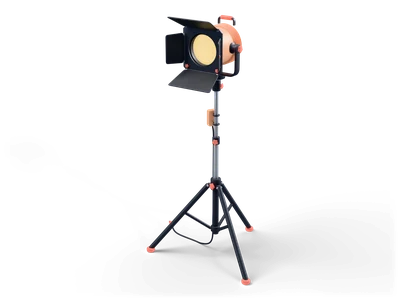
Studio Light
by Grab3D
Peach fresnel studio light with four barn doors and a warm glowing lens on a sturdy tripod, the head tilts and each barn door flap swings on its own hinge. [Procedural 3D model, CC0 1.0]
Can I use Studio Light (Grab3D) in commercial projects without attribution?
Yes. Studio Light is published by Grab3D under CC0 1.0 Public Domain Dedication, granting unrestricted commercial and non-commercial use without attribution.
What resolutions and delivery options exist for Studio Light?
Studio Light provides 1K, 2K packages (default GLB), available via direct browser download or the Unreal Studio plugin.
How do I import Studio Light into Unreal Engine, Blender, or Unity?
Import the mesh and bundled PBR textures using Linear/Non-Color space for roughness, normal, and metallic maps, keeping Albedo in sRGB.
 Poly Haven
 Poly Haven
 Poly Haven
 Poly Haven
 Poly Haven
 Poly Haven
 Poly Haven
 Poly Haven