"24ed63134cdc868f"{"asset":{"id":16823,"slug":"grab3d-spike-trap-block","provider":"grab3d","providerLabel":"Grab3D","sourceSlug":"spike-trap-block","title":"Spike Trap Block","summary":"Coral red 2 by 2 by 1 m trap block with yellow warning stripes, a dark perforated top and 16 round tipped steel spikes that retract as one separate part. [Procedural 3D model, CC0 1.0]","categorySlug":"3d-models","categoryName":"3D Models","subcategorySlug":"furniture-decor","subcategoryName":"Furniture \u0026 Decor","sourceKind":"procedural","creator":"Grab3D","coverUrl":"https://grab3d.com/m/spike-trap-block/thumb-400.webp","sourceUrl":"https://grab3d.com/models/props/spike-trap-block/","licenseUrl":"https://grab3d.com/dl/spike-trap-block/LICENSE.txt","resolutions":["2K"],"defaultVariant":"GLB","variants":[{"url":"https://grab3d.com/dl/spike-trap-block/spike-trap-block-obj.zip","label":"OBJ-ZIP","filename":"spike-trap-block-obj.zip","sizeBytes":763472},{"url":"https://grab3d.com/dl/spike-trap-block/spike-trap-block.blend","label":"BLEND","filename":"spike-trap-block.blend","sizeBytes":835726},{"url":"https://grab3d.com/dl/spike-trap-block/spike-trap-block.glb","label":"GLB","filename":"spike-trap-block.glb","sizeBytes":1040088},{"url":"https://grab3d.com/dl/spike-trap-block/spike-trap-block.usdz","label":"USDZ","filename":"spike-trap-block.usdz","sizeBytes":1681465},{"url":"https://grab3d.com/dl/spike-trap-block/spike-trap-block.fbx","label":"FBX","filename":"spike-trap-block.fbx","sizeBytes":1978908}],"tags":["props","props \u0026 items","stylized","procedural","spike trap","spikes","trap block","hazard","retractable spikes","obstacle","platformer","cozy"],"popularityScore":0,"publishedAt":"2026-09-26T00:00:00.000Z"},"related":[{"id":1531,"slug":"polyhaven-potted-plant-02","provider":"polyhaven","providerLabel":"Poly Haven","sourceSlug":"potted_plant_02","title":"Potted Plant 02","summary":"Potted Plant 02 is a CC0 Furniture \u0026 Decor asset by Rico Cilliers on Poly Haven (1K, 2K, 4K, 8K+).","categorySlug":"3d-models","categoryName":"3D Models","subcategorySlug":"furniture-decor","subcategoryName":"Furniture \u0026 Decor","sourceKind":"models","creator":"Rico Cilliers","coverUrl":"https://cdn.polyhaven.com/asset_img/thumbs/potted_plant_02.png?width=480\u0026height=480\u0026format=jpg\u0026v=24e1bc4c","sourceUrl":"https://polyhaven.com/a/potted_plant_02","licenseUrl":"https://polyhaven.com/license","resolutions":["1K","2K","4K","8K+"],"defaultVariant":"2K","variants":[],"tags":["decorative","plants","potted plants","nature","potplant","plant","pot","vase","medium","leaf","green","terracotta","models"],"popularityScore":110949,"publishedAt":"2021-08-06T00:00:00.000Z"},{"id":1129,"slug":"polyhaven-marble-bust-01","provider":"polyhaven","providerLabel":"Poly Haven","sourceSlug":"marble_bust_01","title":"Marble Bust 01","summary":"Marble Bust 01 is a CC0 Furniture \u0026 Decor asset by Rico Cilliers on Poly Haven (1K, 2K, 4K, 8K+).","categorySlug":"3d-models","categoryName":"3D Models","subcategorySlug":"furniture-decor","subcategoryName":"Furniture \u0026 Decor","sourceKind":"models","creator":"Rico Cilliers","coverUrl":"https://cdn.polyhaven.com/asset_img/thumbs/marble_bust_01.png?width=480\u0026height=480\u0026format=jpg\u0026v=7c4218a8","sourceUrl":"https://polyhaven.com/a/marble_bust_01","licenseUrl":"https://polyhaven.com/license","resolutions":["1K","2K","4K","8K+"],"defaultVariant":"2K","variants":[],"tags":["decorative","sculpt","sculpture","statue","art","sandstone","bust","marble","mansion","renaissance","man","models"],"popularityScore":104107,"publishedAt":"2021-07-14T13:21:46.000Z"},{"id":28,"slug":"polyhaven-television-01","provider":"polyhaven","providerLabel":"Poly Haven","sourceSlug":"Television_01","title":"Television 01","summary":"Television 01 is a CC0 Furniture \u0026 Decor asset by Gabriel Radić on Poly Haven (1K, 2K, 4K).","categorySlug":"3d-models","categoryName":"3D Models","subcategorySlug":"furniture-decor","subcategoryName":"Furniture \u0026 Decor","sourceKind":"models","creator":"Gabriel Radić","coverUrl":"https://cdn.polyhaven.com/asset_img/thumbs/Television_01.png?width=480\u0026height=480\u0026format=jpg\u0026v=fd00df78","sourceUrl":"https://polyhaven.com/a/Television_01","licenseUrl":"https://polyhaven.com/license","resolutions":["1K","2K","4K"],"defaultVariant":"2K","variants":[],"tags":["props","electronics","vintage","prop","furniture","metal","wood","tv","television","video","audio","models"],"popularityScore":91518,"publishedAt":"2020-03-30T22:00:00.000Z"},{"id":1532,"slug":"polyhaven-potted-plant-04","provider":"polyhaven","providerLabel":"Poly Haven","sourceSlug":"potted_plant_04","title":"Potted Plant 04","summary":"Potted Plant 04 is a CC0 Furniture \u0026 Decor asset by James Ray Cock on Poly Haven (1K, 2K, 4K, 8K+).","categorySlug":"3d-models","categoryName":"3D Models","subcategorySlug":"furniture-decor","subcategoryName":"Furniture \u0026 Decor","sourceKind":"models","creator":"James Ray Cock","coverUrl":"https://cdn.polyhaven.com/asset_img/thumbs/potted_plant_04.png?width=480\u0026height=480\u0026format=jpg\u0026v=0458b049","sourceUrl":"https://polyhaven.com/a/potted_plant_04","licenseUrl":"https://polyhaven.com/license","resolutions":["1K","2K","4K","8K+"],"defaultVariant":"2K","variants":[],"tags":["decorative","plants","potted plants","succulent","nature","cactus","aloe","potplant","small","pot","plant","decor","models"],"popularityScore":88518,"publishedAt":"2021-06-15T14:33:49.000Z"},{"id":1935,"slug":"polyhaven-sofa-02","provider":"polyhaven","providerLabel":"Poly Haven","sourceSlug":"sofa_02","title":"Sofa 02","summary":"Sofa 02 is a CC0 Furniture \u0026 Decor asset by Kirill Sannikov on Poly Haven (1K, 2K, 4K).","categorySlug":"3d-models","categoryName":"3D Models","subcategorySlug":"furniture-decor","subcategoryName":"Furniture \u0026 Decor","sourceKind":"models","creator":"Kirill Sannikov","coverUrl":"https://cdn.polyhaven.com/asset_img/thumbs/sofa_02.png?width=480\u0026height=480\u0026format=jpg\u0026v=5c7e6c29","sourceUrl":"https://polyhaven.com/a/sofa_02","licenseUrl":"https://polyhaven.com/license","resolutions":["1K","2K","4K"],"defaultVariant":"2K","variants":[],"tags":["furniture","seating","wood","chair","prop","couch","leather","fabric","models"],"popularityScore":86515,"publishedAt":"2020-06-30T12:50:18.000Z"},{"id":12543,"slug":"polyhaven-decorative-book-set-01","provider":"polyhaven","providerLabel":"Poly Haven","sourceSlug":"decorative_book_set_01","title":"Decorative Book Set 01","summary":"Decorative Book Set 01 is a CC0 Furniture \u0026 Decor asset by James Ray Cock on Poly Haven (1K, 2K, 4K).","categorySlug":"3d-models","categoryName":"3D Models","subcategorySlug":"furniture-decor","subcategoryName":"Furniture \u0026 Decor","sourceKind":"models","creator":"James Ray Cock","coverUrl":"https://cdn.polyhaven.com/asset_img/thumbs/decorative_book_set_01.png?width=480\u0026height=480\u0026format=jpg\u0026v=20bf3277","sourceUrl":"https://polyhaven.com/a/decorative_book_set_01","licenseUrl":"https://polyhaven.com/license","resolutions":["1K","2K","4K"],"defaultVariant":"2K-FBX","variants":[],"tags":["props","decorative","books","bookshelf","reading","library","collection","models"],"popularityScore":67249,"publishedAt":"2021-07-01T16:19:15.000Z"},{"id":20,"slug":"polyhaven-lantern-01","provider":"polyhaven","providerLabel":"Poly Haven","sourceSlug":"Lantern_01","title":"Lantern 01","summary":"Lantern 01 is a CC0 Furniture \u0026 Decor asset by Rajil Jose Macatangay on Poly Haven (1K, 2K, 4K).","categorySlug":"3d-models","categoryName":"3D Models","subcategorySlug":"furniture-decor","subcategoryName":"Furniture \u0026 Decor","sourceKind":"models","creator":"Rajil Jose Macatangay","coverUrl":"https://cdn.polyhaven.com/asset_img/thumbs/Lantern_01.png?width=480\u0026height=480\u0026format=jpg\u0026v=0b1827f5","sourceUrl":"https://polyhaven.com/a/Lantern_01","licenseUrl":"https://polyhaven.com/license","resolutions":["1K","2K","4K"],"defaultVariant":"2K","variants":[],"tags":["props","lighting","prop","metal","glass","lantern","antique","vintage","hurricane","lamp","bronze","oldfashioned","brass","copper","models"],"popularityScore":66691,"publishedAt":"2020-05-28T15:41:04.000Z"},{"id":1530,"slug":"polyhaven-potted-plant-01","provider":"polyhaven","providerLabel":"Poly Haven","sourceSlug":"potted_plant_01","title":"Potted Plant 01","summary":"Potted Plant 01 is a CC0 Furniture \u0026 Decor asset by Rico Cilliers on Poly Haven (1K, 2K, 4K, 8K+).","categorySlug":"3d-models","categoryName":"3D Models","subcategorySlug":"furniture-decor","subcategoryName":"Furniture \u0026 Decor","sourceKind":"models","creator":"Rico Cilliers","coverUrl":"https://cdn.polyhaven.com/asset_img/thumbs/potted_plant_01.png?width=480\u0026height=480\u0026format=jpg\u0026v=217a8182","sourceUrl":"https://polyhaven.com/a/potted_plant_01","licenseUrl":"https://polyhaven.com/license","resolutions":["1K","2K","4K","8K+"],"defaultVariant":"2K","variants":[],"tags":["decorative","plants","potted plants","nature","potplant","plant","terracotta","pot","vase","medium","leaf","green","models"],"popularityScore":64199,"publishedAt":"2021-07-21T12:54:55.000Z"}]}
CC0 1.0 Public DomainGrab3D
Spike Trap Block
by Grab3D
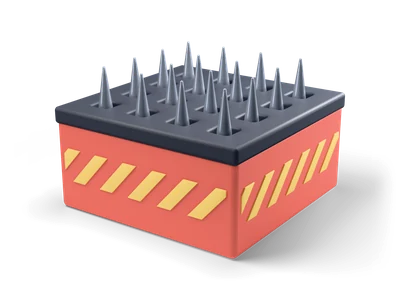
Coral red 2 by 2 by 1 m trap block with yellow warning stripes, a dark perforated top and 16 round tipped steel spikes that retract as one separate part. [Procedural 3D model, CC0 1.0]
Can I use Spike Trap Block (Grab3D) in commercial projects without attribution?
Yes. Spike Trap Block is published by Grab3D under CC0 1.0 Public Domain Dedication, granting unrestricted commercial and non-commercial use without attribution.
What resolutions and delivery options exist for Spike Trap Block?
Spike Trap Block provides 2K packages (default GLB), available via direct browser download or the Unreal Studio plugin.
How do I import Spike Trap Block into Unreal Engine, Blender, or Unity?
Import the mesh and bundled PBR textures using Linear/Non-Color space for roughness, normal, and metallic maps, keeping Albedo in sRGB.
 Poly Haven
 Poly Haven
 Poly Haven
 Poly Haven
 Poly Haven
 Poly Haven
 Poly Haven
 Poly Haven