"24ed63134cdc868f"{"asset":{"id":16993,"slug":"grab3d-metal-detector","provider":"grab3d","providerLabel":"Grab3D","sourceSlug":"metal-detector","title":"Walk-Through Metal Detector","summary":"Walk-through metal detector arch for airport security with two white side panels on feet, a blue header with light band and glowing zone light strips. [Procedural 3D model, CC0 1.0]","categorySlug":"3d-models","categoryName":"3D Models","subcategorySlug":"props-tools","subcategoryName":"Props \u0026 Tools","sourceKind":"procedural","creator":"Grab3D","coverUrl":"https://grab3d.com/m/metal-detector/thumb-400.webp","sourceUrl":"https://grab3d.com/models/electronics/metal-detector/","licenseUrl":"https://grab3d.com/dl/metal-detector/LICENSE.txt","resolutions":["2K"],"defaultVariant":"GLB","variants":[{"url":"https://grab3d.com/dl/metal-detector/metal-detector-obj.zip","label":"OBJ-ZIP","filename":"metal-detector-obj.zip","sizeBytes":396558},{"url":"https://grab3d.com/dl/metal-detector/metal-detector.blend","label":"BLEND","filename":"metal-detector.blend","sizeBytes":429192},{"url":"https://grab3d.com/dl/metal-detector/metal-detector.glb","label":"GLB","filename":"metal-detector.glb","sizeBytes":588272},{"url":"https://grab3d.com/dl/metal-detector/metal-detector.usdz","label":"USDZ","filename":"metal-detector.usdz","sizeBytes":932583},{"url":"https://grab3d.com/dl/metal-detector/metal-detector.fbx","label":"FBX","filename":"metal-detector.fbx","sizeBytes":974572}],"tags":["electronics","electronics \u0026 tech","stylized","procedural","metal detector","walk-through detector","security gate","security checkpoint","emissive","airport","aviation","terminal","cozy"],"popularityScore":0,"publishedAt":"2026-09-26T00:00:00.000Z"},"related":[{"id":5,"slug":"polyhaven-camera-01","provider":"polyhaven","providerLabel":"Poly Haven","sourceSlug":"Camera_01","title":"Camera 01","summary":"Camera 01 is a CC0 Props \u0026 Tools asset by Rajil Jose Macatangay on Poly Haven (1K, 2K, 4K, 8K+).","categorySlug":"3d-models","categoryName":"3D Models","subcategorySlug":"props-tools","subcategoryName":"Props \u0026 Tools","sourceKind":"models","creator":"Rajil Jose Macatangay","coverUrl":"https://cdn.polyhaven.com/asset_img/thumbs/Camera_01.png?width=480\u0026height=480\u0026format=jpg\u0026v=534c7d69","sourceUrl":"https://polyhaven.com/a/Camera_01","licenseUrl":"https://polyhaven.com/license","resolutions":["1K","2K","4K","8K+"],"defaultVariant":"2K","variants":[],"tags":["props","electronics","vintage","camera","antique","ornate","photography","retro","lens","classic","analog","models"],"popularityScore":114714,"publishedAt":"2020-03-30T22:00:00.000Z"},{"id":844,"slug":"polyhaven-grass-bermuda-01","provider":"polyhaven","providerLabel":"Poly Haven","sourceSlug":"grass_bermuda_01","title":"Grass Bermuda 01","summary":"Grass Bermuda 01 is a CC0 Props \u0026 Tools asset by Rico Cilliers on Poly Haven (1K, 2K, 4K, 8K+).","categorySlug":"3d-models","categoryName":"3D Models","subcategorySlug":"props-tools","subcategoryName":"Props \u0026 Tools","sourceKind":"models","creator":"Rico Cilliers","coverUrl":"https://cdn.polyhaven.com/asset_img/thumbs/grass_bermuda_01.png?width=480\u0026height=480\u0026format=jpg\u0026v=fd28a3b9","sourceUrl":"https://polyhaven.com/a/grass_bermuda_01","licenseUrl":"https://polyhaven.com/license","resolutions":["1K","2K","4K","8K+"],"defaultVariant":"2K","variants":[],"tags":["grass","nature","ground cover","plant","shrub","field","foliage","natural","outdoor","botany","small","green","bermuda","models"],"popularityScore":106456,"publishedAt":"2022-04-15T00:00:00.000Z"},{"id":716,"slug":"polyhaven-fern-02","provider":"polyhaven","providerLabel":"Poly Haven","sourceSlug":"fern_02","title":"Fern 02","summary":"Fern 02 is a CC0 Props \u0026 Tools asset by Rob Tuytel, Rico Cilliers on Poly Haven (1K, 2K, 4K, 8K+).","categorySlug":"3d-models","categoryName":"3D Models","subcategorySlug":"props-tools","subcategoryName":"Props \u0026 Tools","sourceKind":"models","creator":"Rob Tuytel, Rico Cilliers","coverUrl":"https://cdn.polyhaven.com/asset_img/thumbs/fern_02.png?width=480\u0026height=480\u0026format=jpg\u0026v=334ce7aa","sourceUrl":"https://polyhaven.com/a/fern_02","licenseUrl":"https://polyhaven.com/license","resolutions":["1K","2K","4K","8K+"],"defaultVariant":"2K","variants":[],"tags":["plants","nature","plant","fern","foliage","jungle","shrub","bush","leaf","leaves","green","forest","outdoor","models"],"popularityScore":84111,"publishedAt":"2022-05-27T00:00:00.000Z"},{"id":2257,"slug":"polyhaven-wine-bottles-01","provider":"polyhaven","providerLabel":"Poly Haven","sourceSlug":"wine_bottles_01","title":"Wine Bottles 01","summary":"Wine Bottles 01 is a CC0 Props \u0026 Tools asset by Rico Cilliers, Jurita Burger on Poly Haven (1K, 2K, 4K, 8K+).","categorySlug":"3d-models","categoryName":"3D Models","subcategorySlug":"props-tools","subcategoryName":"Props \u0026 Tools","sourceKind":"models","creator":"Rico Cilliers, Jurita Burger","coverUrl":"https://cdn.polyhaven.com/asset_img/thumbs/wine_bottles_01.png?width=480\u0026height=480\u0026format=jpg\u0026v=ff1e806c","sourceUrl":"https://polyhaven.com/a/wine_bottles_01","licenseUrl":"https://polyhaven.com/license","resolutions":["1K","2K","4K","8K+"],"defaultVariant":"2K","variants":[],"tags":["props","containers","dishes","wine","drink","bottle","champagne","grape","farmhouse","vineyard","models"],"popularityScore":62719,"publishedAt":"2022-03-25T00:00:00.000Z"},{"id":3,"slug":"polyhaven-barrel-01","provider":"polyhaven","providerLabel":"Poly Haven","sourceSlug":"Barrel_01","title":"Barrel_01","summary":"Barrel_01 is a CC0 Props \u0026 Tools asset by Jorge Camacho on Poly Haven (1K, 2K, 4K, 8K+).","categorySlug":"3d-models","categoryName":"3D Models","subcategorySlug":"props-tools","subcategoryName":"Props \u0026 Tools","sourceKind":"models","creator":"Jorge Camacho","coverUrl":"https://cdn.polyhaven.com/asset_img/thumbs/Barrel_01.png?width=480\u0026height=480\u0026format=jpg\u0026v=29e315a9","sourceUrl":"https://polyhaven.com/a/Barrel_01","licenseUrl":"https://polyhaven.com/license","resolutions":["1K","2K","4K","8K+"],"defaultVariant":"2K","variants":[],"tags":["industrial","containers","barrel","oil","explosive","radioactive","metal","red barrel","oil barrel","drums","fuel barrel","explosive barrel","models"],"popularityScore":60861,"publishedAt":"2020-03-30T22:00:00.000Z"},{"id":650,"slug":"polyhaven-dry-branches-medium-01","provider":"polyhaven","providerLabel":"Poly Haven","sourceSlug":"dry_branches_medium_01","title":"Dry Branches Medium 01","summary":"Dry Branches Medium 01 is a CC0 Props \u0026 Tools asset by Rico Cilliers on Poly Haven (1K, 2K, 4K, 8K+).","categorySlug":"3d-models","categoryName":"3D Models","subcategorySlug":"props-tools","subcategoryName":"Props \u0026 Tools","sourceKind":"models","creator":"Rico Cilliers","coverUrl":"https://cdn.polyhaven.com/asset_img/thumbs/dry_branches_medium_01.png?width=480\u0026height=480\u0026format=jpg\u0026v=5fecfa26","sourceUrl":"https://polyhaven.com/a/dry_branches_medium_01","licenseUrl":"https://polyhaven.com/license","resolutions":["1K","2K","4K","8K+"],"defaultVariant":"2K","variants":[],"tags":["props","nature","plants","ground cover","branches","dead","dry","natural","plant","outdoor","foliage","forest","jungle","shrub","medium","stick","twig","botany","wood","models"],"popularityScore":50961,"publishedAt":"2022-11-09T00:00:00.000Z"},{"id":1864,"slug":"polyhaven-shrub-sorrel-01","provider":"polyhaven","providerLabel":"Poly Haven","sourceSlug":"shrub_sorrel_01","title":"Shrub Sorrel 01","summary":"Shrub Sorrel 01 is a CC0 Props \u0026 Tools asset by Rico Cilliers on Poly Haven (1K, 2K, 4K, 8K+).","categorySlug":"3d-models","categoryName":"3D Models","subcategorySlug":"props-tools","subcategoryName":"Props \u0026 Tools","sourceKind":"models","creator":"Rico Cilliers","coverUrl":"https://cdn.polyhaven.com/asset_img/thumbs/shrub_sorrel_01.png?width=480\u0026height=480\u0026format=jpg\u0026v=079989cc","sourceUrl":"https://polyhaven.com/a/shrub_sorrel_01","licenseUrl":"https://polyhaven.com/license","resolutions":["1K","2K","4K","8K+"],"defaultVariant":"2K","variants":[],"tags":["plants","flowers","nature","sorrel","potplant","bush","shrub","leaf","leaves","green","small","forest","field","floral","flower","models"],"popularityScore":47599,"publishedAt":"2022-04-08T00:00:00.000Z"},{"id":100,"slug":"polyhaven-anthurium-botany-01","provider":"polyhaven","providerLabel":"Poly Haven","sourceSlug":"anthurium_botany_01","title":"Anthurium Botany 01","summary":"Anthurium Botany 01 is a CC0 Props \u0026 Tools asset by Rob Tuytel, Rico Cilliers on Poly Haven (1K, 2K, 4K, 8K+).","categorySlug":"3d-models","categoryName":"3D Models","subcategorySlug":"props-tools","subcategoryName":"Props \u0026 Tools","sourceKind":"models","creator":"Rob Tuytel, Rico Cilliers","coverUrl":"https://cdn.polyhaven.com/asset_img/thumbs/anthurium_botany_01.png?width=480\u0026height=480\u0026format=jpg\u0026v=19be8ef7","sourceUrl":"https://polyhaven.com/a/anthurium_botany_01","licenseUrl":"https://polyhaven.com/license","resolutions":["1K","2K","4K","8K+"],"defaultVariant":"2K","variants":[],"tags":["plants","nature","bush","leaf","shrub","leaves","forest","plant","green","jungle","outdoor","botany","models"],"popularityScore":43282,"publishedAt":"2022-04-27T00:00:00.000Z"}]}
CC0 1.0 Public DomainGrab3D
Walk-Through Metal Detector
by Grab3D
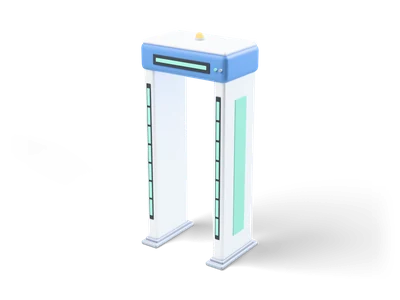
Walk-through metal detector arch for airport security with two white side panels on feet, a blue header with light band and glowing zone light strips. [Procedural 3D model, CC0 1.0]
Can I use Walk-Through Metal Detector (Grab3D) in commercial projects without attribution?
Yes. Walk-Through Metal Detector is published by Grab3D under CC0 1.0 Public Domain Dedication, granting unrestricted commercial and non-commercial use without attribution.
What resolutions and delivery options exist for Walk-Through Metal Detector?
Walk-Through Metal Detector provides 2K packages (default GLB), available via direct browser download or the Unreal Studio plugin.
How do I import Walk-Through Metal Detector into Unreal Engine, Blender, or Unity?
Import the mesh and bundled PBR textures using Linear/Non-Color space for roughness, normal, and metallic maps, keeping Albedo in sRGB.
 Poly Haven
 Poly Haven
 Poly Haven
 Poly Haven
 Poly Haven
 Poly Haven
 Poly Haven
 Poly Haven