"24ed63134cdc868f"{"asset":{"id":17102,"slug":"grab3d-high-rise-apartment","provider":"grab3d","providerLabel":"Grab3D","sourceSlug":"high-rise-apartment","title":"High-Rise Apartment","summary":"Fourteen-storey apartment tower with mint walls, white balcony bands, glass railings and pink and yellow privacy screens. 47.2 m to the parapet. [Procedural 3D model, CC0 1.0]","categorySlug":"3d-models","categoryName":"3D Models","subcategorySlug":"architecture-structures","subcategoryName":"Architecture \u0026 Structures","sourceKind":"procedural","creator":"Grab3D","coverUrl":"https://grab3d.com/m/high-rise-apartment/thumb-400.webp","sourceUrl":"https://grab3d.com/models/buildings/high-rise-apartment/","licenseUrl":"https://grab3d.com/dl/high-rise-apartment/LICENSE.txt","resolutions":["1K","4K"],"defaultVariant":"GLB","variants":[{"url":"https://grab3d.com/dl/high-rise-apartment/high-rise-apartment-light.fbx","label":"FBX-LIGHT","filename":"high-rise-apartment-light.fbx","sizeBytes":1528124},{"url":"https://grab3d.com/dl/high-rise-apartment/high-rise-apartment-light.glb","label":"GLB-LIGHT","filename":"high-rise-apartment-light.glb","sizeBytes":1736584},{"url":"https://grab3d.com/dl/high-rise-apartment/high-rise-apartment.blend","label":"BLEND","filename":"high-rise-apartment.blend","sizeBytes":2265294},{"url":"https://grab3d.com/dl/high-rise-apartment/high-rise-apartment-obj.zip","label":"OBJ-ZIP","filename":"high-rise-apartment-obj.zip","sizeBytes":2691882},{"url":"https://grab3d.com/dl/high-rise-apartment/high-rise-apartment.glb","label":"GLB","filename":"high-rise-apartment.glb","sizeBytes":4807180},{"url":"https://grab3d.com/dl/high-rise-apartment/high-rise-apartment.fbx","label":"FBX","filename":"high-rise-apartment.fbx","sizeBytes":4859564},{"url":"https://grab3d.com/dl/high-rise-apartment/high-rise-apartment.usdz","label":"USDZ","filename":"high-rise-apartment.usdz","sizeBytes":6389906}],"tags":["buildings","buildings \u0026 architecture","stylized","procedural","high rise apartment","apartment tower","residential","apartment","balcony","building","city builder","downtown","modular city"],"popularityScore":0,"publishedAt":"2026-09-26T00:00:00.000Z"},"related":[{"id":1206,"slug":"polyhaven-modular-industrial-pipes-01","provider":"polyhaven","providerLabel":"Poly Haven","sourceSlug":"modular_industrial_pipes_01","title":"Modular Industrial Pipes 01","summary":"Modular Industrial Pipes 01 is a CC0 Architecture \u0026 Structures asset by Jorge Camacho on Poly Haven (1K, 2K, 4K, 8K+).","categorySlug":"3d-models","categoryName":"3D Models","subcategorySlug":"architecture-structures","subcategoryName":"Architecture \u0026 Structures","sourceKind":"models","creator":"Jorge Camacho","coverUrl":"https://cdn.polyhaven.com/asset_img/thumbs/modular_industrial_pipes_01.png?width=480\u0026height=480\u0026format=jpg\u0026v=7f0c137b","sourceUrl":"https://polyhaven.com/a/modular_industrial_pipes_01","licenseUrl":"https://polyhaven.com/license","resolutions":["1K","2K","4K","8K+"],"defaultVariant":"2K","variants":[],"tags":["industrial","structures","pipes","factory","steam","modular","utility","infrastructure","models"],"popularityScore":32593,"publishedAt":"2021-06-15T14:33:45.000Z"},{"id":2157,"slug":"polyhaven-utility-box-02","provider":"polyhaven","providerLabel":"Poly Haven","sourceSlug":"utility_box_02","title":"Utility Box 02","summary":"Utility Box 02 is a CC0 Architecture \u0026 Structures asset by James Ray Cock on Poly Haven (1K, 2K, 4K, 8K+).","categorySlug":"3d-models","categoryName":"3D Models","subcategorySlug":"architecture-structures","subcategoryName":"Architecture \u0026 Structures","sourceKind":"models","creator":"James Ray Cock","coverUrl":"https://cdn.polyhaven.com/asset_img/thumbs/utility_box_02.png?width=480\u0026height=480\u0026format=jpg\u0026v=afaaf3e6","sourceUrl":"https://polyhaven.com/a/utility_box_02","licenseUrl":"https://polyhaven.com/license","resolutions":["1K","2K","4K","8K+"],"defaultVariant":"2K","variants":[],"tags":["structures","industrial","utility","box","electrical","power","urban","city","road","circuit","breakers","transformer","distributionpanel","junction box","control panel","utility box","infrastructure","models"],"popularityScore":29230,"publishedAt":"2023-11-24T00:00:00.000Z"},{"id":1200,"slug":"polyhaven-modular-chainlink-fence","provider":"polyhaven","providerLabel":"Poly Haven","sourceSlug":"modular_chainlink_fence","title":"Modular Chainlink Fence","summary":"Modular Chainlink Fence is a CC0 Architecture \u0026 Structures asset by James Ray Cock, Amal Kumar on Poly Haven (1K, 2K, 4K, 8K+).","categorySlug":"3d-models","categoryName":"3D Models","subcategorySlug":"architecture-structures","subcategoryName":"Architecture \u0026 Structures","sourceKind":"models","creator":"James Ray Cock, Amal Kumar","coverUrl":"https://cdn.polyhaven.com/asset_img/thumbs/modular_chainlink_fence.png?width=480\u0026height=480\u0026format=jpg\u0026v=293e177e","sourceUrl":"https://polyhaven.com/a/modular_chainlink_fence","licenseUrl":"https://polyhaven.com/license","resolutions":["1K","2K","4K","8K+"],"defaultVariant":"2K","variants":[],"tags":["structures","industrial","buildings","infrastructure","city","urban","fencing","barrier","security","boundary","wall","wire","models"],"popularityScore":27979,"publishedAt":"2023-11-11T00:00:00.000Z"},{"id":1724,"slug":"polyhaven-rollershutter-window-01","provider":"polyhaven","providerLabel":"Poly Haven","sourceSlug":"rollershutter_window_01","title":"Rollershutter Window 01","summary":"Rollershutter Window 01 is a CC0 Architecture \u0026 Structures asset by MP on Poly Haven (1K, 2K, 4K, 8K+).","categorySlug":"3d-models","categoryName":"3D Models","subcategorySlug":"architecture-structures","subcategoryName":"Architecture \u0026 Structures","sourceKind":"models","creator":"MP","coverUrl":"https://cdn.polyhaven.com/asset_img/thumbs/rollershutter_window_01.png?width=480\u0026height=480\u0026format=jpg\u0026v=e11965db","sourceUrl":"https://polyhaven.com/a/rollershutter_window_01","licenseUrl":"https://polyhaven.com/license","resolutions":["1K","2K","4K","8K+"],"defaultVariant":"2K","variants":[],"tags":["structures","industrial","buildings","urban","security","commercial","shutters","garage door","security shutter","warehouse door","roller garage door","models"],"popularityScore":21498,"publishedAt":"2023-10-11T00:00:00.000Z"},{"id":1199,"slug":"polyhaven-modular-airduct-rectangular-01","provider":"polyhaven","providerLabel":"Poly Haven","sourceSlug":"modular_airduct_rectangular_01","title":"Modular Airduct Rectangular 01","summary":"Modular Airduct Rectangular 01 is a CC0 Architecture \u0026 Structures asset by James Ray Cock on Poly Haven (1K, 2K, 4K, 8K+).","categorySlug":"3d-models","categoryName":"3D Models","subcategorySlug":"architecture-structures","subcategoryName":"Architecture \u0026 Structures","sourceKind":"models","creator":"James Ray Cock","coverUrl":"https://cdn.polyhaven.com/asset_img/thumbs/modular_airduct_rectangular_01.png?width=480\u0026height=480\u0026format=jpg\u0026v=afb54b06","sourceUrl":"https://polyhaven.com/a/modular_airduct_rectangular_01","licenseUrl":"https://polyhaven.com/license","resolutions":["1K","2K","4K","8K+"],"defaultVariant":"2K","variants":[],"tags":["industrial","vent","airduct","modular","pieces","workshop","warehouse","rectangular","metal","airvent","utility","infrastructure","models"],"popularityScore":21242,"publishedAt":"2021-08-19T00:00:00.000Z"},{"id":512,"slug":"polyhaven-concrete-road-barrier","provider":"polyhaven","providerLabel":"Poly Haven","sourceSlug":"concrete_road_barrier","title":"Concrete Road Barrier","summary":"Concrete Road Barrier is a CC0 Architecture \u0026 Structures asset by Amal Kumar on Poly Haven (1K, 2K, 4K, 8K+).","categorySlug":"3d-models","categoryName":"3D Models","subcategorySlug":"architecture-structures","subcategoryName":"Architecture \u0026 Structures","sourceKind":"models","creator":"Amal Kumar","coverUrl":"https://cdn.polyhaven.com/asset_img/thumbs/concrete_road_barrier.png?width=480\u0026height=480\u0026format=jpg\u0026v=2d7473f3","sourceUrl":"https://polyhaven.com/a/concrete_road_barrier","licenseUrl":"https://polyhaven.com/license","resolutions":["1K","2K","4K","8K+"],"defaultVariant":"2K","variants":[],"tags":["industrial","structures","road barrier","traffic barrier","safety barrier","wall","road","road block","blockade","partition","infrastructure","models"],"popularityScore":18513,"publishedAt":"2023-08-18T00:00:00.000Z"},{"id":2156,"slug":"polyhaven-utility-box-01","provider":"polyhaven","providerLabel":"Poly Haven","sourceSlug":"utility_box_01","title":"Utility Box 01","summary":"Utility Box 01 is a CC0 Architecture \u0026 Structures asset by James Ray Cock on Poly Haven (1K, 2K, 4K, 8K+).","categorySlug":"3d-models","categoryName":"3D Models","subcategorySlug":"architecture-structures","subcategoryName":"Architecture \u0026 Structures","sourceKind":"models","creator":"James Ray Cock","coverUrl":"https://cdn.polyhaven.com/asset_img/thumbs/utility_box_01.png?width=480\u0026height=480\u0026format=jpg\u0026v=a3a3d6ee","sourceUrl":"https://polyhaven.com/a/utility_box_01","licenseUrl":"https://polyhaven.com/license","resolutions":["1K","2K","4K","8K+"],"defaultVariant":"2K","variants":[],"tags":["industrial","structures","utility","box","electrical","power","circuit","breakers","transformer","distributionpanel","junction box","control panel","utility box","infrastructure","urban","city","road","models"],"popularityScore":17147,"publishedAt":"2023-11-18T00:00:00.000Z"},{"id":1204,"slug":"polyhaven-modular-fire-escape","provider":"polyhaven","providerLabel":"Poly Haven","sourceSlug":"modular_fire_escape","title":"Modular Fire Escape","summary":"Modular Fire Escape is a CC0 Architecture \u0026 Structures asset by Juniix on Poly Haven (1K, 2K, 4K, 8K+).","categorySlug":"3d-models","categoryName":"3D Models","subcategorySlug":"architecture-structures","subcategoryName":"Architecture \u0026 Structures","sourceKind":"models","creator":"Juniix","coverUrl":"https://cdn.polyhaven.com/asset_img/thumbs/modular_fire_escape.png?width=480\u0026height=480\u0026format=jpg\u0026v=62ffff29","sourceUrl":"https://polyhaven.com/a/modular_fire_escape","licenseUrl":"https://polyhaven.com/license","resolutions":["1K","2K","4K","8K+"],"defaultVariant":"2K","variants":[],"tags":["industrial","structures","modular","pieces","emergency","building","urban","evacuation","safety","fire egress","stairs","utility","infrastructure","models"],"popularityScore":13726,"publishedAt":"2023-09-13T00:00:00.000Z"}]}
CC0 1.0 Public DomainGrab3D
High-Rise Apartment
by Grab3D
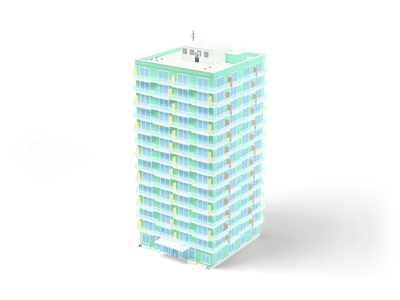
Fourteen-storey apartment tower with mint walls, white balcony bands, glass railings and pink and yellow privacy screens. 47.2 m to the parapet. [Procedural 3D model, CC0 1.0]
Can I use High-Rise Apartment (Grab3D) in commercial projects without attribution?
Yes. High-Rise Apartment is published by Grab3D under CC0 1.0 Public Domain Dedication, granting unrestricted commercial and non-commercial use without attribution.
What resolutions and delivery options exist for High-Rise Apartment?
High-Rise Apartment provides 1K, 4K packages (default GLB), available via direct browser download or the Unreal Studio plugin.
How do I import High-Rise Apartment into Unreal Engine, Blender, or Unity?
Import the mesh and bundled PBR textures using Linear/Non-Color space for roughness, normal, and metallic maps, keeping Albedo in sRGB.
 Poly Haven
 Poly Haven
 Poly Haven
 Poly Haven
 Poly Haven
 Poly Haven
 Poly Haven
 Poly Haven