"24ed63134cdc868f"{"asset":{"id":30480,"slug":"3dassets-airport-terminal-and-ground-operations-perimeter-fence-f8a14e9f","provider":"3dassets","providerLabel":"3DAssets.dev","sourceSlug":"airport-terminal-and-ground-operations-perimeter-fence-f8a14e9f","title":"Perimeter Fence Run (Airport Terminal and Ground Operations)","summary":"Eight metre airfield perimeter fence bay: three posts on cast pads carrying a mesh panel with vertical wires and three line rails, angled top arms with three strand wires and a blank warning plate. [CC0 1.0 GLB]","categorySlug":"3d-models","categoryName":"3D Models","subcategorySlug":"architecture-structures","subcategoryName":"Architecture \u0026 Structures","sourceKind":"3d-model","creator":"3D Assets","coverUrl":"https://cdn.3dassets.dev/assets/26091/v1/thumb.webp","sourceUrl":"https://3dassets.dev/assets/airport-terminal-and-ground-operations-perimeter-fence-f8a14e9f","licenseUrl":"https://creativecommons.org/publicdomain/zero/1.0/","resolutions":[],"defaultVariant":"GLB","variants":[{"url":"https://cdn.3dassets.dev/assets/26091/v1/model.glb","label":"GLB","filename":"airport-terminal-and-ground-operations-perimeter-fence-f8a14e9f.glb","sizeBytes":34736}],"tags":["modern","stylized","modular","kit / set","glb","3d-model"],"popularityScore":62,"publishedAt":"2026-09-07T20:45:27.020Z"},"related":[{"id":1206,"slug":"polyhaven-modular-industrial-pipes-01","provider":"polyhaven","providerLabel":"Poly Haven","sourceSlug":"modular_industrial_pipes_01","title":"Modular Industrial Pipes 01","summary":"Modular Industrial Pipes 01 is a CC0 Architecture \u0026 Structures asset by Jorge Camacho on Poly Haven (1K, 2K, 4K, 8K+).","categorySlug":"3d-models","categoryName":"3D Models","subcategorySlug":"architecture-structures","subcategoryName":"Architecture \u0026 Structures","sourceKind":"models","creator":"Jorge Camacho","coverUrl":"https://cdn.polyhaven.com/asset_img/thumbs/modular_industrial_pipes_01.png?width=480\u0026height=480\u0026format=jpg\u0026v=7f0c137b","sourceUrl":"https://polyhaven.com/a/modular_industrial_pipes_01","licenseUrl":"https://polyhaven.com/license","resolutions":["1K","2K","4K","8K+"],"defaultVariant":"2K","variants":[],"tags":["industrial","structures","pipes","factory","steam","modular","utility","infrastructure","models"],"popularityScore":32593,"publishedAt":"2021-06-15T14:33:45.000Z"},{"id":2157,"slug":"polyhaven-utility-box-02","provider":"polyhaven","providerLabel":"Poly Haven","sourceSlug":"utility_box_02","title":"Utility Box 02","summary":"Utility Box 02 is a CC0 Architecture \u0026 Structures asset by James Ray Cock on Poly Haven (1K, 2K, 4K, 8K+).","categorySlug":"3d-models","categoryName":"3D Models","subcategorySlug":"architecture-structures","subcategoryName":"Architecture \u0026 Structures","sourceKind":"models","creator":"James Ray Cock","coverUrl":"https://cdn.polyhaven.com/asset_img/thumbs/utility_box_02.png?width=480\u0026height=480\u0026format=jpg\u0026v=afaaf3e6","sourceUrl":"https://polyhaven.com/a/utility_box_02","licenseUrl":"https://polyhaven.com/license","resolutions":["1K","2K","4K","8K+"],"defaultVariant":"2K","variants":[],"tags":["structures","industrial","utility","box","electrical","power","urban","city","road","circuit","breakers","transformer","distributionpanel","junction box","control panel","utility box","infrastructure","models"],"popularityScore":29230,"publishedAt":"2023-11-24T00:00:00.000Z"},{"id":1200,"slug":"polyhaven-modular-chainlink-fence","provider":"polyhaven","providerLabel":"Poly Haven","sourceSlug":"modular_chainlink_fence","title":"Modular Chainlink Fence","summary":"Modular Chainlink Fence is a CC0 Architecture \u0026 Structures asset by James Ray Cock, Amal Kumar on Poly Haven (1K, 2K, 4K, 8K+).","categorySlug":"3d-models","categoryName":"3D Models","subcategorySlug":"architecture-structures","subcategoryName":"Architecture \u0026 Structures","sourceKind":"models","creator":"James Ray Cock, Amal Kumar","coverUrl":"https://cdn.polyhaven.com/asset_img/thumbs/modular_chainlink_fence.png?width=480\u0026height=480\u0026format=jpg\u0026v=293e177e","sourceUrl":"https://polyhaven.com/a/modular_chainlink_fence","licenseUrl":"https://polyhaven.com/license","resolutions":["1K","2K","4K","8K+"],"defaultVariant":"2K","variants":[],"tags":["structures","industrial","buildings","infrastructure","city","urban","fencing","barrier","security","boundary","wall","wire","models"],"popularityScore":27979,"publishedAt":"2023-11-11T00:00:00.000Z"},{"id":1724,"slug":"polyhaven-rollershutter-window-01","provider":"polyhaven","providerLabel":"Poly Haven","sourceSlug":"rollershutter_window_01","title":"Rollershutter Window 01","summary":"Rollershutter Window 01 is a CC0 Architecture \u0026 Structures asset by MP on Poly Haven (1K, 2K, 4K, 8K+).","categorySlug":"3d-models","categoryName":"3D Models","subcategorySlug":"architecture-structures","subcategoryName":"Architecture \u0026 Structures","sourceKind":"models","creator":"MP","coverUrl":"https://cdn.polyhaven.com/asset_img/thumbs/rollershutter_window_01.png?width=480\u0026height=480\u0026format=jpg\u0026v=e11965db","sourceUrl":"https://polyhaven.com/a/rollershutter_window_01","licenseUrl":"https://polyhaven.com/license","resolutions":["1K","2K","4K","8K+"],"defaultVariant":"2K","variants":[],"tags":["structures","industrial","buildings","urban","security","commercial","shutters","garage door","security shutter","warehouse door","roller garage door","models"],"popularityScore":21498,"publishedAt":"2023-10-11T00:00:00.000Z"},{"id":1199,"slug":"polyhaven-modular-airduct-rectangular-01","provider":"polyhaven","providerLabel":"Poly Haven","sourceSlug":"modular_airduct_rectangular_01","title":"Modular Airduct Rectangular 01","summary":"Modular Airduct Rectangular 01 is a CC0 Architecture \u0026 Structures asset by James Ray Cock on Poly Haven (1K, 2K, 4K, 8K+).","categorySlug":"3d-models","categoryName":"3D Models","subcategorySlug":"architecture-structures","subcategoryName":"Architecture \u0026 Structures","sourceKind":"models","creator":"James Ray Cock","coverUrl":"https://cdn.polyhaven.com/asset_img/thumbs/modular_airduct_rectangular_01.png?width=480\u0026height=480\u0026format=jpg\u0026v=afb54b06","sourceUrl":"https://polyhaven.com/a/modular_airduct_rectangular_01","licenseUrl":"https://polyhaven.com/license","resolutions":["1K","2K","4K","8K+"],"defaultVariant":"2K","variants":[],"tags":["industrial","vent","airduct","modular","pieces","workshop","warehouse","rectangular","metal","airvent","utility","infrastructure","models"],"popularityScore":21242,"publishedAt":"2021-08-19T00:00:00.000Z"},{"id":512,"slug":"polyhaven-concrete-road-barrier","provider":"polyhaven","providerLabel":"Poly Haven","sourceSlug":"concrete_road_barrier","title":"Concrete Road Barrier","summary":"Concrete Road Barrier is a CC0 Architecture \u0026 Structures asset by Amal Kumar on Poly Haven (1K, 2K, 4K, 8K+).","categorySlug":"3d-models","categoryName":"3D Models","subcategorySlug":"architecture-structures","subcategoryName":"Architecture \u0026 Structures","sourceKind":"models","creator":"Amal Kumar","coverUrl":"https://cdn.polyhaven.com/asset_img/thumbs/concrete_road_barrier.png?width=480\u0026height=480\u0026format=jpg\u0026v=2d7473f3","sourceUrl":"https://polyhaven.com/a/concrete_road_barrier","licenseUrl":"https://polyhaven.com/license","resolutions":["1K","2K","4K","8K+"],"defaultVariant":"2K","variants":[],"tags":["industrial","structures","road barrier","traffic barrier","safety barrier","wall","road","road block","blockade","partition","infrastructure","models"],"popularityScore":18513,"publishedAt":"2023-08-18T00:00:00.000Z"},{"id":2156,"slug":"polyhaven-utility-box-01","provider":"polyhaven","providerLabel":"Poly Haven","sourceSlug":"utility_box_01","title":"Utility Box 01","summary":"Utility Box 01 is a CC0 Architecture \u0026 Structures asset by James Ray Cock on Poly Haven (1K, 2K, 4K, 8K+).","categorySlug":"3d-models","categoryName":"3D Models","subcategorySlug":"architecture-structures","subcategoryName":"Architecture \u0026 Structures","sourceKind":"models","creator":"James Ray Cock","coverUrl":"https://cdn.polyhaven.com/asset_img/thumbs/utility_box_01.png?width=480\u0026height=480\u0026format=jpg\u0026v=a3a3d6ee","sourceUrl":"https://polyhaven.com/a/utility_box_01","licenseUrl":"https://polyhaven.com/license","resolutions":["1K","2K","4K","8K+"],"defaultVariant":"2K","variants":[],"tags":["industrial","structures","utility","box","electrical","power","circuit","breakers","transformer","distributionpanel","junction box","control panel","utility box","infrastructure","urban","city","road","models"],"popularityScore":17147,"publishedAt":"2023-11-18T00:00:00.000Z"},{"id":1204,"slug":"polyhaven-modular-fire-escape","provider":"polyhaven","providerLabel":"Poly Haven","sourceSlug":"modular_fire_escape","title":"Modular Fire Escape","summary":"Modular Fire Escape is a CC0 Architecture \u0026 Structures asset by Juniix on Poly Haven (1K, 2K, 4K, 8K+).","categorySlug":"3d-models","categoryName":"3D Models","subcategorySlug":"architecture-structures","subcategoryName":"Architecture \u0026 Structures","sourceKind":"models","creator":"Juniix","coverUrl":"https://cdn.polyhaven.com/asset_img/thumbs/modular_fire_escape.png?width=480\u0026height=480\u0026format=jpg\u0026v=62ffff29","sourceUrl":"https://polyhaven.com/a/modular_fire_escape","licenseUrl":"https://polyhaven.com/license","resolutions":["1K","2K","4K","8K+"],"defaultVariant":"2K","variants":[],"tags":["industrial","structures","modular","pieces","emergency","building","urban","evacuation","safety","fire egress","stairs","utility","infrastructure","models"],"popularityScore":13726,"publishedAt":"2023-09-13T00:00:00.000Z"}]}
CC0 1.0 Public Domain3DAssets.dev
Perimeter Fence Run (Airport Terminal and Ground Operations)
by 3D Assets
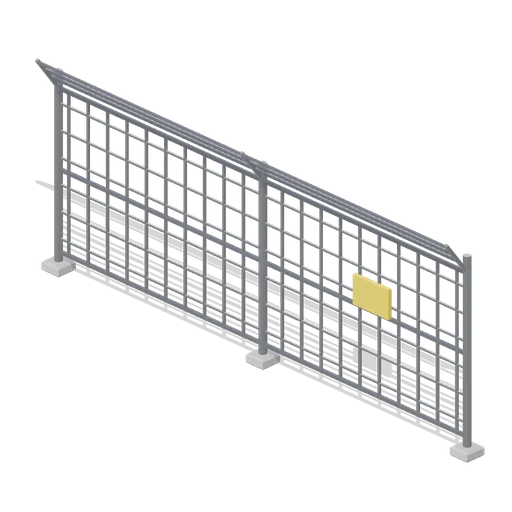
Eight metre airfield perimeter fence bay: three posts on cast pads carrying a mesh panel with vertical wires and three line rails, angled top arms with three strand wires and a blank warning plate. [CC0 1.0 GLB]
Can I use Perimeter Fence Run (Airport Terminal and Ground Operations) (3DAssets.dev) in commercial projects without attribution?
Yes. Perimeter Fence Run (Airport Terminal and Ground Operations) is published by 3DAssets.dev under CC0 1.0 Public Domain Dedication, granting unrestricted commercial and non-commercial use without attribution.
What resolutions and delivery options exist for Perimeter Fence Run (Airport Terminal and Ground Operations)?
Perimeter Fence Run (Airport Terminal and Ground Operations) includes the GLB package ready for direct browser download or Unreal plugin import without registration.
How do I import Perimeter Fence Run (Airport Terminal and Ground Operations) into Unreal Engine, Blender, or Unity?
Import the mesh and bundled PBR textures using Linear/Non-Color space for roughness, normal, and metallic maps, keeping Albedo in sRGB.
 Poly Haven
 Poly Haven
 Poly Haven
 Poly Haven
 Poly Haven
 Poly Haven
 Poly Haven
 Poly Haven