Character Rigging and Bone Visualization
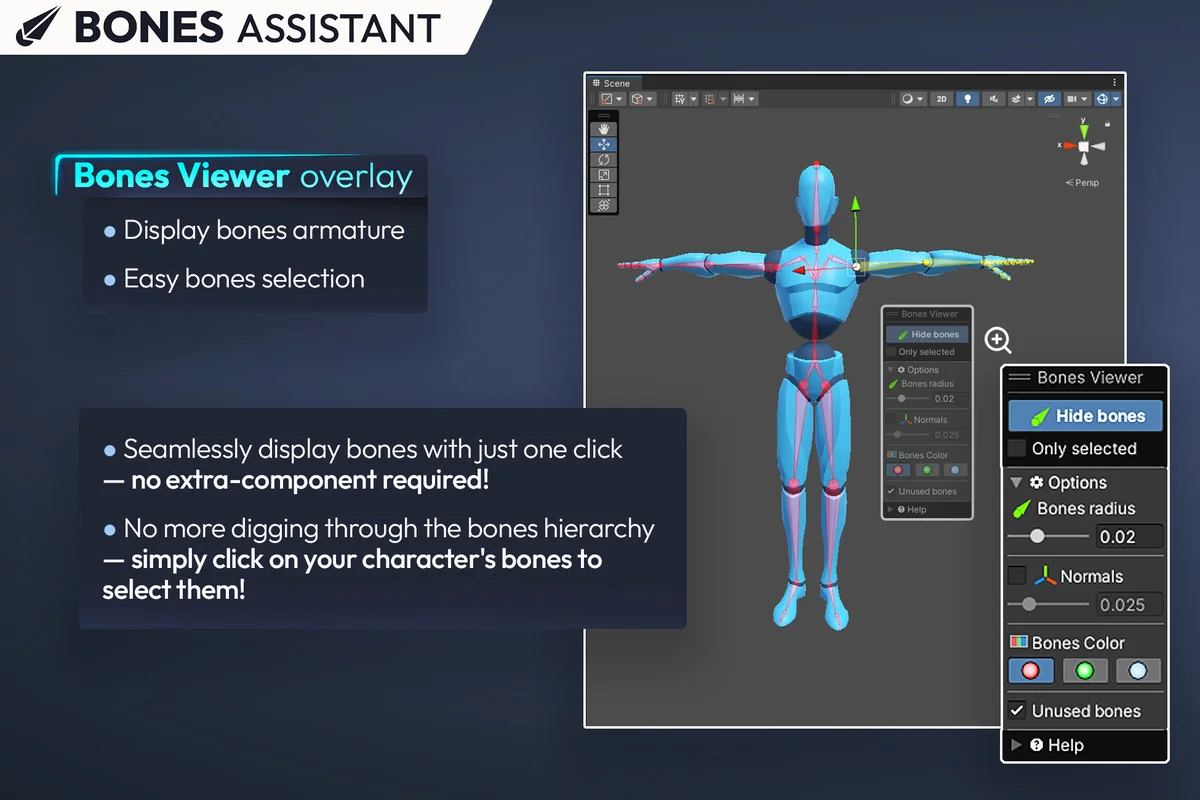
Bones Assistant simplifies the process of interacting with character hierarchies within the Unity Editor. Traditionally, selecting specific bones requires navigating through deeply nested transform lists in the Hierarchy window. The Bones Viewer component eliminates this manual search by allowing developers to display and select character bones directly within the Scene view. This system functions without the need for additional components on the character itself, providing a seamless way to interact with skeletal structures. The tool supports both Humanoid and Generic rigs, ensuring flexibility across various character types. Additionally, users can toggle the display of bone normals to verify orientation and choose to isolate the display to only the currently selected characters.
Humanoid Animation Authoring and Editing
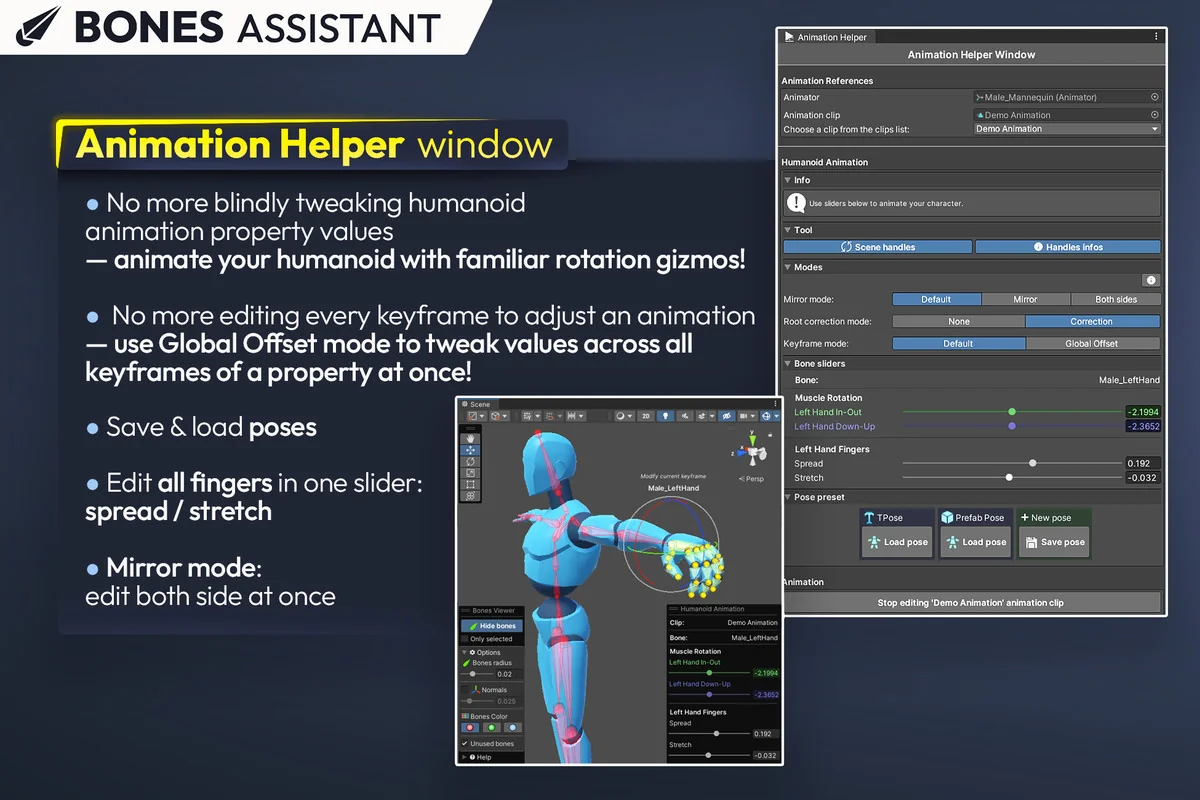
The Animation Helper within the package expands Unity’s native animation capabilities by providing a dedicated interface for creating and modifying humanoid clips. Rather than relying solely on the manipulation of raw property values, the tool enables the use of familiar rotation gizmos and sliders to pose characters. This functionality extends to read-only humanoid animations sourced from FBX files, allowing developers to refine existing assets directly in the engine. One of the more significant workflow features is the Global Offset mode, which allows for the adjustment of property values across all keyframes simultaneously. This is particularly useful for reshaping an entire animation—such as adjusting the overall lean or height of a character—without the need to edit individual keyframes one by one.
Symmetry and Pose Management
To accelerate the posing process, Bones Assistant includes a Mirror mode that allows for the simultaneous editing of both sides of a character rig. This ensures symmetry during the creation of idle poses or movement cycles. The tool also provides specialized controls for hand animation, featuring dedicated spread and stretch sliders for all fingers to avoid the tedious process of rotating individual digital joints. For developers who need to maintain consistency across different animation clips, the system includes a save and load pose feature. This allows specific skeletal configurations to be stored and reapplied to the character at any point during the animation process. The tool also incorporates root correction logic, which automatically adjusts root position and rotation when bone rotations are modified to maintain the character’s intended placement.
Real-Time Bone Mesh Generation
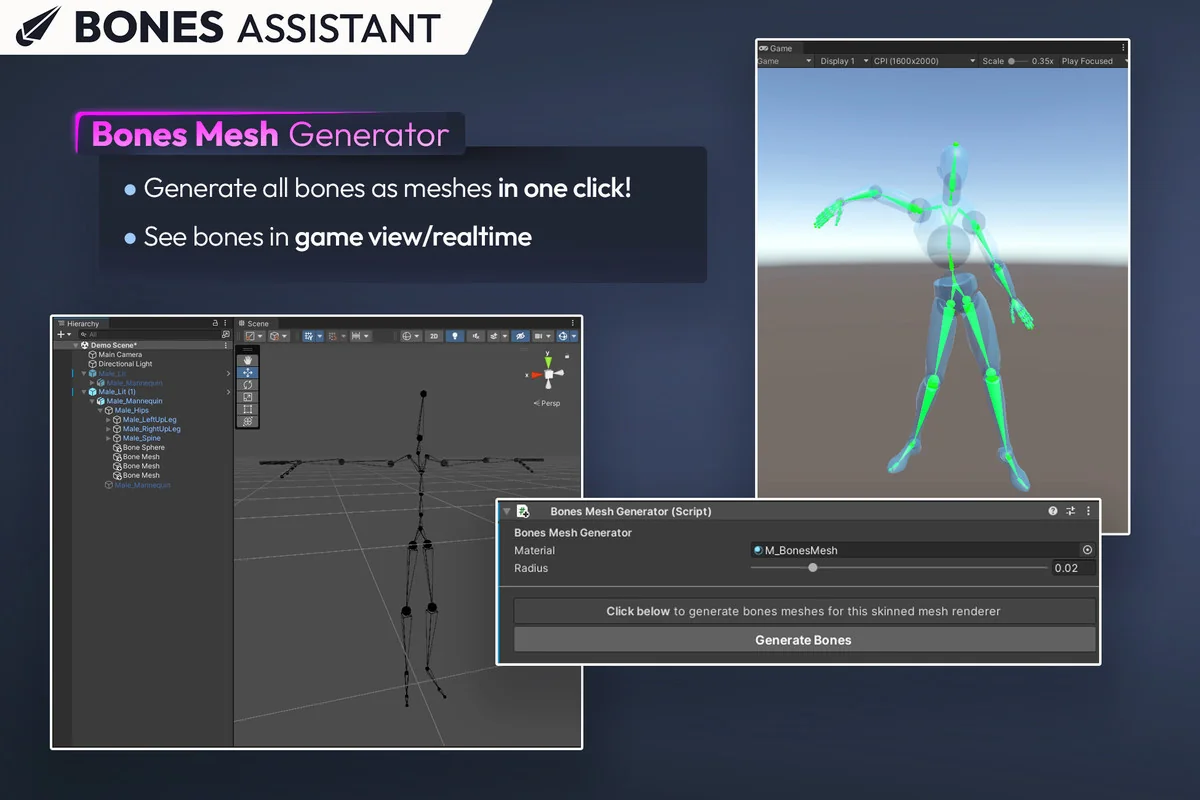
The Bones Mesh Generator provides a specialized utility to convert skeletal data into visible geometry. With a single click, the tool generates meshes for all bones within a skinned mesh structure. This transformation allows bones to be rendered and viewed within the Game view during real-time playback, rather than being restricted to the Scene view gizmos. This is a critical feature for debugging skeletal behavior during gameplay or for creating specific visual representations of a rig that need to persist outside of the editor’s development environment. The generator is compatible with both Humanoid and Generic rigs, making it a versatile option for various technical needs.
Technical Integration and Compatibility
Bones Assistant is designed to fit into modern Unity development pipelines, supporting the Built-in, HDRP, and URP renderers. It is compatible with Unity versions starting from 2021.3.14 and has been updated to ensure functionality within Unity 6. The package includes a Male Humanoid Mannequin model to serve as a standardized reference for testing animations and bone displays. With a compact file size of 1.2 MB and a collection of 35 assets, the tool is lightweight and focused on enhancing the animation workflow without introducing unnecessary overhead to the project. The recent updates have addressed specific editor conditions to ensure the bone generation process remains stable during the build process.
By integrating direct bone selection, advanced keyframe offsetting, and real-time mesh generation, the tool provides a bridge between standard rigging tasks and final animation polish within the Unity environment.
Project Screenshots
Protected download
Access this resource
All resources are 100% manually reviewed to eliminate all risks.